

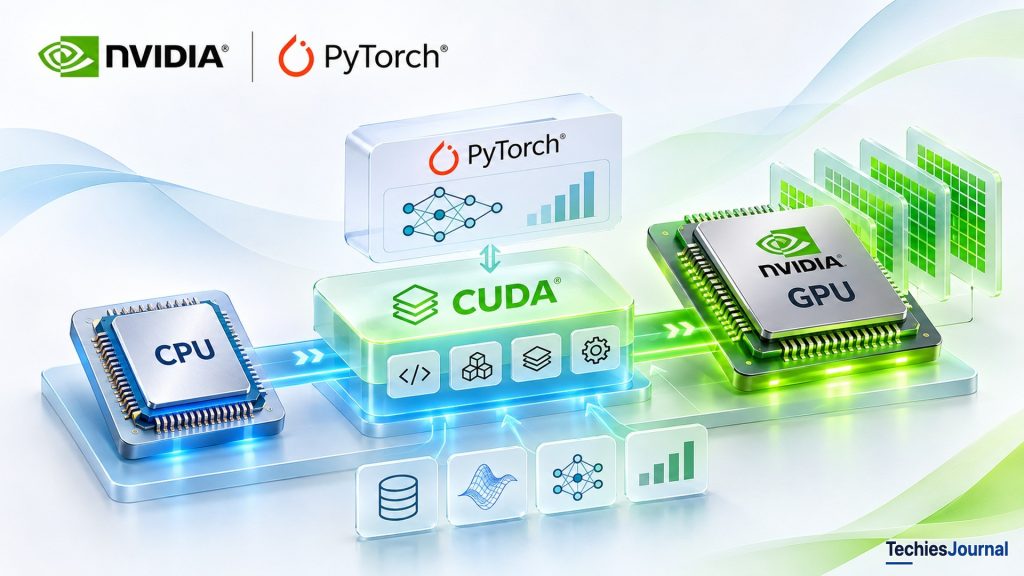
How CPUs and GPUs work together, what CUDA adds, how AI frameworks use it, and how deeply different roles need to learn it.
A computer can be extremely powerful and still struggle with certain kinds of calculations.
Consider an engineering team developing software to simulate how heat moves through an aircraft component. The simulation divides the component into millions of small regions and repeatedly calculates how temperature changes across them.
Each calculation may be relatively straightforward. The challenge is the number of calculations that must be performed. The team could run the simulation on a conventional computer processor. But as the simulation becomes more detailed, the computational demand grows. A task that once completed in minutes may eventually require hours, depending on the model, algorithms and available hardware.
Adding a faster processor may help. But another question becomes increasingly important: What if the problem could be divided into many smaller calculations and processed in parallel?
This is where the difference between a CPU and a GPU becomes important.
Why computers have CPUs
Every general-purpose computer relies on a Central Processing Unit (CPU) to execute instructions and coordinate a wide variety of operations. When you open a browser, save a document, run a business application or execute a program, the CPU plays an important role in making those operations happen.
A modern CPU contains multiple processing cores. Each core is designed to execute instructions efficiently, and CPUs are especially effective at workloads involving varied operations, decision-making, changing execution paths and tasks that depend on the results of earlier instructions.
CPUs can also perform parallel processing. A processor with multiple cores can execute multiple tasks or parts of a workload at the same time, and modern CPU cores may perform several mathematical operations simultaneously. But CPUs are designed to balance many different computing requirements. They are not optimized exclusively for executing enormous numbers of similar calculations.
Return to our heat simulation. Some parts require coordinating data, making decisions and managing the overall program. A CPU handles these responsibilities well. Other parts involve repeatedly applying mathematical operations across millions of regions. That creates an opportunity for a different kind of processor.
Why GPUs are different
A Graphics Processing Unit (GPU) is a processor originally developed to accelerate graphics-related computation. Rendering a three-dimensional scene involves calculating the appearance of large numbers of pixels, surfaces, textures and geometric elements. Many of these calculations can be performed in parallel.
GPU architectures evolved to deliver high computational throughput for workloads with this characteristic. Unlike a CPU, which devotes considerable hardware resources to efficiently executing a broad range of tasks, a GPU devotes much of its architecture to processing large amounts of suitable work in parallel.
This difference makes GPUs valuable for more than displaying graphics. Our engineering simulation also contains large numbers of related mathematical operations. With an appropriate algorithm, many of those operations can potentially execute across a GPU.
The simulation still needs a CPU. The GPU does not replace the processor responsible for running the overall application. Instead, the CPU and GPU can work together, each handling the parts of the workload suited to its architecture.
Accessible text alternative for this figure
Diagram compares four illustrative CPU cores with numerous abstract GPU execution units. It is not to scale.
Text shown in the figure: 1. Why CPU and GPU designs differ | Both execute computations. Their strengths are different, not a universal speed ranking. | CPU · General-purpose processing | GPU · Parallel throughput | Core 1 | Core 2 | Core 3 | Core 4 | Varied tasks · complex control flow | Many similar calculations in parallel | Illustration only: boxes are not a physical core-count comparison.
It is tempting to conclude that GPUs are simply faster CPUs. They are not. A GPU may outperform a CPU significantly on a suitable parallel workload. But applications involving complex sequential dependencies, irregular operations, or very small amounts of work may receive little benefit.
Moving data between CPU and GPU memory, coordinating execution and allocating GPU resources also introduce costs. Performance depends on the nature of the problem, the implementation and the hardware, not merely on whether a GPU is available.
If GPUs are powerful, why do we need CUDA?
We now understand why an engineer might want to use a GPU. But identifying hardware capable of executing a computation is only part of the challenge. The engineering team has an application that describes the simulation through mathematical operations, data structures and program instructions. The GPU has a different execution architecture and memory system.
The application cannot simply assume that an ordinary CPU function will execute efficiently across thousands of GPU threads. It needs a way to describe which calculations should run on the GPU, how that work should be organized, how data becomes available, and how execution is coordinated.
Without suitable programming interfaces, compilers, libraries and supporting software, much of the GPU’s computational capability would remain difficult for general-purpose applications to use. This is the problem that makes CUDA important.
When NVIDIA announced CUDA in November 2006, it helped make compatible NVIDIA GPUs programmable for general-purpose computing rather than only traditional graphics processing. CUDA originally stood for Compute Unified Device Architecture.
Its importance is not that it makes GPUs powerful. The hardware architecture provides the computational capability. CUDA helps software developers express and execute work using that capability.
Over time, the surrounding ecosystem expanded to include mathematical libraries, compilers, debugging tools, performance analysis tools and integrations with higher-level software. That foundation eventually became especially important to artificial intelligence.
Today, a developer can train a neural network using Python and PyTorch without necessarily writing CUDA code directly. Yet beneath the Python application, CUDA-enabled software may be responsible for executing substantial portions of the computation on NVIDIA GPU hardware.
To understand that relationship, we need to examine how an application moves from ordinary program instructions to parallel GPU execution.
From an application to a GPU: understanding CUDA’s architecture
Return to the engineering simulation. The application needs to prepare the simulation, load initial values, manage calculations and eventually display or store the results. Not all of that work belongs on the GPU.
The CPU remains responsible for running the main application, coordinating operations and initiating suitable GPU calculations. In CUDA terminology, the CPU side of the application is called the host, while the GPU is called the device. That distinction is important because host and device may have different execution resources and memory spaces.
The simulation’s CPU-side code might prepare millions of temperature values. It then needs to make those values accessible to GPU code. A typical CUDA application may use the runtime to allocate GPU-accessible memory, transfer data, launch calculations on the GPU, synchronize execution and retrieve results. Underneath those application-facing interfaces, NVIDIA’s software and driver infrastructure manages interactions with GPU hardware.
Accessible text alternative for this figure
Application connects to CPU host and CUDA interfaces, which access NVIDIA GPU via driver infrastructure. Simplified conceptual architecture.
Text shown in the figure: 2. CUDA in the application architecture | CUDA is a platform and ecosystem. It is not itself a GPU or a single mandatory software layer. | Engineering simulation application | CPU / Host | Program control and orchestration | CUDA interfaces / libraries | Kernel launches, data and compute APIs | NVIDIA driver + compatible GPU | Device execution | Host and device cooperate. APIs, libraries and driver have different roles.
There is an architectural distinction here. CUDA is not a single software component located between every application and GPU. It is a broader programming platform and ecosystem containing interfaces, tools and libraries with different responsibilities. Some applications call CUDA APIs directly. Others rely on libraries or frameworks that use CUDA internally.
The relationship becomes clearer when we follow one actual calculation.
What happens when CUDA executes a calculation?
Imagine our engineering team wants to calculate temperature changes across a large set of regions. For illustration, assume that a suitable step can be performed independently for many regions using values from the previous simulation step.
The application first prepares input data. It then ensures the GPU can access those inputs. In a conventional explicit-memory workflow, the application allocates device memory and copies data from CPU memory to GPU memory. Other approaches exist, including managed memory, but the essential requirement is the same: data must be accessible where computation occurs.
Once the data is ready, the application launches a function designed to execute on the GPU. CUDA calls this function a kernel. A kernel is not a complete application. It describes a particular computation that GPU threads will execute.
For our simulation, a kernel might calculate an updated temperature value for each region using nearby values. Instead of executing one calculation after another through a single CPU execution path, the application launches a large collection of GPU threads to perform suitable work in parallel.
When the kernel finishes, the results may remain in GPU memory for another simulation step. Only when the CPU needs the values (for example, to write a report or display a result) might the application transfer them back to host memory.
Accessible text alternative for this figure
Five steps: prepare data, make data GPU-accessible, launch kernel, compute on device, consume results. A synchronization note is included.
Text shown in the figure: 3. One CUDA computation, step by step | Engineering heat-simulation example. GPU results can remain on-device for later steps. | 1 · Prepare | CPU creates inputs | 2 · Make data accessible | Allocate/copy or managed memory | 3 · Launch kernel | Host submits GPU work | 4 · Compute | Device threads calculate | 5 · Use result | GPU next step or CPU read | GPU work may be asynchronous. Synchronize when required. | Data transfer is conditional: unified/managed memory and on-GPU reuse change the path.
Notice the significance of keeping intermediate results on the GPU. If a simulation requires thousands of processing steps, transferring the entire dataset back to the CPU after every step could introduce considerable overhead. A better design may perform many operations on the GPU and transfer only what the CPU actually needs.
This illustrates a larger principle: GPU acceleration is not simply about making individual mathematical operations faster. It also requires designing how computation and data move through the system.
Does the CPU wait while the GPU works?
Not necessarily. Many CUDA operations can be launched asynchronously, allowing the CPU to continue other work while the GPU processes previously submitted operations. CUDA uses streams to organize queued GPU operations.
Operations submitted to the same stream have ordering rules, while independent operations in different streams may be able to overlap, depending on dependencies and hardware capabilities. The application must synchronize when it needs to know that particular work has completed or when another operation depends on its results.
Our simulation might prepare the next batch of inputs while the GPU processes the current batch. But if the next calculation depends on previous results, the program must preserve that dependency. Asynchronous execution can improve utilization. It does not remove the need for correct coordination.
How does CUDA divide work across thousands of GPU threads?
We have described a kernel as a function that executes on the GPU. But how does the GPU know which thread should calculate which region? CUDA provides a logical execution hierarchy: threads, thread blocks and grids.
A thread represents one logical execution instance of a kernel. Each thread has access to identifiers that help determine which part of the workload it should process. Threads are organized into groups called thread blocks. A collection of thread blocks forms a grid.
Consider a simplified simulation containing 1,024 regions, independently processed for one calculation step. A developer could launch four thread blocks containing 256 threads each. That creates 1,024 logical threads, each potentially responsible for one region. Each thread runs the kernel code but uses its own index to identify which region it should update.
Accessible text alternative for this figure
Grid has four blocks of 256 threads each. A separate GPU hardware panel explains scheduling on streaming multiprocessors.
Text shown in the figure: 4. CUDA logical execution hierarchy | Example: 1,024 logical threads = 4 blocks × 256 threads. Not 1,024 dedicated physical cores. | One kernel launch · Grid | Thread block 1 · 256 threads | Thread block 2 · 256 threads | Thread block 3 · 256 threads | Thread block 4 · 256 threads | GPU hardware | Streaming multiprocessors | schedule available blocks | Warps execute threads | Blocks and threads are software organization. SMs and warps are hardware execution concepts. | Drawn: 16 of the 256 threads in each block
The purpose is to describe a large parallel workload without manually assigning every calculation to an individual physical processing unit. Threads in the same block can use supported synchronization mechanisms and shared memory to exchange intermediate data.
That can be valuable in our simulation. A region’s new temperature may depend on nearby regions. A carefully designed kernel may allow cooperating threads to reuse nearby values rather than repeatedly retrieving the same information from slower memory.
But ordinary thread-block programming does not permit developers to assume that all blocks execute simultaneously or that one block can freely synchronize with every other block. An algorithm requiring global coordination must account for those restrictions or use appropriate mechanisms.
Are CUDA threads the same as physical GPU cores?
No. Threads and blocks describe how software organizes work. The GPU contains physical computing resources that execute that work. NVIDIA GPUs contain hardware units called Streaming Multiprocessors (SMs), which schedule and execute blocks subject to resource limits.
Within a block, threads are grouped into execution units called warps. A conventional CUDA warp contains 32 threads, while the precise scheduling and execution behavior depends on architecture. A grid containing thousands of threads does not mean every thread receives a dedicated physical processor, nor that all threads execute simultaneously.
The developer describes parallel work. The GPU’s hardware and execution machinery determine how that work uses available resources. This distinction is one of CUDA’s most important architectural ideas.
Memory matters as much as processing power
A fast processor can spend considerable time waiting for data if an application accesses memory inefficiently. GPUs therefore provide several memory structures designed to support throughput.
A large simulation dataset might reside in GPU global memory. Threads can access global memory, but repeated or poorly organized accesses can be expensive. Threads within a block may use shared memory to cooperate and reuse data. Each thread may use registers for working values, subject to hardware limits.
The point is not to memorize each memory type. It is that performance depends on computation and data access.
If neighboring regions repeatedly need the same temperatures, an inefficient implementation may load the same values unnecessarily many times. A better implementation may organize accesses or reuse shared data. A GPU can have enormous arithmetic capability and still deliver disappointing performance if the software cannot supply data efficiently.
How CUDA became a software ecosystem
Most engineers do not want to implement every mathematical operation from scratch. The simulation may use matrix operations and numerical transformations that are common to many applications. Developing and tuning each one independently would be expensive.
CUDA’s ecosystem provides reusable libraries and tools. cuBLAS implements linear-algebra operations, and cuFFT supports fast Fourier transforms. The CUDA Toolkit includes programming interfaces, compilers and developer tools, including the nvcc compiler for CUDA C++.
The runtime API gives applications convenient access to common execution mechanisms. The driver API offers lower-level resource and execution control. Profilers and debuggers help engineers inspect problems and performance. The NVIDIA driver supports interaction with compatible hardware.
Accessible text alternative for this figure
Four parallel CUDA ecosystem components connect conceptually to NVIDIA driver and GPU hardware, with tools alongside.
Text shown in the figure: 5. CUDA is a software ecosystem | Components are capabilities and paths, not one compulsory linear chain. | Applications · CUDA C++ programs · GPU-accelerated libraries | Compiler / nvcc | Build CUDA kernels | Runtime API | Common execution interface | Driver API | Lower-level resource control | CUDA libraries | cuBLAS · cuFFT · other libraries | NVIDIA driver and supported GPU hardware | Profilers and debuggers observe execution across these components.
An application may invoke a prebuilt GPU library without compiling a custom kernel. A high-level framework may hide much of the underlying memory and execution management. These differences matter when configuring developer computers and cloud GPU environments: having a compatible driver and framework build is not the same as requiring every application developer to install and use the complete toolkit.
The value of an accelerator is influenced not only by hardware performance but by the software available to use it. Impressive hardware specifications deliver little practical value when libraries, frameworks, compilers, troubleshooting tools or compatible applications are missing.
How modern AI uses CUDA without exposing it to developers
An AI engineer commonly begins with a framework rather than handwritten GPU kernels. In PyTorch, the developer defines model layers, prepares data and operates on tensors, multidimensional numerical structures.
Neural networks repeatedly apply transformations such as matrix multiplication to tensors. Many of these operations can benefit from GPU parallelism. When PyTorch performs a supported operation on an NVIDIA GPU, its CUDA-enabled backend dispatches work through suitable kernels and accelerated libraries.
Accessible text alternative for this figure
PyTorch application to CUDA backend to kernels and libraries to NVIDIA GPU. Includes an operation-specific caveat.
Text shown in the figure: 6. CUDA underneath an AI framework | A PyTorch developer can use NVIDIA GPU compute without authoring custom CUDA kernels. | Python model / PyTorch | Tensors and operations | CUDA-enabled PyTorch backend | Dispatch supported device operations | Kernels and optimized libraries | Implementation varies by operation | NVIDIA GPU + driver | Execute supported GPU work | Not every operation follows the same kernel/library path or has GPU support.
This is not one fixed implementation path. Different PyTorch operations may use different kernels, libraries or compiled implementations. Some operations may run on the CPU. Device placement, supported software and framework behavior determine what happens.
Consider a deliberately small Python example:
import torch

device = "cuda" if torch.cuda.is_available() else "cpu"

a = torch.tensor([1.0, 2.0, 3.0], device=device)
b = torch.tensor([4.0, 5.0, 6.0], device=device)

result = a + b
print(result.cpu())
If PyTorch can use CUDA, the tensors and addition run on the selected CUDA device. Otherwise, the example uses the CPU. This demonstrates device selection, not a speed advantage. The developer has not written a custom CUDA kernel. The framework provides the relevant implementation.
Why understand CUDA if PyTorch already handles it?
Abstraction makes GPU computing more accessible, but it does not eliminate architectural dependencies.
Imagine an AI model runs on a workstation but fails on a cloud GPU server. The Python model may be valid, while the deployed environment lacks a compatible driver, framework build or supported GPU architecture. Or the model may run correctly but perform poorly because of excessive CPU to GPU transfers, small operations or unnecessary synchronization.
These problems do not always require writing CUDA C++. They do require enough understanding to identify whether the fault lies in model code, framework device behavior, installed software or data movement.
For cloud engineers, AI platform teams and production application developers, this architectural understanding may be more useful than immediate low-level kernel programming.
Why CUDA does not automatically make software faster
Consider two versions of the simulation. The first processes millions of regions repeatedly and spends substantial time on parallel numerical operations. With a suitable algorithm, it may benefit considerably from GPU acceleration.
The second performs only a few hundred calculations and immediately needs results on the CPU. Data transfers, work submission and synchronization may cost more than the computation itself. Even a large workload may perform poorly because of sequential dependencies, imbalanced work or inefficient memory access.
A serious comparison measures the end-to-end workload: input preparation, data placement, computation, synchronization, output and operating cost. It also compares against a strong, practical CPU implementation, not an intentionally weak baseline.
The purpose is not to maximize GPU utilization. It is to improve a real computational outcome.
Does AI computing depend entirely on NVIDIA CUDA?
No. CUDA is central to many NVIDIA GPU workloads, but accelerated computing is broader than CUDA. AMD develops the ROCm software ecosystem, while SYCL and other approaches support additional models of heterogeneous and accelerator programming. AI applications can run on CPUs and other accelerators as well.
These alternatives introduce a practical architecture question. A high-level framework may offer similar APIs across devices, yet libraries, compatibility, supported operations, performance and deployment behavior can differ. Application source portability does not guarantee equivalent performance or operational simplicity.
When choosing hardware for a production AI system, a team should evaluate the actual workload, the supported framework and libraries, availability, price, skills and long-term maintenance. CUDA’s software maturity is relevant evidence, not a universal mandate to select NVIDIA hardware.
Who needs to learn CUDA?
A student learning AI should begin with programming, Python, data handling, mathematics and a relevant machine-learning framework. Understanding what a GPU and CUDA do is useful, but CUDA C++ optimization is usually not the first priority.
An application developer should understand device selection and deployment dependencies. A cloud engineer should know how compatible drivers, frameworks and GPU resources fit together. An ML performance engineer may need to investigate kernels, memory, synchronization and profiling. Scientific-computing and GPU specialists may need to design and tune CUDA kernels directly.
TechiesJournal’s Know → Use → Master distinction helps define appropriate depth:
- Know: Explain CPU vs GPU, host vs device, kernels and CUDA’s place beneath AI frameworks.
- Use: Configure and troubleshoot CUDA-enabled environments and investigate basic memory or execution problems.
- Master: Develop and optimize GPU kernels, reason about hardware resources and make detailed performance trade-offs.
Not everyone needs the final stage. Many professionals gain more immediately from accurate architectural understanding than from memorizing low-level CUDA syntax.
CUDA reveals something larger about modern computing
Return to the engineering simulation. The original problem appeared to be a shortage of computational power. But the GPU alone did not solve it. The application needed a way to describe parallel work, manage memory, coordinate execution, use optimized mathematical operations and verify results.
The same relationship appears in AI. A developer can train a model using familiar Python interfaces because multiple software and hardware layers work together beneath them.
That simplicity does not make the lower layers irrelevant. It demonstrates the value of abstractions built over capable hardware.
CUDA matters because accelerated hardware becomes genuinely useful through the programming models, interfaces, libraries and tools that allow software to use it effectively.
For most readers, understanding those relationships is the right beginning. The deeper programming details should follow when their work actually requires them.
References and further reading
- NVIDIA CUDA Programming Guide: Host/device model, kernels, grids, memory and execution.
- NVIDIA CUDA Toolkit Documentation: APIs, toolkit components, supported tools and libraries.
- NVIDIA CUDA C++ Best Practices Guide: Memory movement, performance measurement and optimization.
- PyTorch CUDA Semantics: Devices, tensors, operations and synchronization.
- AMD ROCm Documentation: Alternative GPU computing ecosystem for comparison.
- Khronos SYCL: Cross-platform heterogeneous programming standard.
Technical review date: November 17, 2026. Reverify source URLs, software capabilities and release-specific statements at publication time.