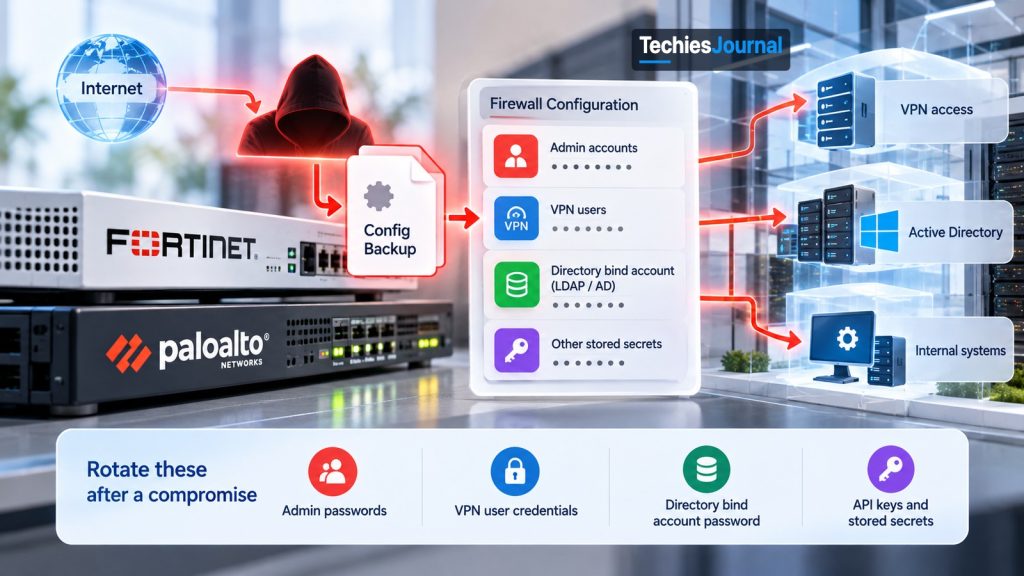
Your Firewall Config Is a Password File: What Leaves With It and What to Rotate
Researchers say one actor copied firewall configuration files and used the saved logins to walk into company networks. Here is what a config file holds, why a patch does not fix that, and what to rotate first.
By Prasad Kukkala · Cybersecurity · What changed · · 12 min read
A firewall sits at the edge of a company network and decides what may come in and what may go out. To do that job it keeps a settings file, called the configuration, or config. Most teams treat that file as a backup. In October 2026, researchers described an actor who treated it as a password file.
The research comes from Group-IB and NyxLab. Their report, Stray Cat, Open Doors: How k0t Wanders Through the Network Edge, was published on 21 October 2026. They track an actor called k0t that they say broke into many company networks through exposed edge devices.
That case raises a question every team that runs a firewall or a VPN has to answer.
If someone copied your firewall’s config, what else did they get, and what must you change?
The device is the door, and the config is the key ring
An edge device is any box that faces the internet and guards the way in. Firewalls and VPN gateways are the common ones. A VPN (virtual private network) lets staff log in from outside and reach internal systems as if they were in the office.
The config file of such a device holds more than rules. It often holds the logins the device uses to talk to other systems, and the secrets of the people and admins it knows about.
Think of a hotel front desk. The desk guards the building, but the desk drawer holds a list of spare keys. Locking the front door better does not help if a copy of the drawer already left the building.
That is the core idea of this article. A patch fixes the door. It does not undo a copy of the key list.
Figure 1. The break-in path Group-IB describes. A patch closes only the second step.
What the researchers say happened
Group-IB says k0t looked for exposed firewalls and VPN gateways, then got in either through a known flaw or by guessing passwords. Once in, it downloaded the device’s config and decrypted the saved secrets. It then used those logins to enter the network the way a normal staff member would, and tried to reach full control of the Windows domain. Group-IB says many of the compromises it found are dated between February and June 2026.
One more term helps here. Active Directory is the system most companies use to keep the list of staff accounts and what each may do. A Domain Admin is the account type that can control all of it. Group-IB reports attempts to reach that level. It also reports that the actor installed remote-management tools and copied data out to cloud storage.
The flaws in the report are a mix of old and new.
For Fortinet, the report points to a 2019 weakness in how FortiOS protects saved passwords, which the researchers say was used to decrypt downloaded configs. For Palo Alto, it names a 2026 flaw in GlobalProtect. When exploits did not work, Group-IB says the actor guessed passwords instead. That matters, because a device with no known flaw can still fall to weak logins.
What a copied config can open
Not every config holds the same things. Settings differ by product and by how the team set it up. Group-IB’s report and the vendor advisories point to three groups of secrets that deserve a check on any device.
The first is the directory bind account. This is the account the firewall uses to look up staff in Active Directory (often over a protocol called LDAP), so it can ask “is this person allowed?” It usually has permission to read the whole staff list. If someone gets it, they get a map of the company’s accounts without having to break in first.
The second is local user secrets. These are the logins stored on the device itself for VPN users or admins. The third is the admin secrets that control the firewall.
Figure 2. One downloaded file can hold three kinds of secrets. A setting that encrypts them with your own key is the fix.
What each stolen secret opens
Select a group of secrets to see what it opens and what to change.
What it is: The account the firewall uses to look up staff in Active Directory, often over LDAP. It usually has permission to read the whole staff list.
What a thief gets: A map of the company’s accounts, without having to break in first.
What to do: Rotate it first, because it reaches furthest. Use a low-privilege account for binding, not a powerful one.
What it is: The logins stored on the device itself for VPN users or other local accounts.
What a thief gets: A way to log in like a normal staff member and enter the network the usual way.
What to do: Rotate them after the device is clean. Add multi-factor authentication and lockouts on every VPN login, and never reuse a password between the firewall and anything else.
What it is: The secrets that control the firewall itself, including admin accounts and API keys.
What a thief gets: Control of the firewall itself. The sources disagree on one point: Fortinet’s advisory excludes the administrator password from the weakness, while Group-IB reports it recovered administrator credentials.
What to do: Rotate admin accounts and API keys right after the device is clean, and treat them as exposed until you know otherwise.
The old Fortinet flaw shows how this works in practice.
Fortinet’s advisory for CVE-2019-6693 says FortiOS used a hard-coded key to protect saved passwords in the config. Anyone who knew that key could decrypt them from a copied file. Fortinet added a setting called private-data-encryption so that a team can use its own key. The advisory says that setting is off by default, and its workaround is to always password-protect config backups.
Many teams miss this part. Keeping the firmware current does not turn that setting on. A device can be fully patched and still hold secrets that anyone with a copy can read.
The sources disagree on one point. Fortinet’s advisory says the weakness covers encrypted config data except the administrator’s password. Group-IB reports that it recovered administrator credentials as well. Until you know which is true for your device, treat the admin secrets as exposed.
What the researchers do not know
The report is a vendor report from one source, so its limits matter. Group-IB says the number of victims it counted is a lower bound, and the regional spread may only reflect which devices were exposed. It says the link to ransomware is unconfirmed. Some victims also appear on the leak sites of the Qilin and The Gentlemen ransomware groups, and the researchers think k0t is likely an initial access broker.
An initial access broker is a criminal who breaks in and then sells or hands over that access to someone else. That someone else may be a ransomware group. This is why the group that gets in may not be the group that sends the ransom note.
Figure 3. Between the break-in and the demand there can be a quiet gap. That gap is your best chance to catch the intruder.
We use only what Group-IB states in its own report. We also do not reproduce indicators or tool names, because a defender gains little from a list of names that changes every month.
Why a patch alone is not the answer
Take the Palo Alto case. Palo Alto’s advisory for CVE-2026-0257, first published on 13 May 2026, describes a sign-in bypass in GlobalProtect, its VPN feature. It applies only when a certain cookie feature is on and a certain certificate setup is used. The advisory lists fixed versions for each release line, and says the flaw was seen in limited attacks.
The fix works for the future. But if someone used the flaw before you patched, the fix does not remove what they did in between.
The same is true of the Fortinet config flaw. After the right settings are in place, a config copied in the future is protected. A config copied before that is not, and the secrets in it stay readable.
This is the same lesson as in our article on edge devices that are patched but not clean. There the question was whether the device itself can be trusted. Here the question is what the device already gave away.
An FBI and US Secret Service advisory, published on 6 October 2026, describes a related campaign called FortiBleed. It reports stolen or reused passwords being used against exposed FortiGate devices and SSL VPNs, new admin accounts being created, and the access being used by ransomware affiliates. Group-IB says it sees a possible connection between its case and FortiBleed, but very little overlap in the compromised data, so treat them as two separate stories that teach the same lesson.
What to do first: the order of work
If you run an exposed edge device and you think it may have been touched, work in this order. This is our recommended order, built from the vendor and FBI guidance. The order matters more than the speed.
Figure 4. Rotate after the device is clean, not before.
Isolate and keep evidence. Take logs and a copy of the config before you change anything, so you can see what changed and when.
Patch, or rebuild. If you cannot be sure the device is clean, rebuild it from a trusted image. Rotating secrets on a device the intruder still controls only hands them the new ones.
Rotate admin accounts and API keys. These control the device itself.
Rotate the directory bind account, VPN logins and local user logins. Start with the bind account, because it reaches furthest. Use a low-privilege account for binding, not a powerful one.
Hunt back. Look from today back to the first date the device was exposed, not just from the day you noticed.
Where do I start after an exposure?
Answer up to four questions. This is TechiesJournal’s decision aid, built from the order of work above. It is not vendor guidance and it is not exhaustive.
Have you saved the logs and a copy of the config?
Isolate the device and keep evidence first. Take logs and a copy of the config before you change anything, so you can see what changed and when.
Are you sure the device is clean?
Patch, or rebuild. If you cannot be sure the device is clean, rebuild it from a trusted image. Rotating secrets on a device the intruder still controls only hands them the new ones.
Have you rotated the admin accounts and API keys?
Rotate the admin accounts and API keys. These control the device itself.
Have you rotated the directory bind account, the VPN logins and the local user logins?
Rotate the directory bind account, VPN logins and local user logins. Start with the bind account, because it reaches furthest. Use a low-privilege account for binding, not a powerful one.
Hunt back. Look from today back to the first date the device was exposed, not just from the day you noticed. Then close the gap that made the copy useful.
Then close the gap that made the copy useful. Turn on private-data-encryption where your vendor offers it, protect config backups with a password, and move device management off the public internet. The FBI advisory ranks the options: trusted-host lists are good, a local-in policy is better, and removing admin access from the internet is best.
Passwords are the other half
Groups like this do not always need a flaw. As noted above, guessed passwords were the fallback when an exploit failed. A VPN that accepts only a password, with no lockout, is an open invitation.
Figure 5. A second step on the VPN login stops a guessed password from being enough.
So the hardening list has three plain items. Use multi-factor authentication (MFA), a second proof of identity on top of the password, on every VPN and admin login. Set lockouts for repeated failures. And never reuse a password between the firewall and anything else.
One caution. Not all MFA is equal. Our article on Microsoft 365 token replay shows how stolen session tokens can walk around some MFA setups. MFA is necessary, but it is not a full answer on its own.
Where to look for a quiet intruder
Because of the gap in Figure 3, you may need to look for someone who has been in for weeks. Group-IB lists signs on four fronts.
Figure 6. Four places to look. Many of these tools are also used by real administrators, so context decides.
The figure lists the signs on each front. Most of them come down to one question: can anyone explain this account, this session or this tool?
The researchers stress that many of these tools are dual-use, which means real admins use them too. A remote-management tool is not proof of an attack. An unknown remote-management tool on a server, installed at 3 a.m., is worth a question.
How much should you learn?
Here is the Know, Use, Master model we use across TechiesJournal.
Know: a student, analyst or developer should know what an edge device is, why its config holds secrets, and what an initial access broker is. That is enough to read news about the next firewall incident and to ask the right question.
Use: a system administrator or cloud engineer who runs a firewall or VPN should be able to find and rotate every credential the device holds, turn on config encryption, restrict management, and read the device logs.
Master: a security engineer or architect should be able to design the rotation plan across directory, VPN and cloud, run the hunt back to the first exposure date, and decide when to rebuild instead of repair.
What can you ignore for now? Indicator lists and tool names. They change often, and the habits above do not.
What we know and what we do not
Claim
Type
Source
FortiOS used a hard-coded key for saved passwords, fixed by a setting that is off by default
Fact
Fortinet advisory FG-IR-19-007
Palo Alto GlobalProtect sign-in bypass, with fixed versions per release line
Fact
Palo Alto advisory for CVE-2026-0257
An actor named k0t copied and decrypted device configs and used the logins
Researcher report
Group-IB and NyxLab
Many victims, with the true count unknown
Researcher report, lower bound
Group-IB and NyxLab
k0t works as an initial access broker
Our inference, based on the researchers’ view
Group-IB and NyxLab
Victims overlap with ransomware leak sites
Researcher report, link unconfirmed
Group-IB and NyxLab
Who bought or used the access, and when
Unknown
None
Your next step
Pick one edge device you are responsible for. Ask three questions.
Can I list every credential stored in its config?
Is config encryption turned on, and are backups password-protected?
If this config left today, how long would it take me to rotate everything in it?
If you cannot answer the third question, you have found your first task.
Check one edge device
Pick one edge device you are responsible for and answer three questions. This is TechiesJournal’s self-check, built from the three questions above.
Can you list every credential stored in its config?
Start there. Build the list of every credential the device holds. You cannot rotate what you cannot list.
Is config encryption turned on, and are backups password-protected?
Close the gap that makes a copy useful. Turn on private-data-encryption where your vendor offers it, and protect config backups with a password.
If this config left today, do you know how long it would take to rotate everything in it?
You have found your first task. Work out how long it would take to rotate everything in the config, then shorten that time.
You can answer all three questions. Repeat the check for the next edge device you run.
A patch closes the door, but only rotation takes the copied keys out of play.