

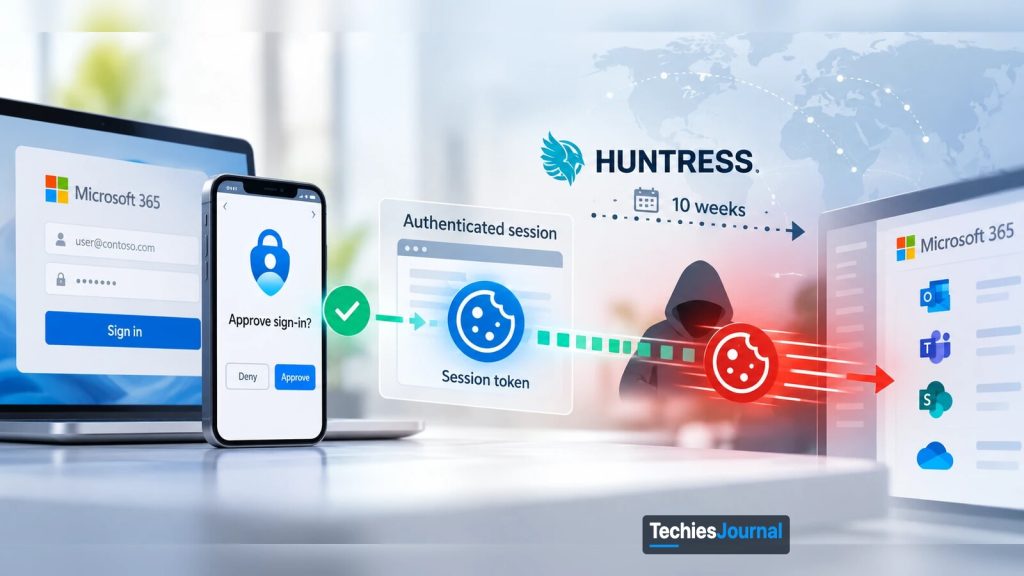
Illustration of the token replay the article describes: a sign-in approved with MFA, the session token that follows, and the token replayed by an attacker over about 10 weeks as Huntress reported. Conceptual, not a real log or screenshot.
Attackers stole sessions that had already passed MFA, replayed them from rented servers, and then swapped the victims’ MFA methods. Here is how it works and what to check.
A session that already passed MFA does not need MFA again
If an attacker steals the session that multifactor authentication just approved, MFA has nothing left to check.
This is what security firm Huntress described in a report on a campaign against Microsoft 365 accounts. Between 14 July and 22 September 2026, it saw more than 200,000 failed sign-in attempts and at least 497 successful ones across its customers’ environments. The activity touched 79 organizations.
This article is for people who run or support Microsoft 365: administrators, security staff and IT managers. It explains what a token is, how attackers took them, what they did next, and which Microsoft controls help. It also says where those controls stop, because that part is easy to miss.
What a token is and what replay means
When you sign in to Microsoft 365, you prove who you are with a password and a second factor. Microsoft then gives your device a token, which is a small digital pass that says “this user was already checked.” Your apps show that pass to Exchange, SharePoint and Teams so you do not have to sign in for every click.
Token replay means using someone else’s pass. If an attacker copies a valid token and presents it from another machine, the service sees a pass that looks genuine. The password and the second factor were already checked earlier, so they are not asked for again.
That is why the attack is hard to see. Nothing was guessed and nothing failed on the successful sign-ins. The pass was simply used by the wrong person.
What Huntress observed
Huntress says the campaign ran for about ten weeks. Besides the counts above, it found 48 fake devices registered in victims’ Entra directories. In at least 19 organizations, the victims’ existing MFA methods were removed and new ones added within three hours of the first sign-in.
The attackers worked in two tiers. One set of servers captured sessions from victims. A separate set of rented servers, in a German hosting provider’s address range, replayed those sessions. Huntress calls the replay step token spraying, by analogy with password spraying.
Because the two tiers are separate, blocking one does not stop the other.
Speed mattered. Huntress measured 12 minutes between an MFA prompt and a hijacked session on 21 July, and four minutes on 22 September. The Hacker News, which reported the findings on 26 October, names no threat actor, and neither does Huntress. Treat any attribution you see elsewhere as unconfirmed.
A note on the numbers: they come from Huntress customer environments only. The real scale is at least this large, and probably larger. Huntress’s page also gives two different figures for one September burst, so we do not quote either of them.
How the attackers got the tokens
Huntress and The Hacker News describe three routes.
The first is adversary-in-the-middle phishing, shortened to AiTM. The victim lands on a fake sign-in page that sits between them and the real Microsoft page. It passes their password and MFA code along to Microsoft, and keeps the token that comes back.
The victim sees a normal sign-in. The attacker holds a working session.
The second is device code phishing. Some devices, such as a TV or a command-line tool, cannot show a full sign-in page, so Microsoft lets them sign in by displaying a short code that the user enters on another device. An attacker can start that process, send the victim the code with a believable story, and receive the token when the victim approves it.
The third is plain social engineering during a legitimate sign-in. The reports give few details on this one, so we do not know how it worked in practice.
What the attackers did after getting in
Huntress found a consistent pattern after the first replay. The attackers added their own authenticator app, or wiped the victim’s MFA methods and registered a new one. In one case on 21 July, an attacker-added method called “iPhone 13” was active about 50 minutes after the relay captured the session.
They also registered fake devices in Entra, which stay in the directory until someone deletes them. And they created hidden inbox rules, with names like a single dot or “sss”, that moved or deleted mail about payroll, deposits and bonuses. In one incident the attacker emailed an outside accountant about payroll and hid the replies, which is a business email compromise pattern. In another, a mailbox was used to send spam to hundreds of outside recipients until Entra ID Protection flagged the account as high risk.
Each step makes the intruder harder to remove. A new MFA method means the attacker can sign in again later. A fake device does the same. A hidden rule keeps the victim from seeing replies.
Why MFA alone was not enough
MFA protects the moment of sign-in. In an AiTM attack, the victim does that part for the attacker. The real code goes to the real Microsoft service through the attacker’s relay, and the attacker keeps the result.
Some MFA methods hold up better than others. Microsoft’s documentation on authentication strengths puts Windows Hello for Business, FIDO2 security keys and certificate-based authentication in a “phishing-resistant” group. It defines these as methods that require an interaction between the method and the sign-in surface. Microsoft Authenticator phone sign-in is a passwordless method but is not in that group, and codes and push approvals are in neither.
Our reading of that definition is that a relay page which is not the real sign-in surface has a much harder time completing these methods. That is our inference and not a Microsoft statement about AiTM, because the Microsoft page does not mention AiTM at all. We also do not know which MFA methods Huntress’s victims were using, so we cannot say whether phishing-resistant methods would have stopped this campaign.
What Microsoft’s controls cover and where they stop
Several controls help against token theft. None of them is a complete answer on its own. The table lists what each does according to Microsoft’s current documentation, and the limit that matters.
| Control | What it does | Limit to know about |
|---|---|---|
| Phishing-resistant authentication strengths | Requires FIDO2 keys, Windows Hello for Business or certificate-based authentication for chosen sign-ins. | Conditional Access is evaluated after the first authentication step, so a user can still type a password before the requirement applies. |
| Token protection | Ties sign-in session tokens to the device, so a stolen token should not work from another device. Microsoft says it “attempts to reduce” replay. | Covers selected native apps such as Exchange Online, SharePoint Online and Teams on supported platforms. Browser support is in preview and limited to selected web apps that reach Azure Resource Manager. Check the page for the current status of each platform. |
| Continuous access evaluation | Lets Exchange, SharePoint and Teams reject a token before it expires after events such as a password reset, a disabled account, a revoked session or high user risk. | Works only with supported apps. Location checks cover only IP based named locations. Microsoft notes that event delays of up to 15 minutes can occur. |
| Block device code flow | A Conditional Access policy that blocks the device code sign-in route for users who do not need it. | Microsoft recommends auditing existing use first, and accounts you exclude bypass the policy. Service principals are not covered by user policies. |
From the Microsoft page, browser based sessions to Outlook on the web or SharePoint are not on the token protection list. Our inference is that this is a gap for AiTM attacks, which commonly capture browser sessions. Microsoft’s page does not say that, so treat it as something to test in your own tenant and not as a fact.
Huntress also recommends Conditional Access policies that require MFA or block access for all users, all cloud apps and all client app types, unconditionally. That is the vendor’s advice, and it makes sense as a baseline. It does not replace the controls above.
What to do if you suspect a stolen session
Huntress is clear on one point. A password reset alone is not enough. The attacker’s MFA methods and fake devices stay in place, and an access token may keep working until it expires, which Huntress puts at about 90 minutes (Microsoft’s default is 60 to 90 minutes). Work through these steps in order.
- Revoke the user’s sessions and then reset the password. In the campaign, the attacker’s later attempts to replay sessions that were no longer valid, for example after a password change, failed with Microsoft’s “SsoArtifactRevoked” error (AADSTS50133).
- Review the user’s MFA methods. Look for methods added or cleared soon after a sign-in, especially within a few hours.
- Audit devices registered in Entra. Confirm a device is not legitimate before you delete it. Huntress noted the fake ones used names starting with “DESKTOP-” followed by eight hex characters, which differs from the Windows default, and it also lists “Device-” and “Work Pc” prefixes followed by eight hex characters.
- Check inbox rules and new enterprise applications. Short or punctuation-only names, and rules that touch payroll or banking messages, deserve a close look.
- Look for outside impact. Check for mail sent to outside parties and for any approved or changed payment details.
For threat hunting, Huntress lists the exact sign-in patterns, client IDs and addresses it saw. Use its report for those, because they change quickly and are useful to hunt teams more than to general readers.
What we know and what we do not
| Label | Statement |
|---|---|
| Fact | Huntress reports activity from 14 July to 22 September 2026, with at least 497 successful sign-ins and 48 fake Entra devices across its customers. |
| Researcher report | Attackers used AiTM relays, device code phishing and social engineering to obtain tokens, then replayed them from rented servers. |
| Researcher report | In at least 19 organizations, MFA methods were replaced within three hours of the first sign-in. |
| Our inference | Phishing-resistant methods and device-bound tokens raise the cost of this attack. Browser sessions may remain exposed to AiTM even where token protection is on. |
| Unknown | Who ran the campaign. Whether any victim used phishing-resistant MFA. How many organizations outside Huntress’s view were affected. Microsoft’s own assessment of the campaign. |
How deeply should you learn this?
Know: Every Microsoft 365 user and manager should understand one idea. MFA protects the sign-in, not the session that follows it. If a message asks you to enter a code on a page you did not open yourself, stop and report it.
Use: Administrators and help desk staff should be able to revoke sessions, review MFA methods and registered devices, find hidden inbox rules, and read a Conditional Access policy. You should know why a password reset alone is not a full response.
Master: Security architects and identity owners should design for token theft. That means choosing authentication strengths, rolling out token protection with report-only testing first, deciding who truly needs device code flow, and forwarding sign-in logs somewhere an intruder cannot edit.
What you can ignore for now
You do not need to memorize the IP addresses, user agents or client IDs in the Huntress report. They are indicators for hunters and will go stale. What lasts is the pattern: a normal sign-in, an MFA change soon after, a new device, and a hidden mail rule.
A practical next step
Open your sign-in logs and look for any account that registered a new MFA method within a few hours of a sign-in from an unfamiliar place. Then check whether your tenant allows device code flow. If you have never needed it, create the block policy in report-only mode first and read the results before you turn it on.
Go deeper
Reports and coverage
- Token spray and replay in Microsoft 365, Huntress, Andrea Hatcher, Susannah Matt, Matt Poto and Andrew Schwartz, October 22, 2026, the full timeline, tooling and indicators.
- The Hacker News on the Huntress findings, The Hacker News, Ravie Lakshmanan, October 26, 2026, a shorter summary.
Microsoft documentation
- Token protection in Conditional Access, Microsoft Learn, supported platforms and deployment steps.
- Continuous access evaluation, Microsoft Learn, events, lifetimes and limits.
- Block device code flow, Microsoft Learn, the policy steps.
- Authentication strengths, Microsoft Learn, the phishing-resistant group.
Facts in this article were checked on 26 October 2026. Microsoft features and the Huntress report may change, so confirm against the sources above before you act.
This article separates what Huntress and Microsoft state from our inference.
Related reading on TechiesJournal
- Phishing Attacks, TechiesJournal, the basics.
- When a Trusted Cloud Application Becomes an Attack Path, TechiesJournal, a different Microsoft 365 identity risk.