

A developer proves that an AI workflow can run on a laptop. The model answers questions, extracts data and keeps sensitive prompts away from an external API. The demonstration works.
The next question is harder: what should run it after the demonstration?
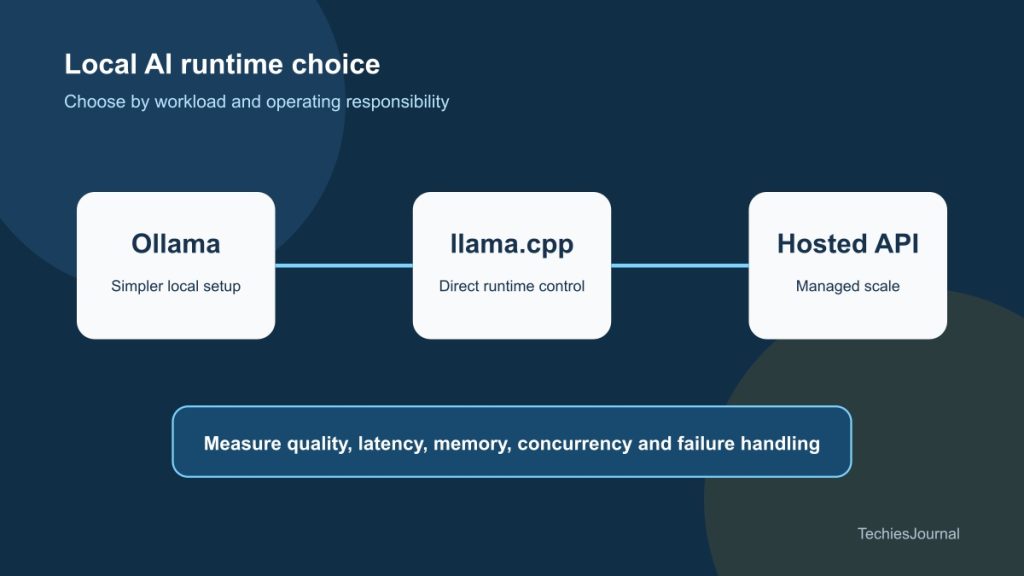
Ollama and llama.cpp are often presented as competing local AI tools. That comparison is only partly correct. Both can run models on developer hardware, but they operate at different levels and make different choices for the user.
Recent releases improved structured output reliability, Apple Silicon performance and hardware support.[1] These changes make local inference more useful, but they do not make every laptop a production AI platform.
The difference is control versus convenience
llama.cpp is an inference engine and toolset written in C and C++. It supports quantised GGUF models and several hardware backends, including Metal, CUDA, HIP, Vulkan, SYCL and CPU execution. It also provides command-line tools, a benchmarking utility and an OpenAI-compatible server.[3]
This gives operators direct control over model files, quantisation, memory use, GPU offload and server behaviour. It also means the operator owns more decisions.
Ollama provides a simpler model-management and serving experience. It handles model retrieval, local storage, configuration and an API behind a smaller operational surface. On supported systems it may use engines such as llama.cpp or MLX underneath.
Choosing Ollama does not mean rejecting llama.cpp. It may mean choosing a managed layer that uses lower-level inference components for you.
Choose according to the work
| Requirement | Start with Ollama | Consider llama.cpp directly | Consider a hosted API |
|---|---|---|---|
| Quick developer setup | Strong fit | More setup choices | Strong fit |
| Direct backend control | Limited compared with direct use | Strong fit | Usually unavailable |
| Private single-user prototype | Strong fit | Strong fit | Depends on data policy |
| Irregular high demand | Limited by local hardware | Requires engineering | Strong fit |
| Offline operation | Strong fit | Strong fit | Poor fit |
| Managed availability and scaling | Team must build it | Team must build it | Usually included |
The same model can behave differently when the runtime, quantisation, context length and hardware change.
Do not benchmark only tokens per second
Generation speed is easy to measure and easy to overvalue. A useful local test should cover the complete workload.
Measure time to first token for interactive tasks and total time for batch work. Record memory use with the longest expected prompt. Test concurrency instead of assuming that one request predicts ten simultaneous requests.
Structured output needs its own test. Ollama supports JSON-schema-constrained responses, but every model will not follow every schema correctly.[2] Count invalid, incomplete and semantically wrong outputs.
For tool-using workflows, test tool selection, arguments and failure handling. A fast model that creates unreliable actions is not ready for automation.
Use a fixed test pack so that model and runtime changes can be compared fairly:
- the same model and quantisation
- the same prompts and context sizes
- cold-start and warm-run measurements
- valid structured-output rate
- time to first token and completion time
- peak memory and sustained memory
- concurrent-request behaviour
- answer quality on the actual task
llama.cpp includes llama-bench for controlled performance testing.[4] Its server project also provides workload-oriented benchmark tools.[5] These are more useful than copying performance numbers from another machine.
Local does not automatically mean secure
Local inference can keep prompts and documents away from a hosted model provider. That is a real advantage for some prototypes. It is not a complete security boundary.
Check where model files came from and whether their licence permits the intended use. Restrict which network interfaces the server binds to. Add authentication before another machine can reach it. Decide whether prompts, responses or uploaded files are logged. Protect local model storage and remove test data when the experiment ends.
A laptop service accidentally exposed to the office network is still an exposed service. A downloaded model is still a software supply-chain dependency.
Know when local inference has reached its limit
Local AI is a strong choice for learning, private experiments, developer assistance, offline work and low-volume internal tools. It becomes harder when a workflow needs predictable latency under concurrency, large context windows, very large models, central observability, high availability or rapid failover.
At that point, the choice is not necessarily local or cloud. A team can prototype locally, validate the task and then move selected workloads to a hosted API or managed inference platform. Sensitive work may remain local while bursty or demanding workloads move elsewhere.
The latest runtime improvements make local AI more capable. They do not remove capacity planning, security, evaluation or operational ownership. Start with Ollama when simplicity helps you learn whether the workflow is useful. Move closer to llama.cpp when you need control over how inference uses the hardware. Choose a hosted service when operating the runtime would distract from the problem you are trying to solve.
Accessible text alternative for Figure 1
Decision map routing quick local setup toward Ollama, direct hardware control toward llama.cpp and managed scaling toward a hosted API, with privacy, reliability and cost checks applying to every option.
References and further reading
- Ollama releases, Ollama. September 2026 structured-output, Apple Silicon and runtime changes. Reviewed 29 September 2026. ↩
- Structured outputs, Ollama documentation. JSON schema support and usage. Reviewed 29 September 2026. ↩
- llama.cpp project, ggml-org. Runtime goals, supported backends, quantisation and server entry points. Reviewed 29 September 2026. ↩
- llama-bench, ggml-org. Repeatable prompt-processing and generation benchmarks. Reviewed 29 September 2026. ↩
- SPEED-Bench server benchmark, ggml-org. Server throughput and latency testing. Reviewed 29 September 2026. ↩