

ఒక developer ల్యాప్టాప్పై AI workflow పనిచేస్తుందని నిరూపిస్తారు. మోడల్ ప్రశ్నలకు సమాధానమిస్తుంది, data ను extract చేస్తుంది, సున్నితమైన prompts ను బయటి API కి వెళ్లకుండా ఉంచుతుంది. Demonstration విజయవంతమవుతుంది.
తరువాతి ప్రశ్న మరింత కఠినమైనది: demonstration తరువాత దాన్ని ఏ runtime పై నడపాలి?
Ollama మరియు llama.cpp రెండింటినీ తరచుగా పోటీ పడే local AI tools గా చూపిస్తుంటారు. ఆ పోలిక కొంతవరకే నిజం. రెండూ developer hardware పై models ను నడపగలవు, కానీ అవి వేర్వేరు స్థాయిలలో పనిచేస్తాయి, user కు వేర్వేరు నిర్ణయాలను అందిస్తాయి.
ఇటీవలి releases structured output reliability, Apple Silicon performance, hardware support ను మెరుగుపరిచాయి.[1] ఇవి local inference ను మరింత ఉపయోగకరంగా మార్చాయి, కానీ ప్రతి laptop ను production AI platform గా మార్చలేవు.
Convenience కావాలా, control కావాలా
llama.cpp అనేది C, C++ లో రాసిన inference engine మరియు toolset. ఇది quantised GGUF models తో పాటు Metal, CUDA, HIP, Vulkan, SYCL, CPU execution వంటి hardware backends ను support చేస్తుంది. Command-line tools, benchmarking utility, OpenAI-compatible server కూడా అందిస్తుంది.[3]
దీనివల్ల model files, quantisation, memory use, GPU offload, server behaviour పై operator కు నేరుగా control ఉంటుంది. అదే సమయంలో మరిన్ని నిర్ణయాల బాధ్యత కూడా operator పైనే ఉంటుంది.
Ollama model management మరియు serving ను సులభం చేస్తుంది. Model retrieval, local storage, configuration, API ను చిన్న operational surface వెనుక నిర్వహిస్తుంది. Supported systems లో అది llama.cpp లేదా MLX వంటి engines ను లోపల ఉపయోగించవచ్చు.
అందువల్ల Ollama ను ఎంచుకోవడం అంటే llama.cpp ను తిరస్కరించడం కాదు. Lower-level inference components ను మీ కోసం నిర్వహించే layer ను ఎంచుకోవడం కావచ్చు.
Workload ఆధారంగా ఎంచుకోండి
| Requirement | Ollama తో మొదలుపెట్టండి | llama.cpp ను నేరుగా పరిగణించండి | Hosted API ను పరిగణించండి |
|---|---|---|---|
| త్వరగా developer setup | మంచి fit | మరిన్ని setup choices | మంచి fit |
| Hardware పై direct control | పరిమితం | మంచి fit | సాధారణంగా ఉండదు |
| Private single-user prototype | మంచి fit | మంచి fit | Data policy పై ఆధారపడుతుంది |
| మారుతూ ఉండే అధిక demand | Local hardware పరిమితి | Engineering అవసరం | మంచి fit |
| Offline operation | మంచి fit | మంచి fit | సరైన fit కాదు |
| Managed scaling, availability | Team నిర్మించాలి | Team నిర్మించాలి | సాధారణంగా service లో ఉంటుంది |
Runtime, quantisation, context length, hardware మారితే అదే model వేరుగా ప్రవర్తించవచ్చు.
Tokens per second మాత్రమే benchmark చేయవద్దు
Generation speed ను measure చేయడం సులభం. దానికి అవసరానికి మించిన ప్రాధాన్యం ఇవ్వడం కూడా సులభం. Local test మొత్తం workload ను cover చేయాలి.
Interactive tasks కోసం time to first token ను, batch work కోసం total time ను measure చేయండి. Longest expected prompt తో memory use ను record చేయండి. ఒక request పనిచేసిందని పది concurrent requests కూడా పనిచేస్తాయని అనుకోకండి.
Structured output ను విడిగా test చేయాలి. Ollama JSON schema ఆధారంగా responses ను constrain చేయగలదు.[2] అయినా ప్రతి model ప్రతి schema ను సరిగ్గా అనుసరించదు. Invalid, incomplete, semantically wrong outputs ను లెక్కించండి.
Tool-using workflows లో tool selection, arguments, failure handling ను పరీక్షించండి. వేగంగా ఉన్న model unreliable actions సృష్టిస్తే automation కు సిద్ధంగా లేదు.
Fair comparison కోసం ఒక fixed test pack ఉపయోగించండి:
- ఒకే model, quantisation
- ఒకే prompts, context sizes
- cold-start, warm-run measurements
- valid structured-output rate
- time to first token, completion time
- peak, sustained memory
- concurrent-request behaviour
- నిజమైన task పై answer quality
llama.cpp controlled performance testing కోసం llama-bench ను అందిస్తుంది.[4] Server workload benchmarks కూడా ఉన్నాయి.[5] వేరే machine నుంచి performance numbers copy చేయడం కంటే ఇవే ఉపయోగకరం.
Local అంటే automatic గా secure కాదు
Local inference prompts, documents ను hosted model provider కు పంపకుండా ఉంచగలదు. కొన్ని prototypes కు ఇది నిజమైన ప్రయోజనం. కానీ ఇది పూర్తి security boundary కాదు.
Model files ఎక్కడి నుంచి వచ్చాయి, licence intended use ను అనుమతిస్తుందా చూడండి. Server ఏ network interfaces పై bind అవుతుందో పరిమితం చేయండి. మరో machine access చేయడానికి ముందు authentication జోడించండి. Prompts, responses, uploaded files log అవుతున్నాయా నిర్ణయించండి. Local storage ను protect చేసి, experiment తరువాత test data ను తొలగించండి.
Office network కు పొరపాటుగా exposed అయిన laptop service కూడా exposed service నే. Download చేసిన model కూడా software supply-chain dependency నే.
Local inference limit ఎప్పుడు చేరిందో గుర్తించండి
Learning, private experiments, developer assistance, offline work, low-volume internal tools కు local AI మంచి ఎంపిక. Predictable latency under concurrency, large contexts, very large models, central observability, high availability లేదా rapid failover అవసరమైనప్పుడు ఇది కష్టమవుతుంది.
అప్పుడు choice local లేదా cloud అని మాత్రమే ఉండాల్సిన అవసరం లేదు. Team local గా prototype చేసి task ను validate చేయవచ్చు. తరువాత demanding workloads ను hosted API లేదా managed inference platform కు మార్చవచ్చు. Sensitive work local గా ఉండవచ్చు.
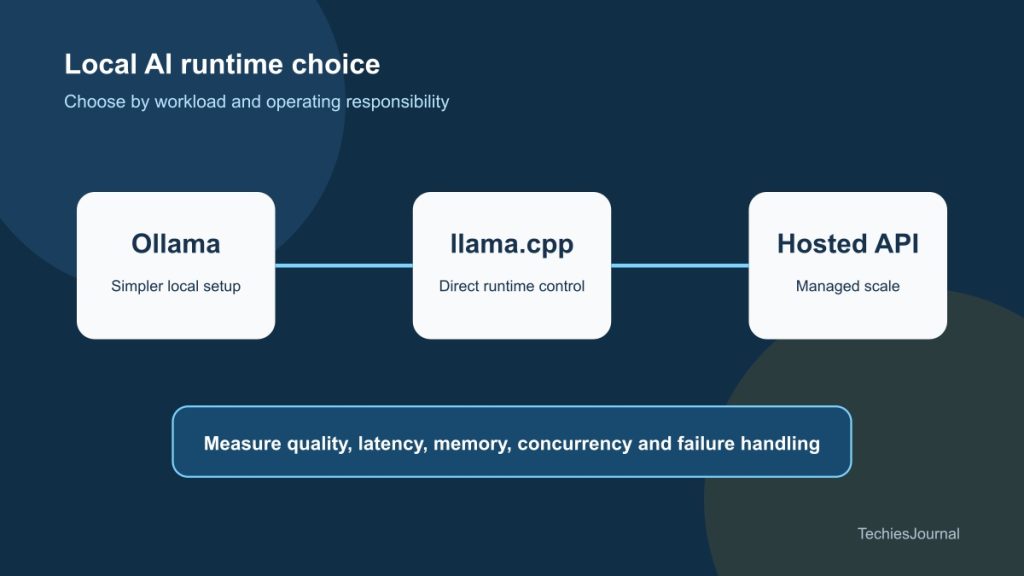
Workflow ఉపయోగకరమో తెలుసుకోవడానికి simplicity అవసరమైతే Ollama తో మొదలుపెట్టండి. Hardware ను inference ఎలా ఉపయోగించాలో control అవసరమైతే llama.cpp కు దగ్గరగా వెళ్లండి. Runtime ను operate చేయడం అసలు సమస్య నుంచి దృష్టి మళ్లిస్తే hosted service ను ఎంచుకోండి.
Figure 1 కోసం అందుబాటులో ఉన్న వివరణ
త్వరగా local setup కోసం Ollama, hardware పై direct control కోసం llama.cpp, managed scale కోసం hosted API వైపు దారి తీసే decision map. ప్రైవసీ, విశ్వసనీయత, ఖర్చులను ప్రతి ఎంపికలోనూ పరీక్షించాలి.
మరింత తెలుసుకోవడానికి
- Ollama releases, Ollama. ↩
- Ollama structured outputs. ↩
- llama.cpp project, ggml-org. ↩
- llama-bench, ggml-org. ↩
- SPEED-Bench server benchmark, ggml-org. ↩