

A SharePoint administrator checks the monthly security list and sees a vulnerability described as spoofing. The update is important, but it competes with outages, application releases and other critical patches. Several weeks later, the same vulnerability is described as remote code execution and active exploitation is confirmed.[1]
That is the operational problem behind CVE-2026-65660.[4]
Microsoft released fixes on 11 August 2026. The vulnerability was later classified as code injection that could allow an authenticated attacker to execute code over a network. By 25 September, Microsoft reported reliable evidence of attacks. CISA added it to the Known Exploited Vulnerabilities catalog, with a remediation deadline of 28 September.[3]
That deadline has passed. Teams that have not verified their farms should treat this as an incident-response task, not an item for the next routine patch cycle.
The vulnerability is serious, but the entry path matters
CVE-2026-65660 affects SharePoint Server 2016, SharePoint Server 2019 and SharePoint Server Subscription Edition. It carries a CVSS score of 8.8.[1]
The normal attack requires an authenticated account. That detail should not reduce the urgency. SharePoint commonly serves employees, contractors, service accounts and external collaborators. An attacker may arrive with stolen credentials or a low-privilege account rather than by breaking authentication directly.
The Canadian Centre for Cyber Security also warns that the vulnerability can become pre-authentication remote code execution when chained with other SharePoint vulnerabilities on servers that permit anonymous access.[2] This is why teams must check both software versions and how each web application is exposed.
First, prove which servers are fixed
Do not rely only on a patch-management dashboard showing a successful job. Inventory every server in every SharePoint farm and compare the installed build with the fixed version.
| SharePoint edition | Fixed version |
|---|---|
| SharePoint Enterprise Server 2016 | 16.0.5565.1001 |
| SharePoint Server 2019 | 16.0.10417.20198 |
| SharePoint Server Subscription Edition | 16.0.19725.20522 |
Record the evidence per server. A farm is not fixed because one server is current. An overlooked application server, search server or disaster-recovery node can preserve the vulnerable path.
After updating, complete the Microsoft-required SharePoint update procedure and confirm that all servers report the expected build. Check that the farm is healthy and that the update did not stop before configuration work finished.
Then check how attackers could reach it
The next question is not simply whether the SharePoint URL is public. Review the complete access path.
- Which web applications are reachable from the Internet or partner networks?
- Is anonymous access enabled anywhere?
- Which reverse proxies, load balancers or web application firewalls sit in front of the farm?
- Can low-privilege users reach publishing, collaboration or legacy sites that were not included in the original inventory?
- Which service accounts and automation tools connect to SharePoint?
Temporary exposure reduction can help while patching is incomplete. Restrict public access, disable anonymous access where it is not required and limit entry points to trusted networks. These steps reduce risk, but they do not replace the update.
Patching does not answer whether exploitation already happened
Because exploitation was observed before the CISA deadline, a successfully patched server may still require investigation.
Review SharePoint and IIS activity around the period when the server was vulnerable. Correlate that activity with Windows security events, endpoint detection alerts, identity sign-ins, process execution and outbound network connections. Pay particular attention to unusual activity tied to accounts that normally perform limited SharePoint work.
Do not turn a generic checklist into invented indicators of compromise. Use Microsoft guidance, CISA information and evidence from your own security tools. If suspicious execution is found, preserve evidence before rebuilding or deleting files. Bring in the incident-response team and expand the review to credentials, connected systems and other farm servers.
Why SharePoint creates a wider blast radius
SharePoint is often described as a collaboration platform. In practice, it may hold contracts, operational documents, employee records, workflow data and links to other business systems. It may also run under identities that can reach databases, file shares, mail systems or automation services.
Compromise of one server therefore creates two risks. The first is access to SharePoint content. The second is the server becoming a starting point for credential theft, persistence or movement into connected systems.
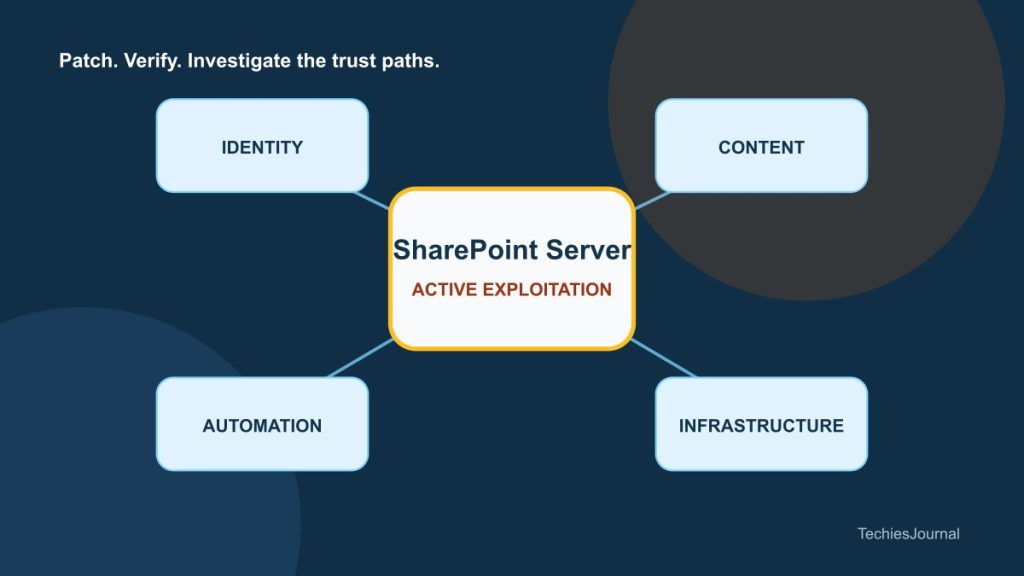
This is why the response team should map four boundaries: content, identity, automation and network access. A narrow SharePoint patch review can miss the systems that make the compromise valuable.
Accessible text alternative for Figure 1
A SharePoint Server farm connects to identity accounts, business documents, workflows, databases and file shares, with Internet and partner access shown as an external boundary. Four trust paths surround the central farm: Identity (users and service accounts), Business content (documents and records), Automation (workflows and integrations), and Infrastructure (databases and file shares).
The hybrid lesson
Moving collaboration to Microsoft 365 does not automatically retire the on-premises risk. Hybrid organisations often keep old farms for workflows, archives, custom applications or integrations that are difficult to migrate.
Those farms can become less visible while remaining highly connected. Assign an owner to every surviving farm. Document why it still exists, who can access it, which systems trust it and when it will next be reviewed. If a farm no longer has a clear business owner, that is a governance problem before it becomes a security incident.
CVE-2026-65660 is an emergency patch issue. It is also a reminder that an internal collaboration server can carry production-level authority. Teams should protect it according to what it can reach, not according to the modest label users see in their browser.
References and further reading
- CVE-2026-65660 Microsoft Security Update Guide, Microsoft. Vendor advisory, affected products and security updates. Reviewed 29 September 2026. ↩
- Vulnerability impacting Microsoft SharePoint Server, Canadian Centre for Cyber Security. Active exploitation, affected versions, fixed builds and chaining risk. Published 24 September 2026. ↩
- Known Exploited Vulnerabilities Catalog, CISA. Exploitation status and federal remediation deadline. Reviewed 29 September 2026. ↩
- CVE-2026-65660 record, CVE Program. Authoritative vulnerability classification and description. Reviewed 29 September 2026. ↩