

ఒక SharePoint నిర్వాహకుడు నెలవారీ భద్రతా జాబితాను పరిశీలిస్తున్నప్పుడు, spoofing సమస్యగా వివరించిన ఒక vulnerability కనిపిస్తుంది. Update ముఖ్యమైనదే. కానీ outages, application releases, ఇతర critical patches మధ్య అది వెనుకబడవచ్చు. కొన్ని వారాల తరువాత అదే vulnerability ను remote code execution గా మార్చి వివరించారు. దాన్ని దాడుల్లో ఉపయోగిస్తున్నట్లు కూడా నిర్ధారించారు.[1]
CVE-2026-65660 విషయంలో జరిగిన operational సమస్య ఇదే.[4]
Microsoft 11 August 2026న fixes విడుదల చేసింది. తరువాత ఈ సమస్యను code injection vulnerability గా వర్గీకరించింది. Authenticated attacker దీనిని ఉపయోగించి network ద్వారా code execute చేయగలడు. 25 September నాటికి attacks జరిగినట్లు Microsoft వద్ద నమ్మదగిన ఆధారాలు ఉన్నాయి. CISA దీనిని Known Exploited Vulnerabilities catalog లో చేర్చి, 28 September ను remediation deadline గా నిర్ణయించింది.[3]
ఆ గడువు ముగిసింది. తమ farms సురక్షితంగా ఉన్నాయని ఇంకా నిర్ధారించని బృందాలు దీనిని సాధారణ patch cycle లోని పనిగా కాకుండా incident-response పనిగా చూడాలి.
సమస్య తీవ్రమైనదే, కానీ attacker ఎలా చేరుకుంటాడో ముఖ్యం
CVE-2026-65660 SharePoint Server 2016, SharePoint Server 2019, SharePoint Server Subscription Edition ను ప్రభావితం చేస్తుంది. దీని CVSS score 8.8.[1]
సాధారణ attack కు authenticated account అవసరం. అందువల్ల urgency తగ్గదు. SharePoint ను employees, contractors, service accounts, external collaborators ఉపయోగిస్తారు. Attacker authentication ను నేరుగా break చేయకపోయినా, దొంగిలించిన credentials లేదా low-privilege account ద్వారా లోపలికి రావచ్చు.
Anonymous access అనుమతించిన servers లో ఇతర SharePoint vulnerabilities తో chain చేసినప్పుడు, pre-authentication remote code execution సాధ్యమని Canadian Centre for Cyber Security హెచ్చరించింది.[2] అందుకే teams software version తో పాటు ప్రతి web application ఎలా exposed అయిందో కూడా పరిశీలించాలి.
ముందుగా ప్రతి server fix అయిందని నిరూపించండి
Patch-management dashboard లో job successful అని కనిపించడం మాత్రమే సరిపోదు. ప్రతి SharePoint farm లోని ప్రతి server ను inventory చేసి, installed build ను fixed version తో పోల్చండి.
| SharePoint edition | Fixed version |
|---|---|
| SharePoint Enterprise Server 2016 | 16.0.5565.1001 |
| SharePoint Server 2019 | 16.0.10417.20198 |
| SharePoint Server Subscription Edition | 16.0.19725.20522 |
ప్రతి server కు evidence నమోదు చేయండి. ఒక server current గా ఉందని మొత్తం farm fixed అయిందని భావించవద్దు. మిగిలిపోయిన application server, search server లేదా disaster-recovery node vulnerable path ను కొనసాగించవచ్చు.
Update తరువాత Microsoft సూచించిన SharePoint update procedure ను పూర్తిచేయండి. అన్ని servers సరైన build ను చూపుతున్నాయో నిర్ధారించండి. Farm ఆరోగ్యంగా ఉందో, configuration పని మధ్యలో ఆగలేదో కూడా పరిశీలించండి.
తరువాత access path ను పరిశీలించండి
SharePoint URL public గా ఉందా అనే ఒక్క ప్రశ్న సరిపోదు. పూర్తి access path ను చూడాలి.
- Internet లేదా partner networks నుంచి ఏ web applications అందుబాటులో ఉన్నాయి?
- ఎక్కడైనా anonymous access enabled గా ఉందా?
- Farm ముందు ఏ reverse proxies, load balancers లేదా web application firewalls ఉన్నాయి?
- Original inventory లో లేని publishing, collaboration లేదా legacy sites ను low-privilege users చేరగలరా?
- SharePoint కు ఏ service accounts, automation tools connect అవుతున్నాయి?
Patching పూర్తయ్యే వరకు public access ను పరిమితం చేయడం, అవసరం లేని anonymous access ను నిలిపివేయడం, trusted networks కు entry points ను తగ్గించడం ఉపయోగపడుతుంది. ఇవి risk ను తగ్గిస్తాయి. కానీ update కు ప్రత్యామ్నాయం కావు.
Patch చేశామని exploitation జరగలేదని చెప్పలేం
CISA deadline కు ముందే exploitation కనిపించింది. కాబట్టి ఇప్పుడు patched అయిన server ను కూడా investigate చేయాల్సి రావచ్చు.
Server vulnerable గా ఉన్న కాలానికి సంబంధించిన SharePoint, IIS activity ను చూడండి. Windows security events, endpoint detection alerts, identity sign-ins, process execution, outbound network connections తో వాటిని correlate చేయండి. సాధారణంగా పరిమిత SharePoint పనులు మాత్రమే చేసే accounts కు సంబంధించిన అసాధారణ activity పై ప్రత్యేకంగా దృష్టి పెట్టండి.
Generic checklist ను కల్పిత indicators of compromise గా మార్చవద్దు. Microsoft, CISA guidance తో పాటు మీ security tools లోని evidence ను ఉపయోగించండి. Suspicious execution కనిపిస్తే files తొలగించడానికి లేదా server rebuild చేయడానికి ముందు evidence ను preserve చేయండి. Incident-response team ను చేర్చి credentials, connected systems, ఇతర farm servers వరకు review ను విస్తరించండి.
SharePoint ఎందుకు పెద్ద blast radius సృష్టిస్తుంది
SharePoint ను collaboration platform అని పిలుస్తారు. కానీ అది contracts, operational documents, employee records, workflow data, ఇతర business systems కు links కలిగి ఉండవచ్చు. Databases, file shares, mail systems లేదా automation services ను చేరగల identities తో అది నడవవచ్చు.
అందువల్ల ఒక server compromise రెండు risks ను సృష్టిస్తుంది. మొదటిది SharePoint content కు access. రెండవది credential theft, persistence లేదా connected systems లోకి movement కోసం ఆ server ను ప్రారంభ స్థలంగా ఉపయోగించడం.
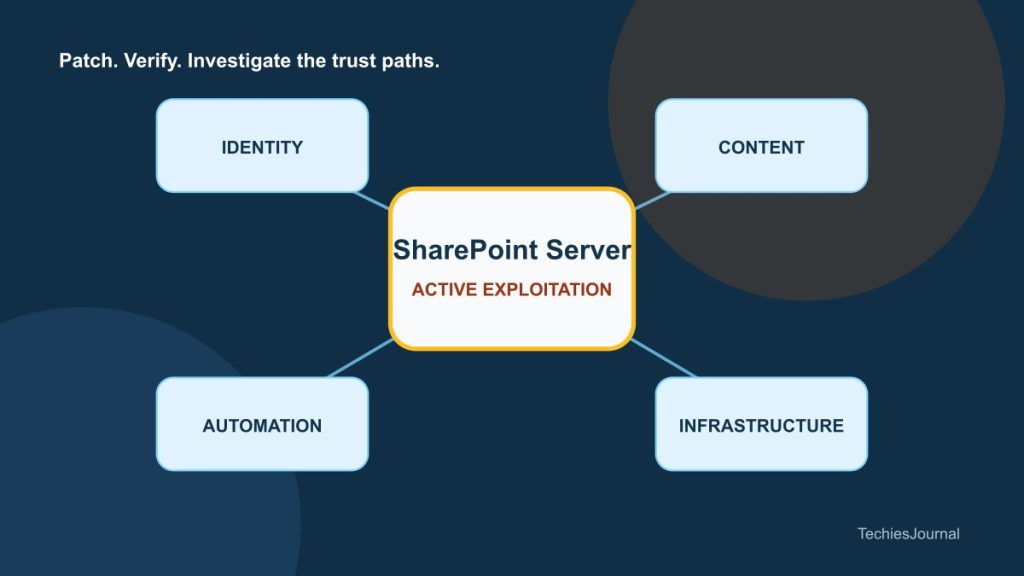
Response team నాలుగు boundaries ను map చేయాలి: content, identity, automation, network access. కేవలం SharePoint patch review చేస్తే compromise విలువను పెంచే connected systems కనిపించకపోవచ్చు.
Figure 1 కోసం అందుబాటులో ఉన్న వివరణ
మధ్యలో SharePoint Server farm, దానికి identity accounts, business documents, workflows, databases, file shares connections, బయట Internet మరియు partner access boundary చూపించే చిత్రం.
Hybrid environment కు పాఠం
Collaboration ను Microsoft 365 కు మార్చినంత మాత్రాన on-premises risk ముగియదు. Workflows, archives, custom applications లేదా migrate చేయడం కష్టమైన integrations కోసం పాత farms కొనసాగుతుంటాయి.
అవి తక్కువగా కనిపించినా, ఇంకా ముఖ్యమైన systems తో connected గా ఉండవచ్చు. ప్రతి farm కు owner ను నిర్ణయించండి. అది ఎందుకు కొనసాగుతోంది, ఎవరు access చేయగలరు, ఏ systems దాన్ని trust చేస్తున్నాయి, తదుపరి review ఎప్పుడు జరుగుతుందో నమోదు చేయండి.
CVE-2026-65660 emergency patch సమస్య. అదే సమయంలో, internal collaboration server కూడా production-level authority కలిగి ఉండవచ్చని గుర్తుచేస్తుంది. Browser లో కనిపించే సాధారణ label ఆధారంగా కాకుండా, ఆ server ఏమి చేరగలదో ఆధారంగా దాన్ని రక్షించాలి.