

| Part | Article | Covers |
|---|---|---|
| 1 | Free vs. Paid AI Models: What the Words Actually Mean | What each tier means, what you give up at $0, licenses, a decision framework |
| 2 | Running Open AI Models Yourself: What It Actually Takes | Hardware, tools, skills, and the real challenges of self-hosting |
| 3 | Where to Find and Verify Open AI Models Safely (this article) | Trusted sources, spotting tampered downloads, safe practices |
| 4 | Open AI Models Worth Knowing Right Now (dated snapshot) | A field guide to 18 current free and open-weight models |
Part 1 explained what “open-weight” means, and Part 2 covered what it takes to run one. This part covers the step in between that gets skipped most often: where the file actually comes from.
A Model File Is Still a File
In 2025, security researchers at ReversingLabs found AI models on Hugging Face, the largest public hub for open-weight models, that contained a working “reverse shell” — code that, once loaded, would quietly connect out to an attacker’s server (ReversingLabs: Malicious ML model discovered on Hugging Face). The files were built to slip past Hugging Face’s own automatic scanner by corrupting the file in a way that made the scanner error out silently, after the malicious code had already run.
This is not a reason to fear open-weight models. It is a reason to treat a model file the way any other downloaded software gets treated: something that runs code on your machine, from a source you should be able to name, not just a harmless block of numbers. A chatbot subscription never asks a user to trust a specific file from a specific uploader — an open-weight model always does.
Where Legitimate Models Actually Come From
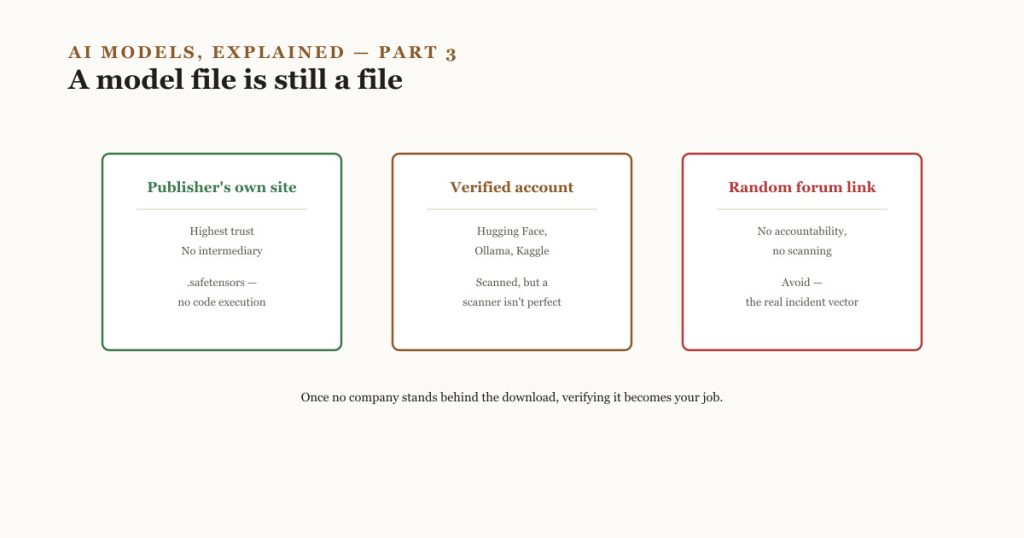
| Source | Trust level | Why |
|---|---|---|
| The publisher’s own site or GitHub (Meta, Google, Mistral, Alibaba, DeepSeek, and similar) | Highest | Comes directly from the organization that trained the model, with no intermediary |
| Hugging Face, from a verified organization account | High | Automated malware, pickle, and secrets scanning; version history; usually a direct link to the publisher’s own account |
| Ollama’s official model library | High | Curated, wraps verified upstream releases, and applies its own packaging |
| Kaggle Models | Medium–high | Google-operated, scanned, smaller catalog than Hugging Face |
| A direct download link from a forum, Discord server, video description, or unofficial “mirror” | Low — avoid | No accountability, no scanning, and the exact vector the incident above exploited |
The pattern is simple: trust follows the organization publishing the file, not the platform hosting it. A verified publisher account on Hugging Face is trustworthy because the publisher is identifiable and accountable, not because Hugging Face’s scanner is perfect — as the incident above shows, it is not.
The Detail That Actually Matters: File Format
Two file formats show up constantly when downloading model weights, and they are not equally safe.
- Pickle-based formats (files often ending in
.bin,.pt, or.pth) are Python’s native way of saving objects, and Python’s pickle format can contain instructions that execute code the moment the file is loaded — not just data. This is a known, long-standing risk in the Python ecosystem, not something unique to AI. - Safetensors is a format built specifically to hold only the model’s numbers, with no ability to execute code at all. Loading a safetensors file cannot trigger the kind of attack described above, by design.
Hugging Face documents both pickle scanning and safetensors support as part of its platform security practices (Hugging Face Hub security), and most major publishers now offer a safetensors version of their models. When both formats are offered for the same model, prefer safetensors — it removes an entire category of risk rather than relying on a scanner to catch it.
A Practical Checklist Before Running Any Downloaded Model
- Get it from the publisher’s own page, or a verified account on Hugging Face, Ollama’s library, or Kaggle — never a link shared in a video description, forum post, or chat group with no accountable identity behind it.
- Prefer a
.safetensorsfile over.binor.ptwhen both are offered. If only a pickle-based format exists, treat it with the same caution as any executable downloaded from the internet. - Check the file size and format against what the model’s own page states. A mismatch is a signal something was altered.
- Use a maintained tool (Ollama, LM Studio, or a recent llama.cpp build) rather than hand-loading a raw file with older or custom code — these tools track known-safe sources and get security fixes over time; a script copied from an old tutorial does not.
- Keep that tool itself updated. Vulnerabilities are found in loading code, not just in model files, and updates patch them the same way browser updates patch website-based attacks.
- When in doubt about an unfamiliar publisher, run the model in an isolated environment first — a virtual machine or container with no access to sensitive files or credentials — before trusting it on a main device.
What “Safe” Actually Means Here
There is no company standing behind an open-weight download the way a paid subscription’s provider stands behind its own servers. “Safe” does not mean risk-free; it means the risk has been reduced to what a careful person can reasonably manage: a named, accountable publisher; a format that cannot execute code; and tooling that gets maintained. That is a realistic bar to meet, not a reason to avoid open-weight models altogether — it is simply a step worth taking deliberately instead of skipping because a video made the process look instant.
Continue This Series
- Part 1 — Free vs. Paid AI Models: What the Words Actually Mean. The definitions and licensing background behind the terms used here.
- Part 2 — Running Open AI Models Yourself: What It Actually Takes. The hardware and tools this article assumes.
- Part 4 — Open AI Models Worth Knowing Right Now. With a source and a format now established, the next part names specific current models worth knowing about, and where their official pages actually are.
Go Deeper
- Malicious ML model discovered on Hugging Face platform — ReversingLabs. The documented “nullifAI” incident referenced above, including how the malicious file evaded automatic scanning. Reviewed September 2026.
- Hugging Face Hub security — Hugging Face. The platform’s own documented scanning and security practices.
- Safetensors documentation — Hugging Face. What the format is and why it was built.
Platform security practices and specific incidents change over time. Treat the checklist above as a standing set of habits, and check Hugging Face’s current security documentation directly if a specific decision depends on the details.