

| Part | Article | Covers |
|---|---|---|
| 1 | Free vs. Paid AI Models: What the Words Actually Mean | What each tier means, what you give up at $0, licenses, a decision framework |
| 2 | Running Open AI Models Yourself: What It Actually Takes (this article) | Hardware, tools, skills, and the real challenges of self-hosting |
| 3 | Where to Find and Verify Open AI Models Safely | Trusted sources, spotting tampered downloads, safe practices |
| 4 | Open AI Models Worth Knowing Right Now (dated snapshot) | A field guide to 18 current free and open-weight models |
New to this series? Part 1 explains what “paid,” “free,” and “open-weight” actually mean before this article gets practical.
The Part the Demo Video Skips
A viewer follows a tutorial: download this file, run one command, and a private AI assistant is running on their own laptop, free forever. The command runs. Then the laptop’s fans spin up, the response takes ninety seconds to appear, and the answer is noticeably worse than what the same person gets from a free chatbot app. Nobody edited that part into the video.
None of that means open-weight models are a bad idea — Part 1 covered real reasons to prefer them, especially privacy. It means “free to download” and “easy to run well” are two separate claims, and only the first one is actually true. This article covers the second one honestly: what hardware a reader actually needs, which tools people really use, and the specific trade-offs that decide whether the experience feels like a capable assistant or a frustrating experiment.
What Actually Eats Your Memory
An open-weight model’s size is usually described by its parameter count — a 7B model has about 7 billion internal numbers. Every one of those numbers has to fit in memory (RAM, or a graphics card’s VRAM) while the model is running, and how much space each number takes depends on its precision.
| Precision | Bytes per parameter | Who uses it |
|---|---|---|
| fp16 (half precision) | 2 bytes | The original, full-quality release most publishers upload first |
| int8 (8-bit) | 1 byte | A moderate compression, roughly half the memory of fp16 |
| int4 (4-bit) | ~0.5 bytes | The most common “quantized” download people actually run at home |
This gives a rule-of-thumb memory estimate, before any extra overhead (Hugging Face: Quantization overview):
| Model size | fp16 (full quality) | int8 | int4 (typical home setup) |
|---|---|---|---|
| 3B | ~6 GB | ~3 GB | ~1.5–2 GB |
| 7B | ~14 GB | ~7 GB | ~4 GB |
| 13B | ~26 GB | ~13 GB | ~7 GB |
| 34B | ~68 GB | ~34 GB | ~17–20 GB |
| 70B | ~140 GB | ~70 GB | ~35–40 GB |
These numbers are for the model’s weights alone. Add roughly 10–20% more for the “working memory” a conversation itself needs (covered next), plus whatever the operating system and other apps are already using. A machine with exactly the number in the table will usually not be enough in practice.
Why a Long Conversation Can Crash a Model That “Fit”
A model advertised with a large context window — the amount of conversation it can hold in mind at once, often marketed in tokens like “128K context” — needs extra memory for that context, separate from the memory its weights already use. This working memory, called the KV cache, grows as a conversation gets longer.
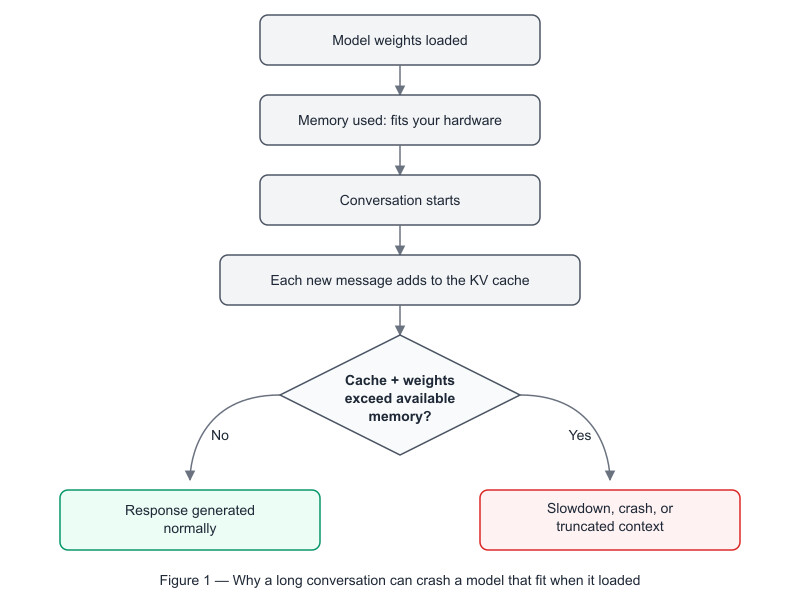
This is why a model that loads fine and answers the first question well can fail or slow to a crawl an hour into a long session, a long document upload, or a big pasted codebase — the weights were never the whole story.
The Tools People Actually Use
Almost nobody hand-builds their own inference setup from scratch. Three tools cover most real-world use:
| Tool | What it is | Best for | Platform |
|---|---|---|---|
| Ollama | A command-line tool and simple local server; one command downloads and runs a model | Developers and technical readers comfortable with a terminal | macOS, Windows, Linux |
| LM Studio | A graphical desktop app: browse, download, and chat with models by pointing and clicking | People who want an open-weight model without touching a command line | macOS, Windows, Linux |
| llama.cpp | The underlying engine much of this ecosystem, including Ollama, is built on top of | Developers who want full control, or plan to embed a model inside their own application | Any platform with a C++ toolchain |
All three support the quantized (int4/int8) model formats from the memory table above, and all three are free to use. The tool a reader picks does not change what the model can do — it changes how much technical comfort is required to get there.
The Real Challenges Influencer Content Skips
- Quantization is a genuine trade-off, not a free discount. Compressing a model from fp16 to 4-bit cuts its memory need by roughly four times, but it also measurably reduces accuracy, most noticeably on precise reasoning, math, and code — a heavily quantized model can feel fine in casual chat and still fail tasks a person actually needed it for.
- Large context windows need their own memory, as shown above — a long conversation, a big pasted document, or an entire codebase can exhaust memory even on hardware that comfortably loaded the model itself.
- The downloads are large. Even 4-bit quantized files commonly run from a few gigabytes to several dozen; the original fp16 releases run into the hundreds of gigabytes for the biggest models. The first run means a real wait and real free disk space, not a five-second install.
- There is no support line. A driver conflict, a cryptic crash, or a model that refuses to load gets solved through community forums, GitHub issues, and trial and error — never a chat-support agent.
- Nothing patches itself. Security fixes, bug fixes, and better quantized versions appear on an ongoing basis, but a downloaded model file only gets safer or better if the reader goes back and downloads the update themselves.
- Changing how a model behaves is a different skill entirely. Running a model as published is approachable. Teaching it new behavior through fine-tuning is a deeper machine-learning skill, and is out of scope for this article.
- Heat, noise, and electricity are real costs. Sustained local inference spins laptop fans loudly and drains batteries fast; a dedicated GPU pulls meaningful power. This is the “hidden bill” described in Part 1 of this series — it is just paid in electricity instead of a subscription.
The Skill Floor, Honestly
Using Ollama or LM Studio does not require knowing how to write code. It does require:
- Comfort installing software from a terminal, or trusting and configuring a downloaded desktop app
- Reading a model’s own documentation (“model card”) to pick the right quantized version for your hardware, rather than guessing
- Basic troubleshooting: reading an error message, checking whether a graphics driver is installed and up to date
- Patience for multi-gigabyte downloads and the occasional failed one
Writing code, using Python, or understanding the underlying architecture is only needed if the goal is to build a product on top of the model, not simply to use one.
Matching Your Hardware to What You Can Realistically Run
| Your setup | What runs comfortably | What to expect |
|---|---|---|
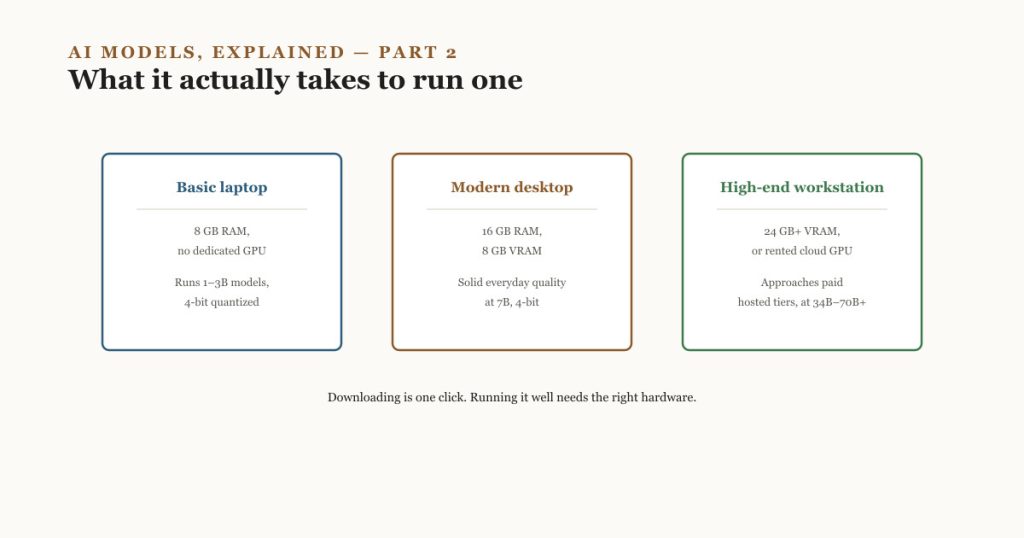
| Basic laptop, 8 GB RAM, no dedicated GPU | 1–3B models, 4-bit | Fine for drafting and simple questions; slow and shallow on complex reasoning |
| Modern laptop or desktop, 16 GB RAM, 8 GB VRAM | 7B, 4-bit | Solid everyday quality, broadly comparable to a mid-tier free hosted chatbot |
| Gaming or creator desktop, 16–24 GB VRAM | 13B–24B, 4-bit | Noticeably stronger reasoning and coding ability |
| High-end workstation or a rented cloud GPU | 34B–70B+ | Approaches what many paid hosted tiers offer, at the cost of real hardware or cloud rental spend |
The pattern from Part 1 holds here too: better results are available at every tier, but “free” keeps trading against something — in this case, hardware cost, setup time, and ongoing electricity.
Continue This Series
- Part 1 — Free vs. Paid AI Models: What the Words Actually Mean. Start here if the difference between paid, free, and open-weight is still unclear.
- Part 3 — Where to Find and Verify Open AI Models Safely. Now that running one is possible, the next question is where to actually get the file from, and how to tell a legitimate model from a tampered one.
- Part 4 — Open AI Models Worth Knowing Right Now. A dated field guide to current free and open-weight models, so the hardware guidance above can be matched to specific choices.
Go Deeper
- Quantization overview — Hugging Face. The precision-to-memory relationship used in the tables above. Reviewed September 2026.
- Ollama — Official site and model library for the command-line tool discussed above.
- LM Studio — Official site for the graphical desktop tool discussed above.
- llama.cpp — The open-source inference engine underlying much of the local-AI tooling ecosystem, including its own quantization documentation.
Hardware needs and tool capabilities change with every release cycle. Treat the memory table above as a planning estimate, and check a specific model’s own page for its actual file sizes before committing to hardware.