

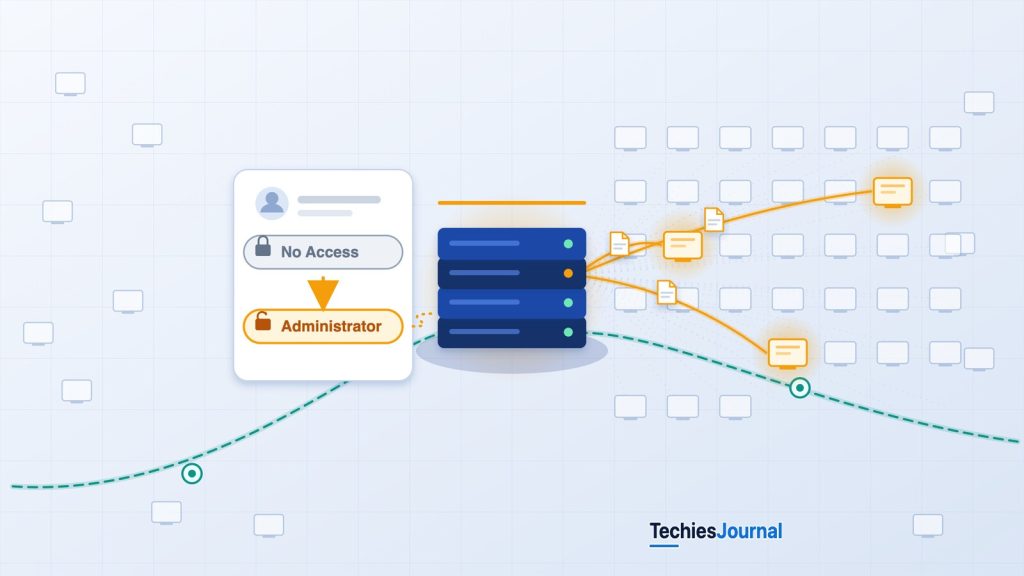
TechiesJournal illustration of the sequence the article describes. Most computers are shown dim because the evidence does not establish that every endpoint was accessed, and the picture does not show how many were.
The August 2026 BeyondTrust incident demonstrated how attackers could use a compromised remote-support platform to reach internal systems through legitimate administrative capabilities. It illustrates why securing a remote-management platform is different from securing the individual computers it manages.
The attacker did not need to exploit every endpoint
Remote-support platforms allow IT teams to administer computers, troubleshoot problems and access systems across an organization. A support engineer might connect to an employee’s laptop, investigate an application failure or transfer a diagnostic file. An infrastructure administrator might use the same platform to manage servers.
These capabilities are useful because organizations can manage remote access through a central system. That system also becomes responsible for deciding who can connect to which machines and what actions are permitted during a session.
In August 2026, attackers exploited a vulnerability in BeyondTrust Remote Support, an enterprise remote-administration platform. The vulnerability, CVE-2026-102764, involved insufficient validation of the origin of messages within an internal component, allowing unauthorized file operations under certain conditions. Source: BeyondTrust Security Advisory BT26-05.
The vulnerability provided an initial route into affected appliances (the servers or virtual machines that run the platform). But Mandiant’s investigation documented something beyond the initial exploitation.
After compromising the platform, attackers changed remote-support administrative permissions, established sessions to internal endpoints and used the product’s built-in file-transfer functionality to obtain documents, including software inventories.
The investigated endpoint access was achieved through the remote-support platform. Mandiant did not report a separate vulnerability being exploited on each destination computer to establish those sessions.
This is the central technical issue: once attackers controlled a platform authorized to access internal systems, they could misuse its existing remote-management capabilities. Source: Google Threat Intelligence Group and Mandiant, ARMORY CASTLE Exploits BeyondTrust, October 15, 2026.
Why remote-support platforms have a different security responsibility
Remote-support platforms operate between IT administrators and the systems they manage. The platform authenticates support personnel, maintains configured remote-access connections and enforces permissions that determine which systems those personnel may reach.
In BeyondTrust Remote Support, a Jump Item represents a configured remote-access connection to a system. A Jump Item contains or references the information needed to initiate that connection. Depending on its type, this may involve a Jump Client, a Jumpoint or other connection details.
Jump Items can be organized into Jump Groups, allowing organizations to separate connections by team, location or operational responsibility.
Consider a hypothetical organization with two groups: employee workstations and production servers. Its help-desk team may be authorized to connect to workstations, while access to production servers is reserved for infrastructure administrators. Both teams may authenticate successfully to the same Remote Support platform. Their authorization to reach managed systems can still differ.
How Jump Item permissions work
BeyondTrust uses Jump Item Roles to define the actions users may perform with Jump Items. These permissions can include starting sessions, creating or removing Jump Items and editing connection settings or associated policies.
Effective access is not necessarily determined by one setting. BeyondTrust’s versioned documentation describes role assignments through individual users, group policies and relationships between users and Jump Groups. Where several Jump Item Roles apply, the most-specific assignment takes precedence.
For example, a general user role may allow remote-support operations, while a more-specific assignment for a particular Jump Group restricts access to connections within that group. To establish a user’s effective access, an administrator must examine the applicable assignments rather than relying solely on the user’s general role.
Which Jump Item Role applies
Select a situation to see which role BeyondTrust’s documentation says is used when more than one role is assigned to a user.
Only a general role
- 1A role for the user and a Jump Group, set on the Jump Item Roles pageNot set in this example
- 2A role for the user and a Jump Group, set on the Group Policies pageNot set in this example
- 3The user’s general Jump Item Roles, set on the Users page or in a group policy (role used)This role is used
With only a general role configured, that role is the one used.
A group policy adds a Jump Group role
- 1A role for the user and a Jump Group, set on the Jump Item Roles pageNot set in this example
- 2A role for the user and a Jump Group, set on the Group Policies page (role used)This role is used
- 3The user’s general Jump Item Roles, set on the Users page or in a group policySet, but a more specific role takes precedence
A role assigned to the relationship between the user and a Jump Group is more specific than the general role, so it takes precedence.
Roles are set at all three levels
- 1A role for the user and a Jump Group, set on the Jump Item Roles page (role used)This role is used
- 2A role for the user and a Jump Group, set on the Group Policies pageSet, but a more specific role takes precedence
- 3The user’s general Jump Item Roles, set on the Users page or in a group policySet, but a more specific role takes precedence
The role assigned to the relationship between the user and a Jump Group on the Jump Item Roles page is the most specific, so it is always used.
From BeyondTrust’s v24.3 documentation, in order from most specific to least specific. Check your own version and edition. This is why a general role field alone does not show a user’s effective access.
The article uses Jump Item Roles, the terminology appearing in Mandiant’s investigation and the relevant BeyondTrust Remote Support documentation. Organizations should interpret configuration details against their installed product version and edition. Source: BeyondTrust Remote Support v24.3, Jump Item Roles.
Starting a session is not the same as controlling the endpoint
Permission to launch a remote-support session is only one part of authorization. A user may be able to start a connection but remain restricted by the configured session policy. The target computer also has its own operating-system privileges and security controls.
Three permissions therefore need to be distinguished:
- Permission to sign in to the Remote Support platform.
- Authorization to initiate a session through a particular Jump Item.
- Privileges to perform operations on the remote computer.
The actions available during a session depend on the connection configuration, applicable policies, available credentials and privileges on the endpoint. This distinction matters when interpreting the intrusion.
What the attackers changed inside Remote Support
The intrusion began with compromise of the appliance. Mandiant documented a malicious webshell (a small script that lets an attacker run commands on a server through its web interface), escalation to root privileges (full control of the appliance’s operating system) and mechanisms designed to preserve access. Those findings explain how attackers established control over the appliance’s operating environment.
The next stage involved the Remote Support application itself. Mandiant observed attackers using compromised administrator credentials to access its web administration portal. Investigators recorded a user_changed event in which two role fields changed:
| Recorded field | Previous role | New role |
|---|---|---|
| Default Jump Item Role | No Access | Administrator |
| Teams Jump Item Role | No Access | Administrator |
Both changes were recorded with role ID 1 becoming role ID 3.
These are distinct fields in the account’s Remote Support configuration. They should not be confused with a specific user-to-Jump-Group role assignment.
In Mandiant’s log entry the two fields are jump_item_role:default and jump_item_role:teams, and Mandiant describes the change as upgrading local Jump Items and Team permissions. The v24.3 Jump Item Roles page does not describe these two fields, so they appear to be a general role setting and a team-related setting. Other more-specific assignments may still affect the effective authorization available for a particular connection.
The observed changes therefore establish that the administrator account’s application permissions were expanded. They do not, by themselves, prove unrestricted access to every Jump Item. Mandiant describes this change as granting permanent, unrestricted authorization to launch remote sessions to the systems in the appliance’s Jump Item list, and the documented sessions and file transfers are the evidence of what was actually done.
Mandiant subsequently observed attackers establishing remote-support sessions to internal endpoints. The evidence connects actual changes in administrative authorization with subsequent use of the platform’s remote-access capabilities.
Attackers were no longer relying exclusively on commands executed through the compromised appliance’s operating system. They were also using the application designed to administer other systems. Source: Mandiant, BeyondTrust administrator session abuse.
How legitimate remote sessions became an access path
Remote Support maintains connections to systems an organization has already configured for administration. Authorized personnel use these connections for troubleshooting, maintenance and file transfer.
Following the permission changes, Mandiant observed attackers using that infrastructure to reach internal endpoints. The attackers took advantage of the management platform’s ability to establish sessions rather than installing a separate remote-access mechanism on every target machine.
What investigators observed on internal endpoints
Mandiant documented remote-support sessions to internal systems. During those sessions, attackers used BeyondTrust’s built-in capabilities to request access to the remote file system. They then used the native file-transfer functionality to download sensitive documents, including software inventories.
These were observed activities, not merely potential consequences of having broader permissions.
The file-transfer capability itself was legitimate. Support teams can use it to collect logs, retrieve diagnostic material or deliver files needed for troubleshooting. In this incident, an unauthorized operator used that capability to remove information from internal endpoints.
The software performed its intended technical function. The problem was that the operator exercising the capability was not authorized.
What the evidence does not establish
The investigation does not demonstrate that every endpoint registered in the appliance’s Jump Item inventory was accessed. Nor does it establish that attackers acquired operating-system administrator privileges on every endpoint they reached.
The observed sessions, file-system access and document transfers demonstrate unauthorized downstream activity without requiring those broader claims. Remote-session access and complete control of a target operating system remain different findings.
The four security boundaries involved
The incident involved several layers of control, each with a different responsibility.
| Security boundary | What it governs | Observed significance |
|---|---|---|
| Appliance host | Operating-system files, services and privileges | Attackers obtained root-level access |
| Remote Support administration | Application accounts, roles and configuration | Attackers expanded administrative permissions |
| Remote session | Connections and allowed support activities | Attackers initiated sessions and transferred files |
| Target endpoint | Local privileges and endpoint security controls | Internal endpoints were accessed. Universal administrative compromise was not established |
Compromising one boundary can create opportunities to abuse another. It does not automatically prove every other boundary has also been defeated.
In this case, Mandiant documented both administrative permission changes and subsequent use of remote-support capabilities. That is what establishes the connection between appliance compromise and unauthorized activity on internal systems.
A separate route through the appliance
Investigators also discovered a route that did not depend on ordinary Remote Support sessions. Mandiant identified BARECLAW, a custom network tunneler installed on the compromised appliance. The tool could relay network traffic through a SOCKS5 proxy carried over WebSocket connections, a way of carrying relayed network connections over a web connection.
Attackers also modified the appliance’s HAProxy configuration. HAProxy is a reverse proxy: it accepts incoming requests and forwards them to configured internal services. By modifying its routing rules, attackers directed requests arriving through a designated web path toward the tunneling component. This provided an alternative communication route through the compromised appliance.
In our reading, this traffic did not, unlike a normal Remote Support connection, depend on an operator launching a session through a Jump Item.
The difference matters when investigating activity. Application session records may establish which managed connections were used through normal Remote Support workflows. But, in our reading, traffic passing through an attacker-installed tunneler may not appear as an ordinary support session.
Two routes through the appliance
Select a route to see how it works and where the records may not show it.
Remote Support session
How it works
- An operator launches a session through a Jump Item
- Application session records may show which managed connections were used in normal workflows
Limits of the evidence
- Traffic that passed through the attacker-installed tunneler
BARECLAW tunnel
How it works
- A custom tunneler on the appliance relays traffic through a SOCKS5 proxy carried over WebSocket
- Changed HAProxy rules send requests arriving on a designated web path to it
- In our reading, it did not depend on an operator launching a session through a Jump Item
Limits of the evidence
- Its traffic may not appear as an ordinary support session
- Mandiant’s public findings do not establish that the two routes reached an identical set of endpoints
Summarises Mandiant’s findings as described in this article. It does not show which endpoints each route reached.
Mandiant documented both mechanisms. Its public findings do not establish that they reached an identical set of endpoints. Source: Mandiant, BARECLAW and HAProxy findings.
What organizations can verify after this type of compromise
The BeyondTrust investigation offers a practical way to trace the consequences of unauthorized remote-support permissions. The starting point is not merely whether the appliance was vulnerable. It is what changed inside the management application and what happened afterward.
First, establish the administrative change.
Review the affected accounts, Jump Item Roles, Jump Group assignments and group policies. Identify which account made a change, which permissions were modified and whether the action had an authorized operational purpose. In the investigated incident, the key evidence included a user_changed event showing two role fields changing from No Access to Administrator.
Next, establish which sessions followed.
Review the endpoints accessed, the identities initiating those connections and the timing relative to unexpected permission changes. A role change does not prove a remote session occurred. Session evidence provides the next link.
Then examine what occurred during those sessions.
Relevant records may include file-system access, native file transfers and session-configuration activity. Mandiant’s investigation connected remote sessions with observed document transfers.
Finally, identify the endpoints requiring investigation.
An endpoint appearing in the platform’s inventory is not automatically compromised. An endpoint accessed through an unauthorized session, however, becomes relevant to the investigation and should be assessed using the available activity records and endpoint evidence.
The resulting investigation path is:
Unexpected role change → remote session → file access or transfer → affected endpoint.
This describes a way to connect evidence. It does not assume every stage occurred in every environment.
From a role change to an affected endpoint
Select a step to see what that evidence establishes and what it does not.
1. Role change
- 1Unexpected role change (current step)
- 2Remote session
- 3File access or transfer
- 4Affected endpoint
Establishes
- An account’s permissions changed, for example two role fields from No Access to Administrator
Does not by itself establish
- That a remote session occurred
- Unrestricted access to every Jump Item
2. Session
- 1Unexpected role change
- 2Remote session (current step)
- 3File access or transfer
- 4Affected endpoint
Establishes
- A remote session to an endpoint was established, which session evidence provides
Does not by itself establish
- What happened during the session
- That every endpoint in the inventory was accessed
3. File access
- 1Unexpected role change
- 2Remote session
- 3File access or transfer (current step)
- 4Affected endpoint
Establishes
- File-system access and native file transfers during sessions, as Mandiant observed
Does not by itself establish
- That attackers held operating-system administrator privileges on every endpoint they reached
4. Endpoint
- 1Unexpected role change
- 2Remote session
- 3File access or transfer
- 4Affected endpoint (current step)
Establishes
- An endpoint accessed through an unauthorized session is relevant to the investigation
Does not by itself establish
- That an endpoint is compromised just because it appears in the platform’s inventory
A way to connect evidence, as the article describes it. It does not assume every stage occurred in every environment.
Host-level activity also requires examination when the appliance itself was compromised. In the BeyondTrust incident, attackers deleted log files and established a separate tunneling mechanism. Records stored solely on the compromised appliance may therefore be incomplete.
Independently collected logs, endpoint telemetry and network records can help corroborate findings, although none should be assumed to provide complete visibility.
Patching the initial vulnerability addresses the documented entry point. It does not establish which legitimate support connections were previously used by an attacker. The broader recovery problem is discussed in TechiesJournal’s related article, “Patched” Is Not “Clean”: What to Do After an Exploited Edge Device Fix.
The purpose here is narrower: to understand which remote-management permissions changed, which connections were used and what happened on the systems those connections reached.
The security boundary extends beyond the management server
Remote-support platforms are useful because they give organizations a central way to administer many systems. Their access controls determine who may use those connections and which activities are permitted.
The BeyondTrust investigation showed how attackers who compromised the management platform could also abuse those legitimate capabilities. Mandiant documented administrative role changes, unauthorized remote-support sessions and the use of native file transfer to obtain information from internal endpoints. Investigators also found a separate network-tunneling route through the compromised appliance.
The lesson is not that remote-support tools are inherently unsafe.
It is that the security of managed endpoints partly depends on the integrity of the platform authorized to connect to them.
When that platform is compromised, examining the management server alone cannot establish the consequences. Organizations must also determine which permissions changed, which sessions were established and what happened on the systems those sessions reached.
Go deeper
Research reviewed October 21, 2026, and rechecked October 22, 2026. This article focuses on remote-support authorization and downstream access rather than the full vulnerability-response process.
Investigation and vendor sources
- ARMORY CASTLE Exploits BeyondTrust, Google Threat Intelligence Group and Mandiant, October 15, 2026, original investigation describing administrative changes, remote-support sessions, file transfers and tunneling.
- BeyondTrust Security Advisory BT26-05, BeyondTrust, October 15, 2026, official vulnerability description, affected versions and mitigation information for CVE-2026-102764.
- ARMORY CASTLE and BT26-05: What Security Teams Need to Know, BeyondTrust, October 15, 2026, vendor investigation, response chronology and containment information.
- BeyondTrust Remote Support v24.3, Jump Item Roles, BeyondTrust product documentation, reviewed October 21, 2026, explains Jump Item access, role assignment and precedence. The observed intrusion is established separately by Mandiant.
Organizations assessing possible exposure should consult current BeyondTrust advisories and their own incident-response procedures. The publicly documented intrusion does not establish that every installation or managed endpoint was compromised.
Related reading on TechiesJournal
- “Patched” Is Not “Clean”: What to Do After an Exploited Edge Device Fix, TechiesJournal, October 2026, related analysis of why fixing a vulnerability does not automatically remove existing compromise.
- When a Trusted Cloud Application Becomes an Attack Path for another case where attackers used a trusted application’s own legitimate access instead of attacking each target.