

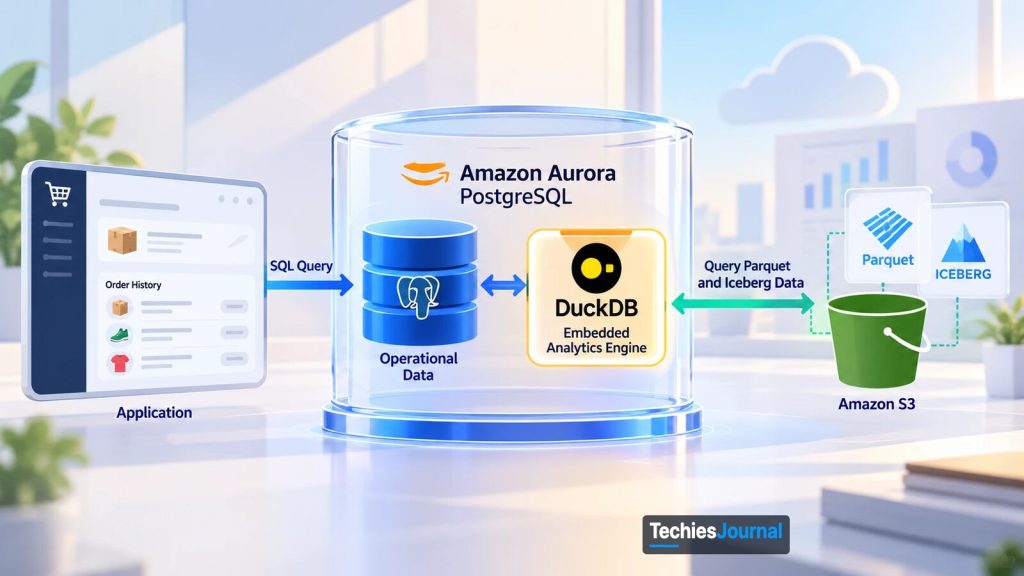
Architecture illustration supplied by the owner. The labels in the picture are in English, and the marks in it are approximate renderings used only to name the technologies discussed.
Amazon Aurora PostgreSQL can now query historical data stored in Amazon S3 using an embedded DuckDB engine. The development changes how applications access data across operational databases and data lakes, potentially removing some data-copying processes without replacing the broader work of data engineering.
When an application needs data from two places
Consider a fictional retail business that has been operating an online store for several years. Its application uses Amazon Aurora PostgreSQL to manage customers, orders and payments. These records change throughout the day. When a customer places an order, the database must save the transaction reliably and make the updated information available to the application.
The business also keeps several years of historical transactions in Amazon S3. Those records are rarely modified, but they remain useful for customer enquiries, reporting and understanding purchasing patterns. This arrangement works until the application needs information from both systems.
Suppose a customer contacts the support team about a product purchased three years ago. Recent orders are available in Aurora, but the older purchase record is stored in S3. The engineering team needs to bring that information into the support application’s existing view.
One option is to maintain a process that copies historical transactions from S3 into Aurora. Once copied, the application can query them alongside current orders through PostgreSQL. This works, but it adds responsibilities: the team must maintain the copying process, handle failures, manage duplicate storage and keep the copied information consistent with the source.
Another option is to query the historical records through a separate analytical service and combine the results in the application. That avoids copying the data into Aurora but introduces another service and integration.
Neither approach is inherently wrong. But when the requirement is simply to retrieve a customer’s purchase history, additional data movement or integration may be more work than the feature needs. This is the problem behind Amazon’s recent Aurora development.
What DuckDB is and what changed in Aurora
DuckDB is an open-source database designed for analytical processing. Unlike traditional database servers that usually run as separate services, DuckDB can run directly inside an application or analytical tool. Developers and analysts have used it from languages such as Python to query Parquet files and data stored in cloud object storage such as Amazon S3. Source: DuckDB, Why DuckDB.
It processes analytical queries efficiently, particularly when working with large datasets organized by columns. Before this launch, an application that wanted DuckDB alongside Aurora would have had to run and integrate it separately. Embedding DuckDB into Aurora brings the analytical engine into the PostgreSQL environment, allowing supported external datasets to be queried through the database connection an application already uses.
On September 30, 2026, AWS announced general availability of direct querying for Apache Iceberg and Parquet data in Amazon Aurora PostgreSQL. The capability is supported on Aurora PostgreSQL 17.11 and 18.6 and higher, in all AWS commercial and GovCloud (US) Regions, at no additional charge. Source: AWS, Aurora PostgreSQL now supports querying of Apache Iceberg and Parquet data.
To understand the change, it helps to separate the roles of the technologies involved. Aurora PostgreSQL remains the operational database. It manages records that applications frequently read, insert and update, such as current orders and customer information.
Amazon S3 stores historical data. In the example, older transactions may be saved as Parquet files. Parquet organizes data by columns, allowing analytical systems to read selected fields without reading every field in every record. AWS also lets foreign tables point to Amazon S3 Tables and the AWS Glue Data Catalog, but the retailer’s S3 files are enough to follow the idea.
Apache Iceberg provides table-management capabilities over data files. It maintains metadata describing the dataset and its changes over time, helping analytical systems work consistently with large collections of data. DuckDB performs the analytical query processing. With the new Aurora integration, it can read supported Parquet and Iceberg data while applications continue using PostgreSQL.
The historical records do not need to move into Aurora simply because an application wants to query them. What changes is the path through which the application accesses those records.
How a customer-history query runs
Return to the retailer’s support application. The engineering team creates a foreign table in Aurora that represents historical orders stored in S3. A foreign table is a PostgreSQL table definition that points to data stored outside the database. It provides information about the columns and the external source, but does not require the underlying records to be copied into ordinary Aurora storage.
The application now has access to two types of tables through PostgreSQL: native tables containing current orders and foreign tables representing historical records in S3.
When the support application requests a customer’s purchase history, it submits a SQL query through its normal Aurora connection. PostgreSQL parses and plans the query, then delegates execution to the embedded DuckDB engine, which reads the relevant data from S3. AWS says whole plans, including joins between foreign tables and local PostgreSQL tables, can be pushed down to the engine. The query returns ordinary PostgreSQL rows, and AWS says such queries run in a single process and take part in the session’s transactions like any other PostgreSQL query.
Follow one customer-history query
Select a step to see where the query is and what happens there.
Aurora PostgreSQL
The support application sends an ordinary SQL query. It keeps using its existing driver and connection.
Aurora PostgreSQL
PostgreSQL parses and plans the query, then delegates execution to the embedded DuckDB engine. AWS says whole plans, including joins between foreign and native tables, can be pushed down to it.
Aurora PostgreSQL
DuckDB reads only the byte ranges it needs from S3, using the IAM role attached to the cluster. Column pruning and filters skip data the query does not reference.
Aurora PostgreSQL
Frequently accessed data is cached on the instance’s local storage and shared across sessions, so repeat queries can avoid S3. The cache is cleared when the instance restarts or fails over.
Aurora PostgreSQL
Results come back as ordinary PostgreSQL rows. AWS says queries that join foreign and native tables run in a single process and take part in the session’s transactions.
A simplified view of AWS’s description of how the capability works. It is not a performance model.
The foreign-table definition remains inside Aurora, while the historical data stays in S3. Aurora is not simply importing the entire historical dataset before answering the query. For supported operations, the engine reads only the byte ranges it needs, skipping columns the query does not reference and files whose statistics cannot match the filter. Frequently accessed data is also cached on the instance’s local storage and shared across sessions.
The actual work depends on the query and its execution plan, but the application no longer necessarily needs a separate data-copying process or analytical-service connection for this type of request. Source: AWS, how Aurora analytical querying works.
The approach has an important boundary: foreign tables are read-only. They allow applications to query external data, but INSERT, UPDATE, DELETE, TRUNCATE and COPY FROM are not supported on them.
To change the data, update the source files in S3 or the Iceberg table through AWS Glue or other tools. For the retailer’s historical purchase records, read-only access may be sufficient. Other applications may require a different design.
Where the data pipeline becomes simpler
The retailer may have created its historical-data copying process for one reason: the support application needed a PostgreSQL-accessible copy of older transactions. If Aurora’s direct-query capability meets the application’s performance and reliability requirements, that copying process may no longer be necessary. The business could retain its historical data in S3, expose it through foreign tables and remove the additional Aurora copy.
Copy into Aurora, or query in place
Switch between the two designs to compare what the team has to run.
What the team runs and maintains
- The copying process and its failure handling
- Duplicate storage for the copied history
- Keeping the copy consistent with the source
The application queries the copied history through PostgreSQL, alongside current orders.
What the team runs and maintains
- The foreign-table definition and access to S3
- Testing performance and resource use on representative queries
- Monitoring Aurora CPU, memory, cache hit ratio and S3 reads, and possibly a dedicated reader
- The process that prepares and places clean data in S3 (this capability does not replace it)
The history stays in S3 and the application reads it through PostgreSQL. Whether this is simpler depends on measured performance and cost.
Illustrative, for the article’s fictional retailer. Whether the copy can be removed depends on testing.
But the distinction changes when the pipeline does more than copy data. Suppose the same retailer receives transactions from its website, physical stores and external marketplaces. These systems may use different customer identifiers, product codes and transaction formats. The engineering team must still reconcile those differences, correct inconsistent records and prepare trustworthy information.
DuckDB does not automatically perform those business transformations simply because it can query the resulting data. The process that places historical records into S3 may also remain necessary.
The new capability addresses how Aurora accesses prepared external data. It does not replace the complete process of collecting, validating, transforming and governing that data.
How Azure and Google Cloud approach the same problem
AWS is not the only provider simplifying access between operational and analytical systems, but the architectures differ. Microsoft Azure supports mirroring Azure Database for PostgreSQL data into Microsoft Fabric’s OneLake, where, Microsoft says, a continuously replicated copy becomes available for analytics without complex ETL. Google Cloud offers BigQuery federated queries, which send a query from BigQuery to Cloud SQL, AlloyDB or Spanner and return the result as a temporary table, without first loading that data into BigQuery storage.
Aurora takes a third route by embedding DuckDB within PostgreSQL to query supported external lake data. These are related solutions to data-access problems, not interchangeable implementations.
| Provider | Approach | Where the analytical query runs | Is the data copied? |
|---|---|---|---|
| AWS | Aurora PostgreSQL foreign tables over Parquet and Iceberg data | Inside the Aurora cluster, in the embedded DuckDB engine | Not into Aurora tables. Data is read in place, and frequently used data is cached on the instance |
| Microsoft Azure | Azure Database for PostgreSQL mirroring into Microsoft Fabric | In Fabric, on the replicated copy in OneLake | Yes, continuously replicated by the service |
| Google Cloud | BigQuery federated queries to Cloud SQL, AlloyDB or Spanner | The statement runs on the source database, and BigQuery receives the result | Not persistently. Results return as a temporary table, and Google notes performance may be lower than reading BigQuery storage |
The table shows why the choice is not only about features. Each route puts the analytical work in a different place. Sources: Microsoft, PostgreSQL mirroring in Fabric and Google Cloud, BigQuery federated queries.
The limits of running analytics inside Aurora
Direct querying can simplify an application, but it does not make analytical workloads free of operational consequences. Aurora is often responsible for transactions where response time matters. Customers expect orders and payments to complete reliably while the application is serving normal traffic.
Analytical queries behave differently. They may read large datasets, perform complex calculations and use substantial memory or processing resources. Although DuckDB is optimized for analytical processing, its embedded execution uses computing resources within the Aurora database cluster.
An occasional customer-history lookup may be suitable for direct querying. Hundreds of simultaneous reports scanning several years of transactions could create a different workload that competes with the application’s normal operations for CPU and memory.
AWS’s guidance is that workloads that query foreign tables heavily should run on a dedicated reader instance rather than alongside production transactions. It also notes that instances with local NVMe storage cache and spill faster than EBS-only instances. Source: AWS, choosing the right DB instance class.
Other restrictions also matter. AWS documents that some PostgreSQL data types, including JSONB, SERIAL and array types, have no supported mapping. A single query cannot read S3 data from more than one AWS Region, although the data may sit in a Region different from the cluster’s.
The on-disk cache is cleared when an instance restarts or fails over, so later queries re-read from S3. On Aurora Serverless v2, several heavy analytical queries at once may exceed the rate at which the instance can scale up. Source: AWS, Aurora analytics limitations.
Cost should be evaluated in the same way. AWS’s announcement states only that the capability itself carries no additional charge. Analytical queries still consume Aurora resources, and applicable Amazon S3 charges, such as requests and any data transfer, may apply when data is read from S3.
Removing a data-copying process may reduce storage and maintenance costs. But if direct analytical queries require larger Aurora instances or dedicated readers, the overall financial benefit may be different. Neither lower cost nor better performance should be assumed without testing a representative workload.
What this means for an existing application
For the retailer, the engineering decision is now more focused. The team does not need to redesign its entire data platform. It needs to examine why the historical-data copying process exists.
If that process serves only to make query-ready records in S3 accessible through Aurora, the new DuckDB integration offers an alternative worth testing. The team can compare the existing approach with direct foreign-table queries using realistic customer-history requests and expected application traffic. It should measure:
- Response times for the customer-history query, compared with the current copied-table version.
- Aurora CPU and memory use while the query runs, including the analytics memory and disk-spill metrics AWS publishes in Amazon CloudWatch.
- S3 reads and the cache hit ratio, which show how much of the data is served locally after the first queries.
- The effect on normal order and payment transactions running at the same time.
The result will determine whether removing the copying process genuinely simplifies operations. The broader data preparation and reporting systems can remain unchanged.
If direct queries prove too slow for a latency-sensitive path, AWS also describes a middle option: materializing Iceberg or Parquet data into native Aurora tables with standard SQL, without an ETL pipeline.
Choose how to query historical data from Aurora
Answer up to three questions. This is TechiesJournal’s decision aid, not AWS guidance, and it is not exhaustive.
Do you need to insert, update or delete the historical records through the foreign table?
Foreign tables are read-only. Update the source files in S3, or the Iceberg table through AWS Glue or other tools, and use a different design for data that must change through PostgreSQL.
Will foreign-table queries be heavy or frequent, such as large scans or many concurrent reports, rather than occasional lookups?
Plan for isolation. AWS’s guidance is that heavy foreign-table workloads should run on a dedicated reader instance, and it recommends a class with local NVMe storage for production foreign-table workloads. Test with a representative workload.
In testing, does the direct query meet your latency target on the normal order path?
Keep the foreign table. Keep measuring Aurora CPU, memory, cache hit ratio and S3 reads, then decide whether the copy process can go.
Consider materializing. AWS describes loading Iceberg or Parquet data into native Aurora tables with standard SQL, without an ETL pipeline, for latency-sensitive workloads. That puts a copy back in Aurora storage, so keeping it current becomes your job (TechiesJournal’s note).
Check AWS’s limitations list too: some data types are unsupported, a query cannot read S3 data from more than one Region, and Aurora Serverless v2 may not scale up fast enough for several heavy queries at once.
Amazon Aurora’s embedded DuckDB capability therefore does not mark the end of analytics pipelines. It changes one important boundary between operational databases and historical data storage. For supported workloads, applications can now bring current and historical information together through PostgreSQL without maintaining another copy of the historical records.
The value lies in removing data movement that no longer serves a purpose, while retaining the data-processing and analytical capabilities the business still needs.
Go deeper
Research reviewed October 21, 2026. The retail business is a fictional scenario. No independent performance benchmark or cost comparison is claimed.
AWS announcement and documentation
- AWS, Aurora PostgreSQL now supports querying of Apache Iceberg and Parquet data, September 30, 2026, feature availability, supported engine versions and Regions.
- AWS, how Aurora analytical querying works, query processing, embedded DuckDB, foreign tables and data-lake integration.
- AWS, choosing the right DB instance class, memory, concurrency and workload isolation.
- AWS, Aurora analytics limitations, read-only tables, data types, Regions and cache behavior.
Background and other cloud providers
- DuckDB, Why DuckDB, embedded analytical processing and common usage patterns.
- Microsoft, Azure Database for PostgreSQL mirroring in Fabric, how operational PostgreSQL data is replicated into OneLake.
- Google Cloud, Introduction to BigQuery federated queries, querying external operational databases from BigQuery.
Related reading on TechiesJournal
- Multicloud Networking Is Becoming a Cloud Service: What AWS, Google and Azure Are Standardizing for how the same three providers are standardizing a different layer of the cloud.