
You ask an AI assistant:
“According to our company policy, how many vacation days can I carry into next year?”
A few seconds later, it gives you an answer.
The interaction looks simple. You asked a question; AI answered it.
But several very different things could have happened between those two points.
The AI may have responded using patterns learned during training. It may have read a document you uploaded. It may have searched a company knowledge base, retrieved a few relevant paragraphs, or called another system to obtain current information.
Those differences matter because they affect where the answer came from, how current it is, what evidence supports it, and how much confidence you should place in it.
In Part 1 of this series, we learned the language behind AI: models, training, inference, prompts, tokens, and context windows.
Now we move from what those terms mean to what happens when we actually use AI.
The question to keep in mind throughout this article is simple:
Where did this answer come from?
A model does not automatically know everything the application knows
An AI model and an AI application are not the same thing.
The model has patterns learned during training.
The application around it may provide access to additional information and capabilities.
An AI assistant might be able to:
- read an uploaded document;
- search the web;
- search a company knowledge base;
- query an approved database;
- remember selected information;
- use software tools;
- create or update something in another system.
The underlying model does not automatically contain all of that information.
The application decides what information and tools are available during an interaction.
That is one reason two AI products can behave differently even when both use capable language models.
Start with the simplest case
Imagine your company’s leave policy says:
Employees receive 20 days of annual leave. Up to 5 unused days may be carried into the following year.
You ask:
“How many vacation days can I carry into next year?”
If you have not supplied the policy and the application cannot access it, the model may still answer.
Perhaps it says:
“Many companies allow employees to carry over five vacation days.”
That sounds reasonable.
It might even happen to match your company’s policy.
But the important question is not whether the answer sounds right.
It is:
What was the answer based on?
If the system did not have access to your company’s policy, it could not know that private policy simply because its answer sounded convincing.
Training knowledge and current information are different
In Article 1, we separated training from inference.
Training is when a model learns or is adjusted.
Inference is when the trained model processes new input and produces an output.
What a model learned during training can help it answer many general questions. But training does not automatically give it access to everything that exists now.
For example, training alone may not provide:
- your private company documents;
- a policy updated yesterday;
- today’s account balance;
- this morning’s support ticket;
- the latest project plan;
- information created after the relevant training period.
This gives us a useful distinction:
Training knowledge is information represented through what the model learned before the interaction.
Current or supplied information is information made available while the task is being performed.
They are not the same thing.
Grounding: give the AI something relevant to work from
Now upload the company leave policy and ask:
“According to this document, how many vacation days can I carry into next year?”
The situation changes.
The application can now provide the relevant policy text to the model as part of the information available for the task.
This is a simple example of grounding.
Grounding connects an AI response to relevant source information.
That information might come from:
- a document you uploaded;
- a company knowledge base;
- a database;
- a search result;
- a product catalogue;
- another trusted source.
Without the policy, the answer might be:
“Many companies allow five days.”
With the policy, the answer can instead say:
“The policy states that employees may carry up to 5 unused days into the following year.”
The second answer has a specific source behind it.
Remember it
Grounding = giving AI relevant information to base its answer on.
Grounding can make an answer more useful and easier to verify.
But it does not guarantee that the answer is correct.
The model can still misunderstand the source, miss an exception, combine sections incorrectly, or introduce something that the document does not say.
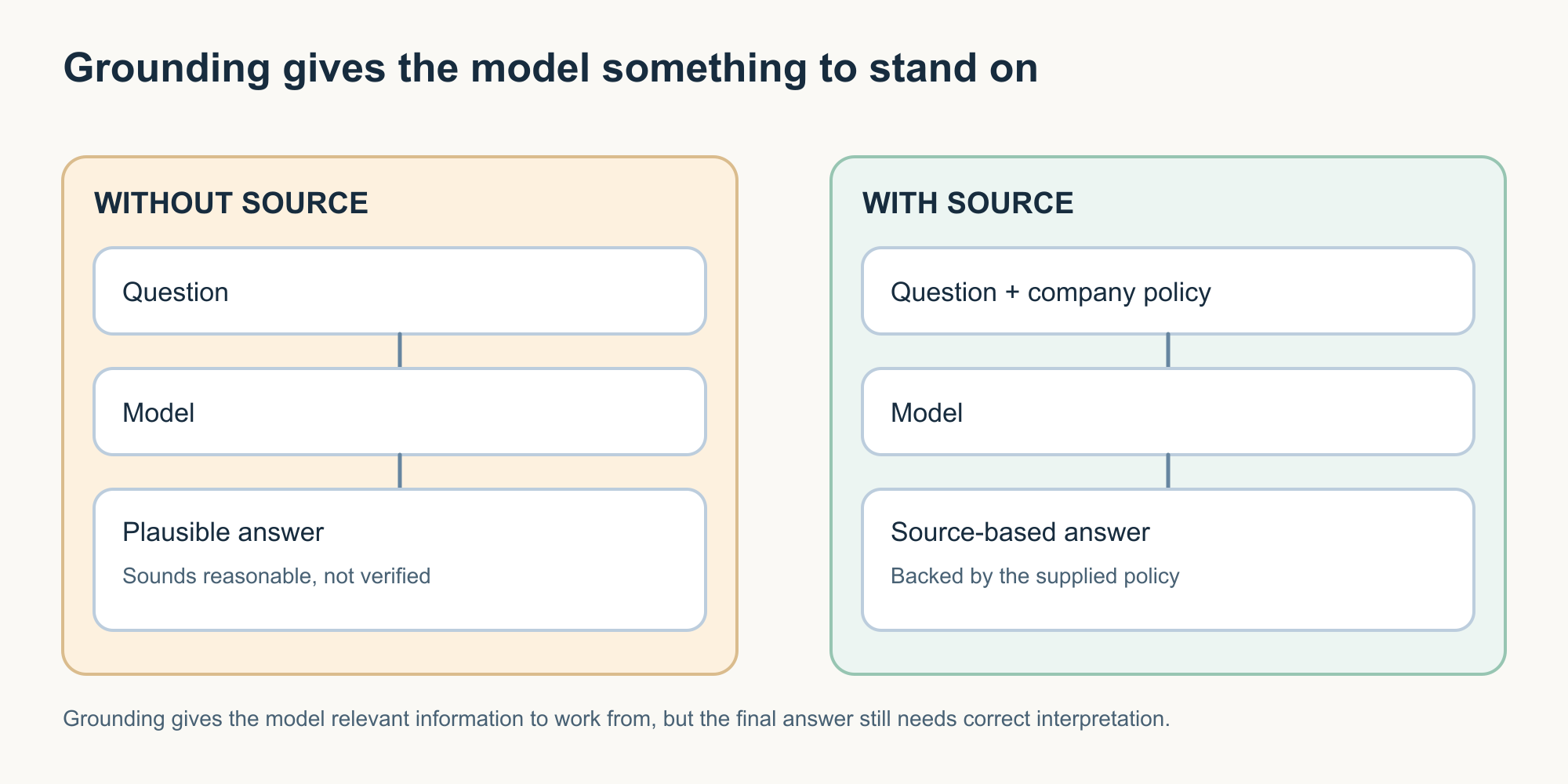
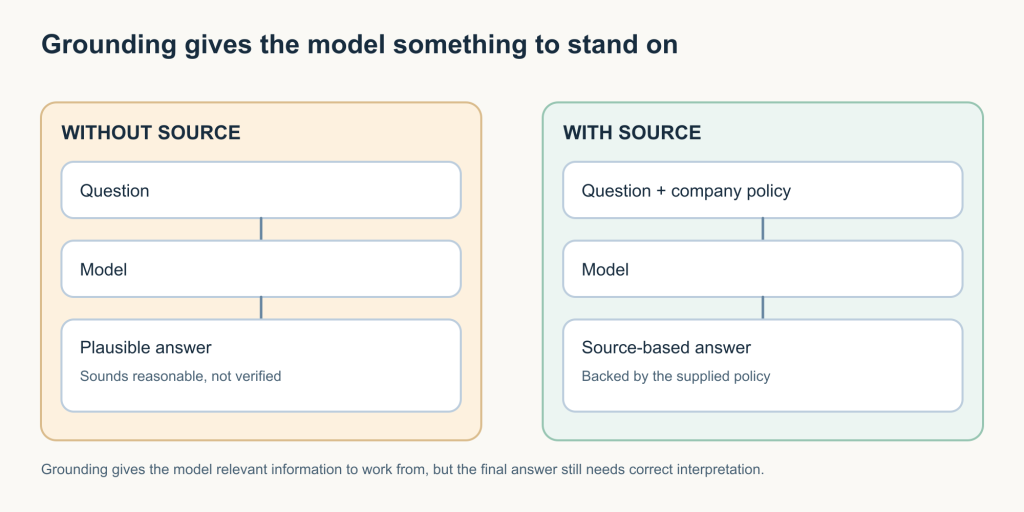
Without source:
Question → Model → Plausible answer
With source:
Question + company policy → Model → Source-based answer
Key idea: The source gives the model evidence to work from. The model still needs to interpret it correctly.
Retrieval and RAG: find the useful information before answering
Uploading one short policy is easy.
Now imagine an organisation has thousands of documents:
- policies;
- employee handbooks;
- technical manuals;
- procedures;
- wiki pages;
- support articles.
Sending all of them to the model every time someone asks a question would be inefficient and may exceed what the model can use effectively in one interaction.
Instead, the application can first find the information that appears relevant to the question.
That is retrieval.
For our question:
“How many vacation days can I carry into next year?”
the system might retrieve:
- Annual Leave Policy;
- Leave Carryover Rules;
- Regional Employment Exceptions.
The important point is that retrieval finds information.
It does not itself create the final explanation.
RAG: retrieve first, then generate
When retrieval is combined with a generative model, you will often hear the term Retrieval-Augmented Generation, or RAG.
The name sounds more complicated than the basic idea.
Think of it as:
Find → Give → Answer
First, find information relevant to the question.
Then give that information to the model.
Then ask the model to generate an answer using it.
For example:
Question
“How many days can I carry over?”
Retrieve
Find the relevant policy paragraphs.
Give
Provide those passages to the language model.
Answer
“Employees may carry up to 5 unused days into the following year.”
That is the core idea behind RAG.
What about vector databases and embeddings?
When people discuss RAG, you may also hear terms such as:
- embeddings;
- vector databases;
- semantic search;
- indexes;
- hybrid search.
These can help an application find relevant information, but they are implementation details rather than the definition of RAG itself.
Different systems can use different retrieval approaches.
For this article, the important idea is simply:
The application finds useful information before asking the model to answer.
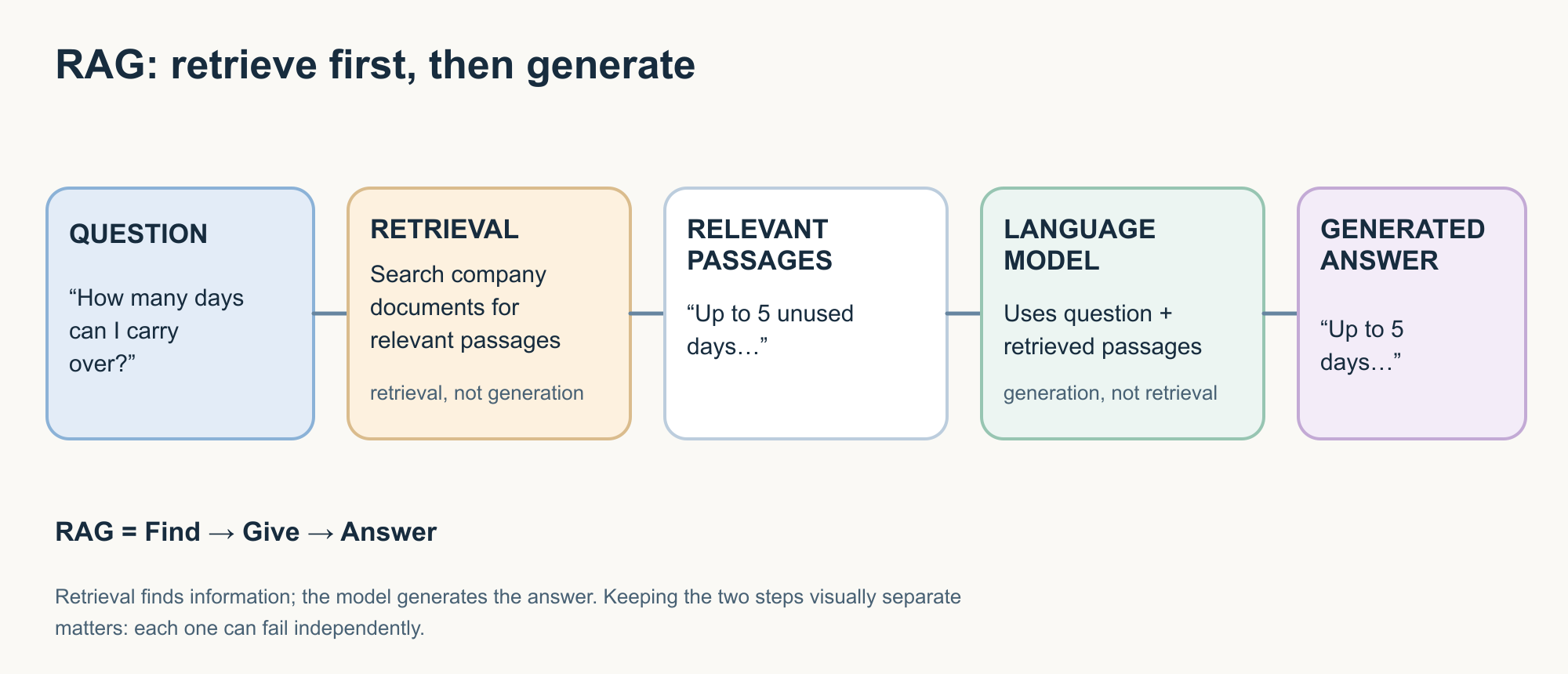
Question Retrieval Relevant passages Language model Answer
Make retrieval and generation visually separate.
RAG can still fail
Suppose the current policy says:
“Employees may carry up to 5 unused days into the following year.”
But the retrieval system finds an older policy that says:
“Employees may carry up to 10 unused days.”
The language model may accurately answer from the wrong document.
That shows us two different places where a RAG system can fail.
Retrieval failure
The application finds information that is:
- outdated;
- incomplete;
- irrelevant;
- or simply wrong for the question.
Generation failure
The correct information is retrieved, but the model misunderstands or misstates it.
These are different problems.
A useful rule is:
Good generation cannot repair every bad retrieval.
And:
Good retrieval does not guarantee a good answer.
This is why evaluating an AI system often means looking at more than the final sentence it produces.
A citation helps, but you still need to check it
Imagine the AI says:
“You can carry over 10 days. See Annual Leave Policy, page 6.”
You open page 6.
It actually says:
“Up to 5 unused days may be carried over.”
The response contains a citation.
It is still wrong.
This leads to an important habit:
Do not check only whether a citation exists. Check whether the source supports the claim.
An AI system can:
- cite the wrong passage;
- misunderstand the right passage;
- attach a source to a statement the source does not support;
- or sometimes generate supporting details that do not exist.
A source makes verification easier.
It does not eliminate the need to verify.
Hallucinations: convincing language is not evidence
You will often hear the term hallucination in AI discussions.
It describes situations where generative AI produces information that appears plausible but is unsupported or false.
NIST uses the term confabulation in its generative AI risk guidance for confidently presented erroneous or false content, including fabricated supporting material.
Return to our policy example.
The document says:
5 days.
The AI says:
10 days.
Or it says:
“Employees may carry five days, except employees with more than ten years of service may carry ten.”
That exception sounds believable.
But suppose the policy contains no such exception.
The problem is not that the sentence looks strange.
The problem is that it looks normal.
Remember it
Hallucination = plausible generated information that is not properly supported by the facts available for the task.
Grounding and RAG can reduce some kinds of unsupported output because they provide better source information.
They do not make hallucinations impossible.
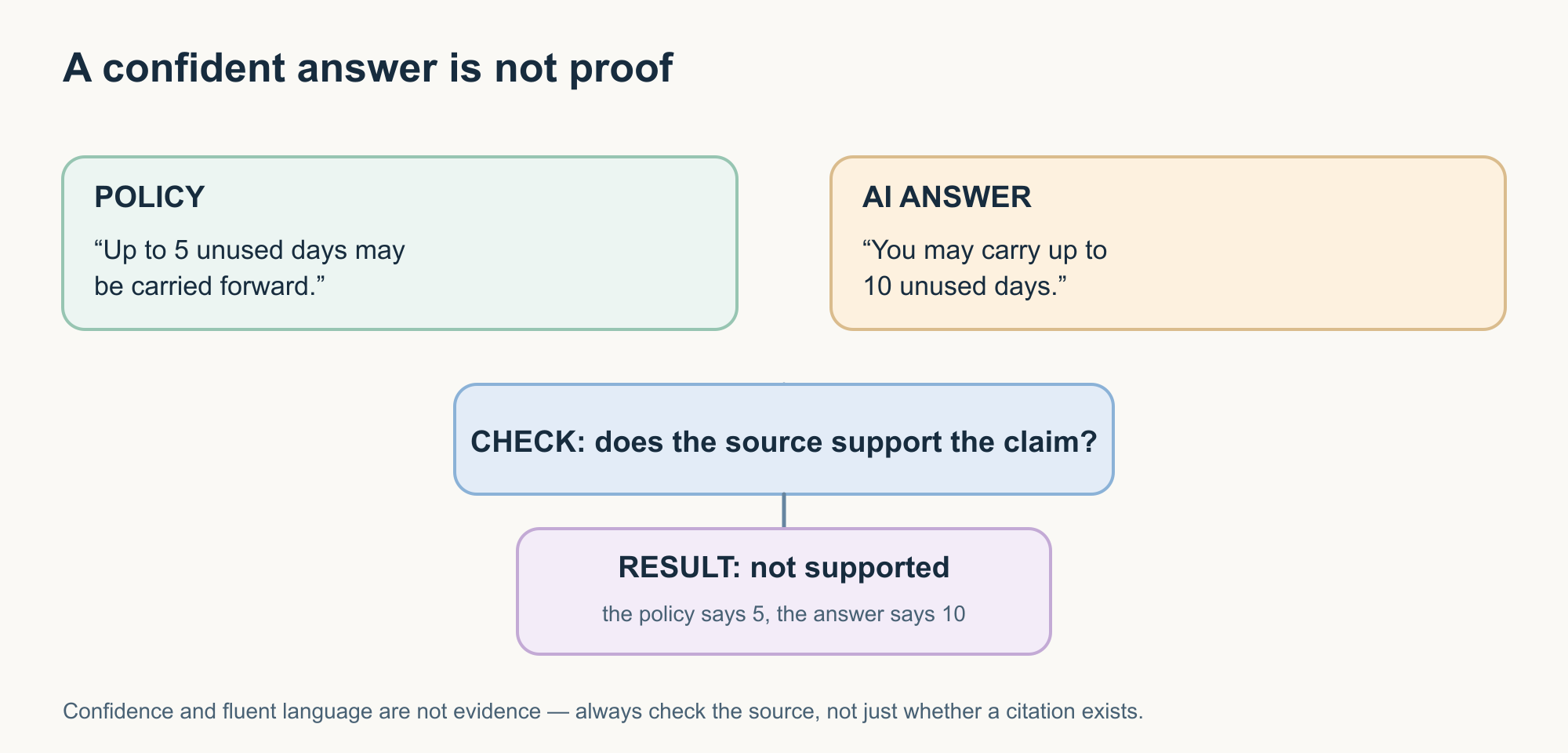
Policy:
“Up to 5 unused days may be carried forward.”
AI answer:
“You may carry up to 10 days.”
Check the source.
Not supported
Key idea: Fluent language and confident wording are not evidence.
Try it yourself: verify the answer, not the confidence
Choose a short, non-sensitive document that you understand reasonably well.
It could be:
- public product documentation;
- a software manual;
- meeting notes without confidential information;
- a public policy document.
Upload it to an AI assistant that supports documents.
First ask:
“Summarise this document.”
Then ask:
“Give me the three most important factual conclusions from this document. For each one, identify the section or passage that supports it. Do not add information that is not present in the document.”
Now check the document yourself.
Ask:
- Did the AI find the right information?
- Did it miss an exception?
- Did it combine two unrelated points?
- Does every source actually support the statement beside it?
One thing not to do is simply ask:
“Is your answer correct?”
That asks the same system to judge its own output.
Verification means going back to the evidence.
Search and generation are different jobs
Suppose you ask:
“What changed in today’s interest-rate announcement?”
A language model cannot reliably answer a question about a new event unless the application can provide information about that event.
An AI application may solve this by using web search or another current information source.
The process might look like:
Question Search Current sources Model Generated explanation
The search obtains the information.
The model interprets or explains it.
Remember it
Search finds.
Generation explains or creates.
Modern AI applications may combine the two so smoothly that you do not notice the boundary.
But the distinction still matters when you are deciding how current or verifiable an answer is.
What does it mean when AI “remembers”?
Another term that needs care is memory.
People often say:
“The AI remembers me.”
But that can describe several different mechanisms.
An application might:
- include recent conversation messages in the current context;
- save selected information outside the model;
- retrieve stored information in a later conversation;
- maintain project or task state;
- store preferences;
- summarise earlier interactions and provide the summary later.
These are application behaviours.
They do not automatically mean the underlying model permanently learned something new from your conversation.
A useful distinction is:
Context Information available to the model for the current interaction.
Memory Information the application may preserve and reuse later.
Training Changes to what the model itself has learned.
Those are different things.
Whenever a product says it has “memory,” useful questions include:
- What is being stored?
- Where is it stored?
- How long is it retained?
- Can I review or control it?
- Is it simply supplied back to the model later?
- Is any of it used to improve or train models?
The word memory alone does not answer those questions.
AI can work with more than text
Our example has focused on text and documents.
But modern AI systems may also work with:
- images;
- audio;
- video;
- diagrams;
- combinations of different input types.
This is commonly described as multimodal AI.
For example, you might photograph an equipment panel and ask:
“What warning indicators are visible?”
Or upload a chart and ask:
“Explain what changed between these two years.”
Or speak to an AI assistant rather than typing.
Remember it
Multimodal = working with more than one type of information.
That does not mean every AI product supports every modality.
Capabilities vary by model and application.
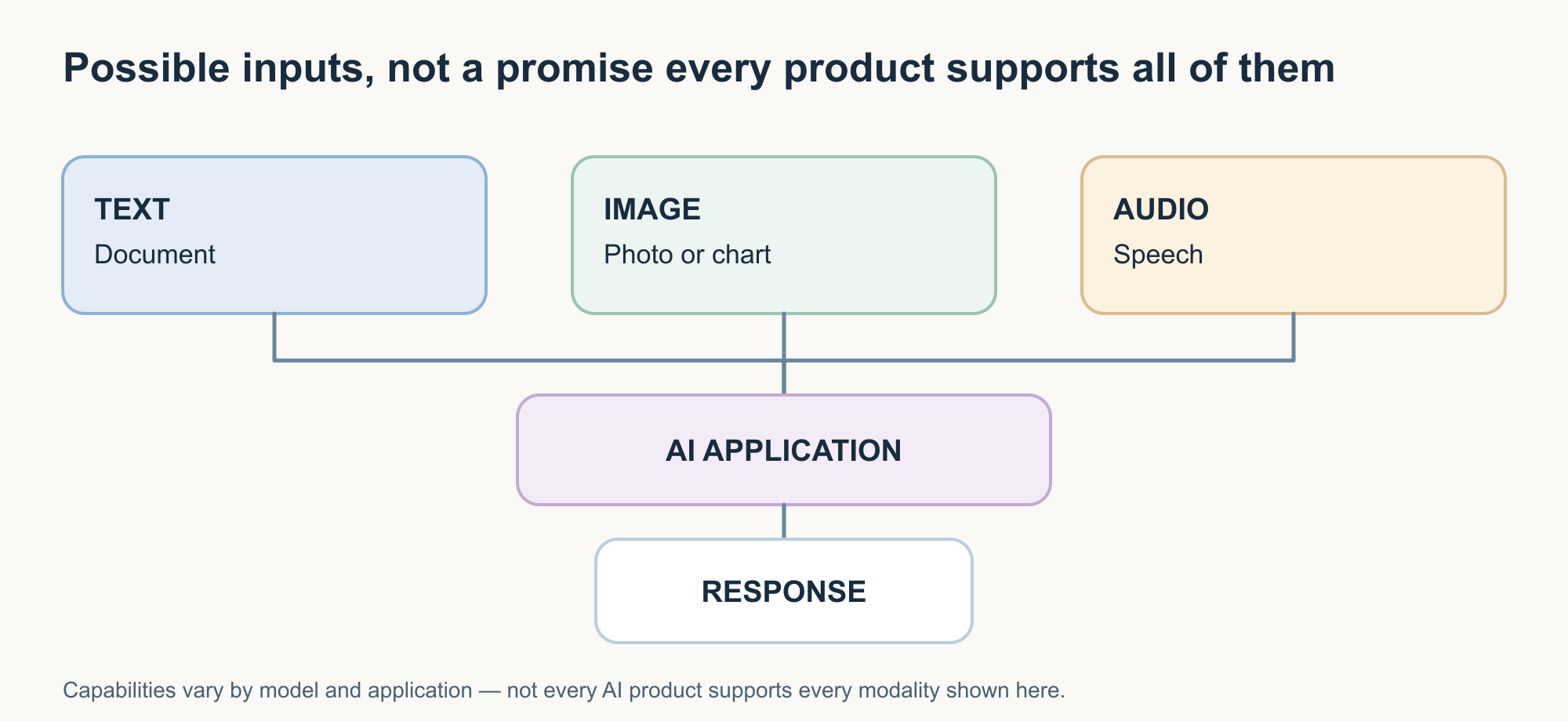
Text Image Audio
AI application
Response
The visual should represent possible input types, not imply universal support.
From answering questions to taking action
Now change the request.
Instead of asking:
“How many vacation days can I carry over?”
you ask:
“Email HR and ask them to confirm my remaining leave balance.”
Writing the email is one task.
Actually sending it is another.
A language model can generate:
“Hi HR, could you please confirm my remaining annual leave balance…”
But sending that message requires access to an email system.
That is where tools become important.
Tool use
A tool allows an AI application to interact with a capability outside the model.
Examples include:
- web search;
- calculators;
- databases;
- email;
- calendars;
- file systems;
- code execution;
- business APIs.
A typical interaction might be:
Request Model determines a tool is needed Application executes the tool Tool returns a result Model continues the task
The model has not become an email server or a database.
The surrounding application provides controlled access to those systems.
Answering and acting are different
Compare these requests:
“Write an email asking HR about my leave balance.”
The AI generates text.
“Send this approved email to HR.”
The application needs an email tool and permission to use it.
Now consider:
“Check my remaining leave, look at my calendar, identify suitable dates for a December vacation, and prepare a leave request.”
That may require several connected steps.
The system might need to:
- obtain the leave balance;
- inspect a calendar;
- compare dates;
- decide which information matters;
- prepare a request;
- stop for human approval before an external action.
This brings us to another widely used term: AI agent.
AI agents: working towards a goal
There is no single everyday definition that perfectly covers every product described as an AI agent.
A practical foundation is:
An AI agent is a system that can work towards a goal by deciding what steps to take and using available information or tools to carry out those steps.
Instead of producing one answer, an agent may:
- understand a goal;
- determine what information it needs;
- use a tool;
- inspect the result;
- choose the next step;
- continue until it reaches a stopping point.
For example:
“Plan my business trip.”
An agent might check a calendar, search available travel options, compare them, identify a hotel, and prepare an itinerary.
Whether it is permitted to actually book anything depends on the system’s permissions and controls.
A simple way to separate the concepts is:
Assistant Often helps with a request.
Tool use Allows the application to interact with something outside the model.
Agent Can coordinate several steps and tools while working toward a goal.
The boundaries are not perfectly standardised, so we should be cautious when products use the term agent.
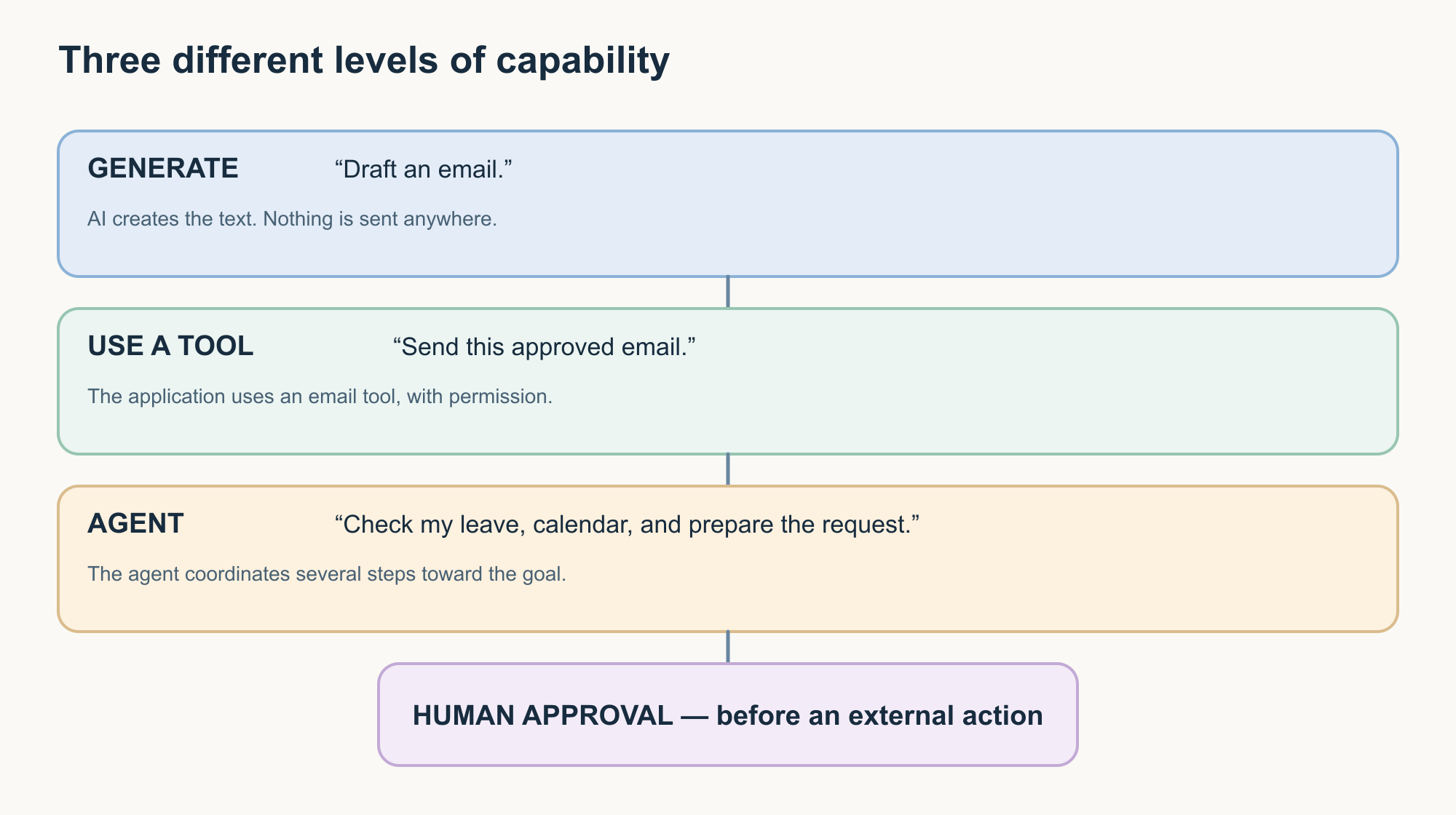
Generate
“Draft an email.”
Use a tool
“Send the approved email.”
Agent
“Check my leave, calendar, and prepare the request.”
Include a visible human-approval point before consequential external action.
Automation and agents are not the same thing
Multi-step software existed long before generative AI.
Traditional automation might perform:
Every Friday at 5 PM, export this report and email it to the finance team.
The process is predefined.
An agent becomes more relevant when some of the path depends on what the system finds while working.
For example:
Review this week’s support incidents, identify the important themes, gather supporting evidence, and prepare a management summary.
The exact steps may vary depending on the incidents.
A useful distinction is:
Automation follows a predefined process.
An agent can determine some of the process while working towards a goal.
Real systems can combine both.
An agent may use ordinary deterministic automation for many of its steps.
More capability means more questions
Giving AI access to more information and tools can make it much more useful.
It also creates new questions.
If an AI can read documents:
Which documents can it access?
If it can query a database:
Which records can it retrieve?
If it can send email:
Does it send automatically, or does a person approve first?
If it can change another system:
What prevents unintended actions?
If it stores memory:
What is saved, where, and for how long?
This is why understanding the technology is only one part of AI fluency.
We also need to know how to judge its claims, limitations, evidence, and controls.
That is where Part 3 takes us.
Put the journey together
Return to the original question:
“According to our company policy, how many vacation days can I carry into next year?”
There are several possible ways the system could respond.
Model only
Question → Model → Generated answer
Useful for many general questions.
Not enough to establish a private company policy unless that information is actually available to the system.
Supplied document
Question + policy → Model → Grounded answer
Relevant evidence is now available, but correct interpretation still matters.
RAG
Question → Retrieve relevant information → Supply it to the model → Generate the answer → Show supporting sources
Useful when there is too much information to provide directly.
Quality depends on both retrieval and generation.
Tool use
Request → Model identifies an external capability → Tool is invoked → Result returns → Model continues
Useful when the task requires current information or interaction with another system.
Agent
Goal → Decide next step → Use information or tools → Inspect result → Choose the next step → Continue within permissions and stopping rules
Useful when the work requires several connected decisions or actions.
You do not need to memorise these as five architectures.
Instead, ask:
What happened between my question and this answer or action?
That question will take you surprisingly far.
A simple way to remember Article 2
| Question | Concept |
|---|---|
| What information does the answer have behind it? | Grounding |
| How was relevant information found? | Retrieval |
| Was information retrieved and then supplied to the model? | RAG |
| Did the AI interact with something outside the model? | Tool use |
| Did the system coordinate several steps toward a goal? | Agent |
And one question should sit above all of them:
Can I verify what happened?
What we have learned
An AI answer may come from more than what a model learned during training.
An application can provide additional information during the task.
Grounding connects an answer to relevant source information.
Retrieval finds useful information.
RAG retrieves information, gives it to the model, and then generates a response.
A hallucination is plausible generated information that is unsupported or false.
Memory can mean information stored and supplied again later; it is not automatically the same thing as training.
Multimodal AI can work with different types of information.
Tools let AI applications interact with systems outside the model.
Agents can coordinate information, decisions, and tools while working toward a goal.
Together, these concepts explain the journey from:
asking AI a question
to:
giving AI access to information
to:
allowing AI to interact with other systems.
Understanding that journey makes AI easier to reason about.
It also leads to the most important question in this series:
How do we decide whether an AI system’s claims and results deserve our trust?
That is Part 3.
AI Fluency series
Part 1 — Learn the language The Language of AI: Essential Terms Everyone Should Understand
Part 1 explains AI, machine learning, generative AI, models, LLMs, training, inference, prompts, tokens, and context windows.
Part 2 — Understand the experience How AI Answers Your Questions: Understanding the Terms Behind the Experience
You are here.
Part 3 — Develop judgment Understanding AI Claims: The Terms That Help You Make Better Decisions
Part 3 will look at accuracy, reliability, evaluations, benchmarks, bias, guardrails, privacy, human oversight, reasoning claims, and autonomy.
References and further reading
- Google Cloud — Generative AI glossary
Terminology covering grounding, retrieval, RAG, hallucinations, and related generative AI concepts. - Google Cloud — Develop a generative AI application
Guidance on grounding, retrieval, model adaptation, and application architecture. - Microsoft Learn — Retrieval-Augmented Generation (RAG) and indexes
Explains retrieval, augmentation, generation, indexing, and different retrieval approaches. - Microsoft Learn — RAG evaluators
Covers retrieval quality, groundedness, relevance, and evaluation of RAG systems. - NIST — Artificial Intelligence Risk Management Framework: Generative Artificial Intelligence Profile
Covers confabulation and other risks associated with generative AI. - Google Agent Development Kit documentation
Covers agent workflows, tool use, external functions, and orchestration.
Technology and product behaviour continue to evolve. When capabilities such as memory, retrieval, tool use, or agents matter to your work, check how the specific product actually implements them rather than relying only on the label.