
Artificial intelligence is becoming part of everyday work.
People use AI to write, search, analyse documents, generate images, review code, summarise meetings, and answer questions.
At the same time, the language around AI is becoming harder to follow.
AI. Machine learning. Generative AI. LLM. Model. Training. Inference. Prompt. Token. Context window.
These words often appear together, but they do not mean the same thing.
You do not need to become an AI engineer to understand them.
You need enough of the language to know:
- what kind of technology you are using;
- what happens when you ask it something;
- why one AI system may behave differently from another;
- and which questions are worth asking when something is unclear.
This article builds that foundation.
Start with one important idea
Before learning individual terms, remember this:
AI is not one technology.
Artificial intelligence is a broad field containing different approaches, models, applications, and purposes.
That is why statements such as:
“This uses AI.”
do not tell us very much by themselves.
A spam filter may use AI.
A system predicting equipment failure may use AI.
A chatbot may use AI.
A tool generating an image may use AI.
They can all belong to the same broad field while working in very different ways.
1. Artificial intelligence — the bigger family
Artificial intelligence, or AI, is the broad term for computer systems designed to perform tasks associated with abilities such as recognising patterns, understanding language, making predictions, solving problems, or generating content.
Examples include:
- detecting suspicious financial transactions;
- recognising objects in photographs;
- recommending products;
- translating languages;
- predicting machine failures;
- generating text, code, images, audio, or video.
The easiest way to remember it
AI = the bigger family.
Do not automatically read “AI” as “chatbot.”
Chatbots are only one type of AI application.
See how the terms connect
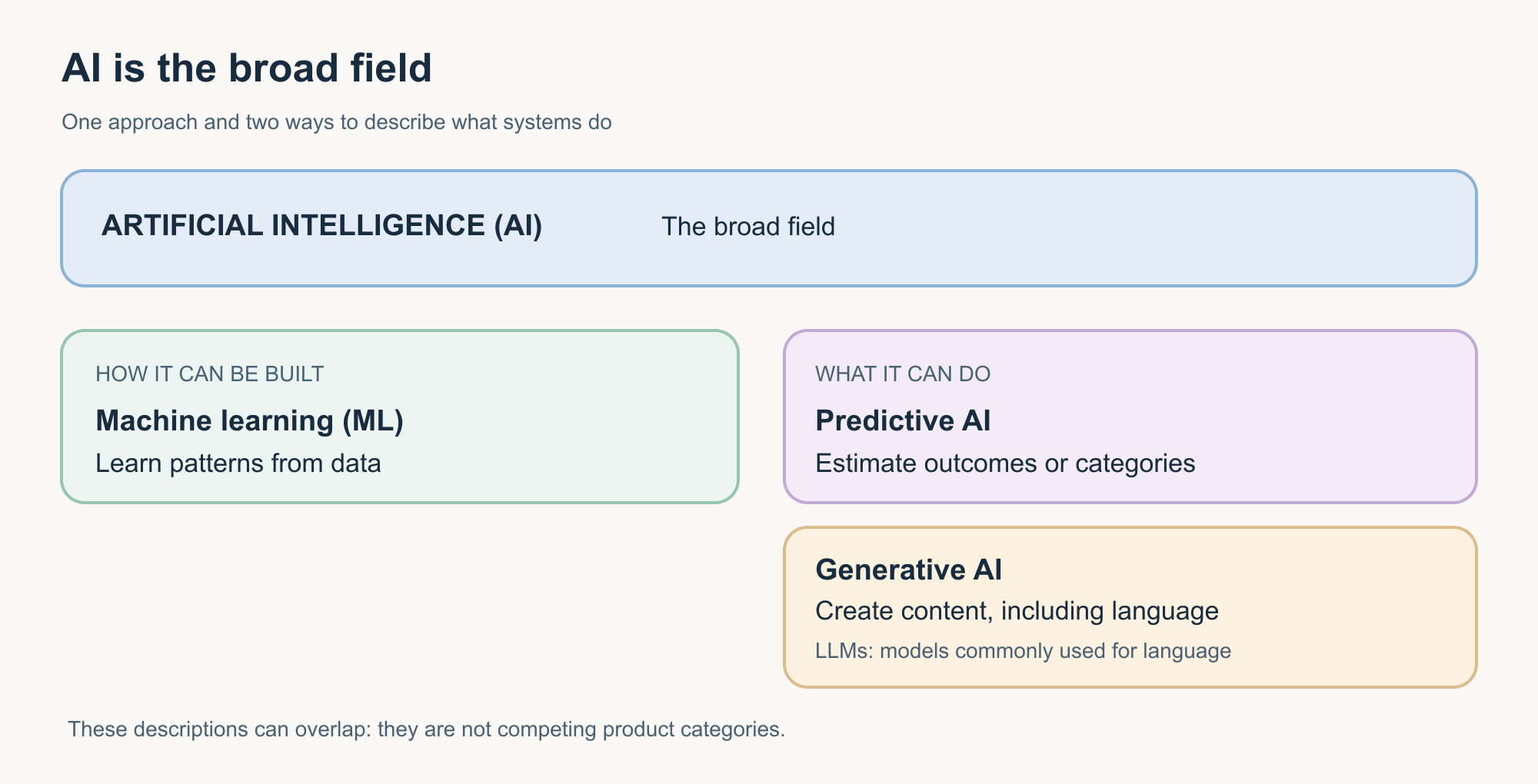
The relationships are not always simple branches. Some of these categories overlap.
That matters because AI terminology often describes different things: a field, a method, a model, a capability, or a type of application.
2. Machine learning — learning patterns from data
Machine learning, or ML, is one important way of building AI systems.
Instead of writing every rule manually, developers can train a model using data so that it learns useful patterns.
Consider spam detection.
A programmer could try to create thousands of rules:
- if the email contains this phrase, mark it as spam;
- if the sender looks like this, increase the spam score;
- if the message contains these links, treat it differently.
That quickly becomes difficult.
A machine-learning system can instead learn patterns from examples of spam and legitimate messages.
After training, it can use those learned patterns when it sees a new email.
Remember it
Machine learning = learning patterns from examples.
It does not mean the computer learns exactly like a human.
“Learning” here describes a technical process in which a model changes based on data and optimisation.
3. Predictive AI and generative AI solve different kinds of problems
Two terms frequently appear in current AI discussions:
predictive AI and generative AI.
They are easier to understand when compared.
Predictive AI
Predictive systems estimate something about existing or future data.
For example:
Is this transaction likely to be fraudulent?
Is this customer likely to cancel?
What demand might we expect next month?
Does this medical image contain a particular pattern?
The output might be a category, probability, score, forecast, or recommendation.
Generative AI
Generative AI, often shortened to GenAI, creates new output based on patterns learned during training and information available during use.
That output could be:
- text;
- code;
- images;
- audio;
- video;
- or combinations of these.
For example:
Draft a response to this customer complaint.
Explain this technical document in simple English.
Create an illustration of a solar-powered city.
Generate a SQL query for this database structure.
Remember the difference
Predictive AI asks: “What is likely?”
Generative AI asks: “What can I create?”
That is a simplification, but it is a useful starting point.
The categories can also overlap. Modern AI applications may combine prediction, generation, search, and other capabilities.
4. What is a model?
The word model appears everywhere in AI.
A model is the trained computational system that has learned patterns and can use those patterns when processing new input.
Think of it as the part that performs the learned task.
A fraud-detection application may contain a model that estimates fraud risk.
An image application may contain a model that recognises objects.
An AI assistant may use one or more language models to interpret and generate language.
The model is important, but it is usually not the whole product.
A model is not the same as an AI application
This distinction is easy to miss.
Suppose you use an AI assistant that can:
- answer questions;
- search the web;
- read uploaded files;
- remember selected information;
- generate images;
- run code;
- connect to other software.
The underlying model may provide much of the intelligence, but the complete application includes other components around it.
A model and an AI application are not the same thing
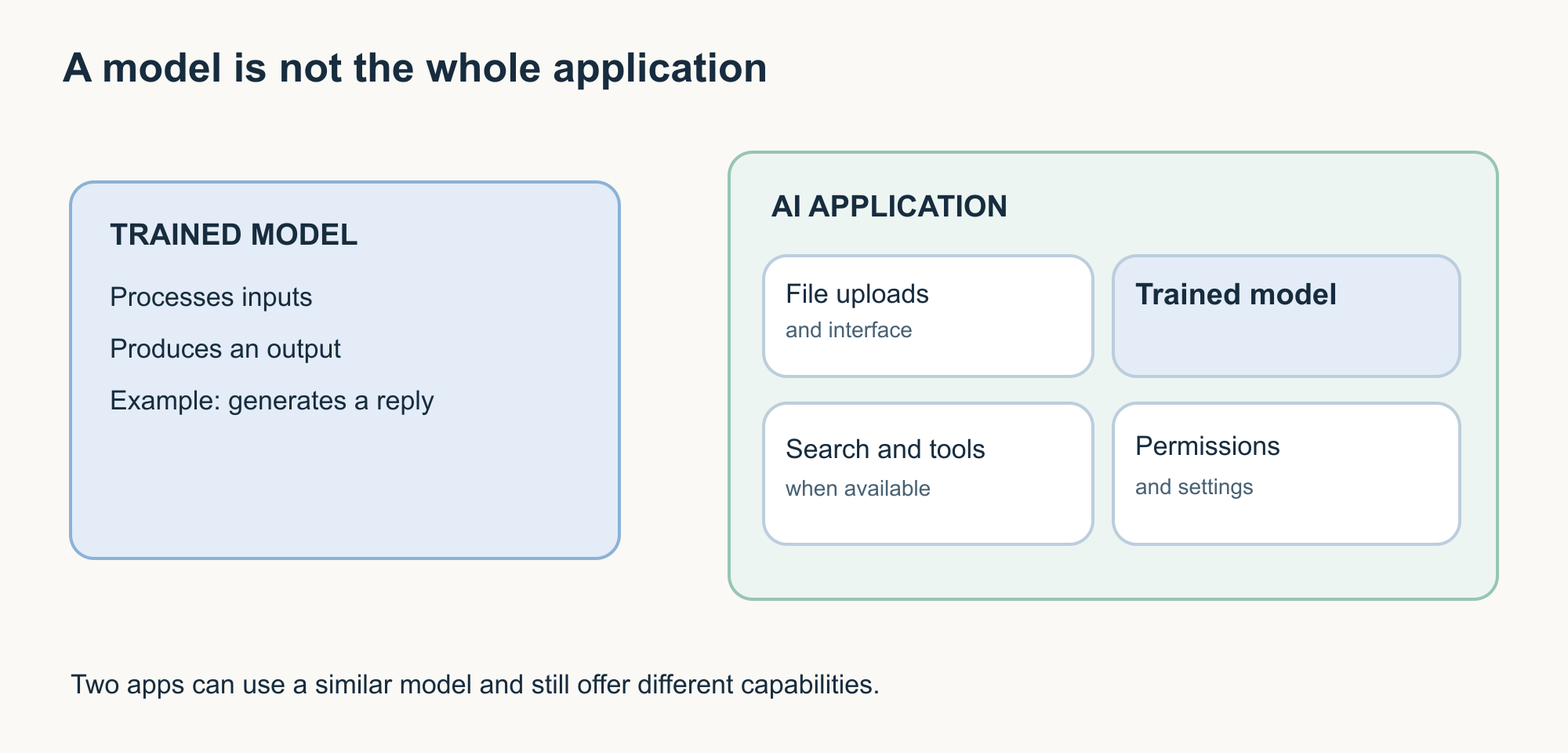
This distinction explains why two products using similar underlying models can still behave differently.
The surrounding application matters.
5. Large language models — models built to work with language
A large language model, usually shortened to LLM, is a type of model designed to work with language.
LLMs can support tasks such as:
- answering questions;
- summarising;
- rewriting;
- translating;
- extracting information;
- drafting;
- analysing text;
- generating code.
Many modern AI assistants use LLMs.
But:
LLM does not mean chatbot.
The LLM is the model.
The chatbot is an application built around a conversational interface.
The application may also provide files, tools, search, memory, safety systems, and other capabilities.
Remember it
LLM = language model.
Chatbot = an application that may use one.
6. Training — when the model learns
How does a model become useful?
Through training.
During training, the model processes data and adjusts internal numerical values so that it becomes better at the task it is being trained to perform.
For a language model, this involves learning statistical patterns across large amounts of data.
Training happens before you have your ordinary conversation with the model.
This leads to another important term.
7. Inference — when the trained model is used
When you ask a trained model a question and it produces an answer, the model is performing inference.
The distinction is simple:
Training
The model learns or is adjusted.
Inference
The trained model is used.
Inference: using the trained model
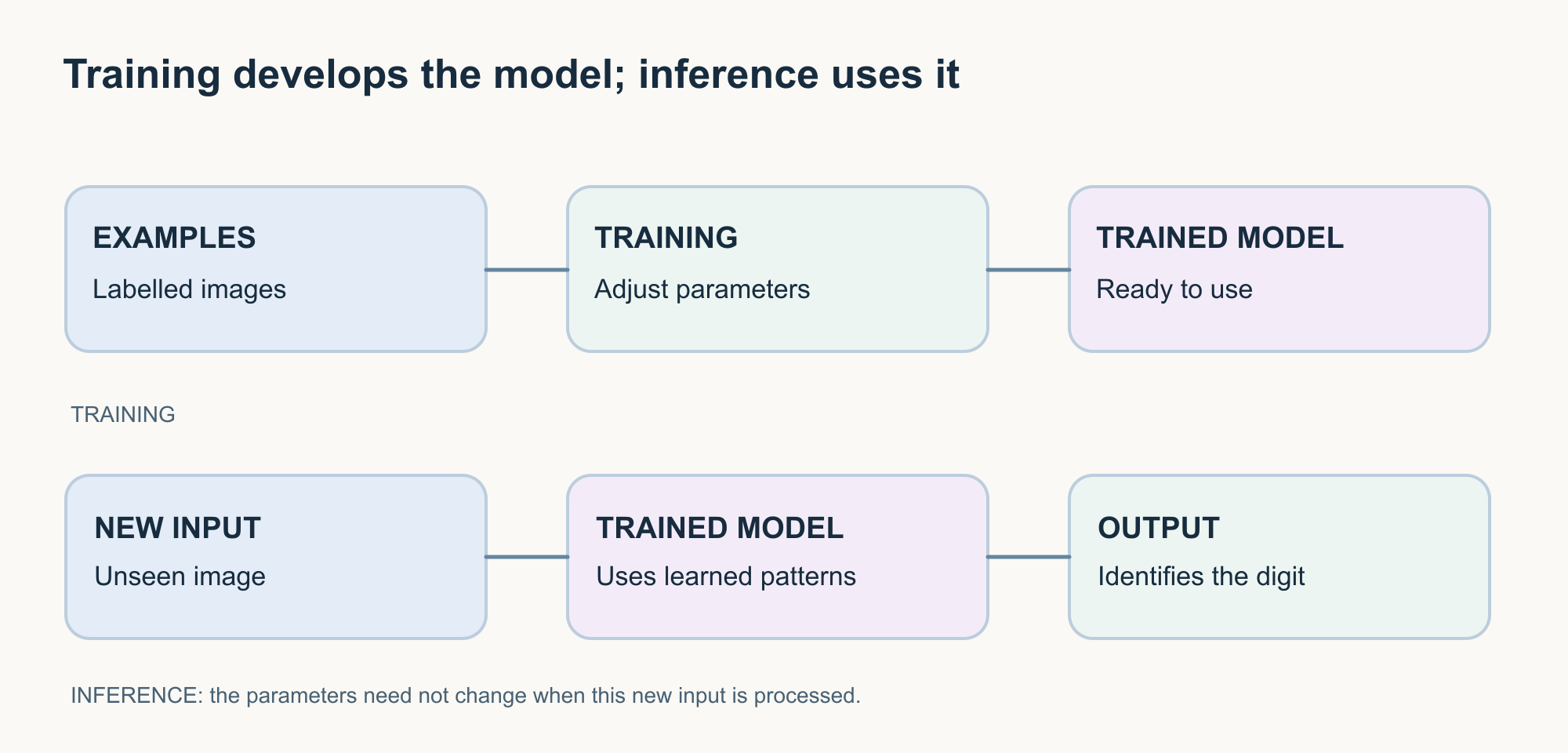
Remember it
Training = learning stage.
Inference = using stage.
This distinction is useful because people sometimes assume that every conversation they have with an AI assistant immediately teaches the underlying model.
That is not necessarily true.
Whether information from interactions is stored, remembered, or later used for improving systems depends on the product, configuration, and provider policies.
8. Fine-tuning — additional training for a purpose
You may also hear the term fine-tuning.
Fine-tuning is additional training applied to an existing model so that its behaviour or performance becomes better suited to particular tasks or domains.
For example, an existing model might be fine-tuned to improve performance on specialised text or particular response behaviours.
Remember it
Training builds or teaches the model.
Fine-tuning further adapts an existing model.
And one important distinction:
Uploading a document and asking questions about it is not the same as fine-tuning the model.
We will explore that difference in Article 2.
Now move from building AI to using AI
So far we have looked at the technology itself.
Now imagine you open an AI assistant and type:
Explain cloud computing.
What happens next introduces another set of important terms.
9. Prompt — what you give the AI
A prompt is the input or instruction you provide to an AI system.
For example:
Explain cloud computing.
That is a prompt.
So is:
Explain cloud computing to a first-year college student. Use one everyday example and keep the answer under 150 words.
The second prompt contains more useful direction.
It identifies:
- the task;
- the audience;
- the desired example;
- the expected length.
A prompt in practice
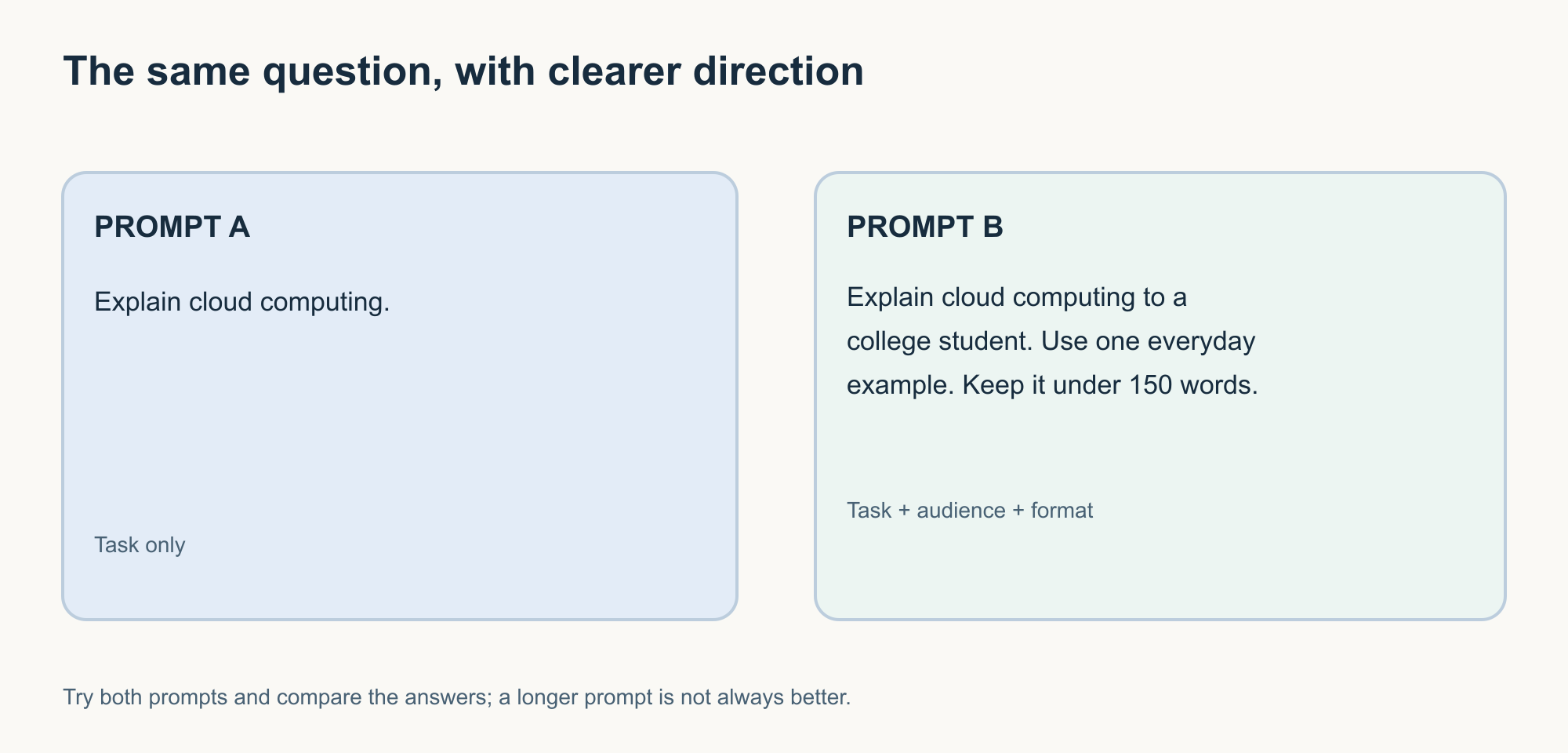
The second prompt is not better because it is longer.
It is better because it reduces ambiguity.
Remember it
Prompt = what you give the AI to work with.
That may include more than a question.
A prompt can contain:
- instructions;
- examples;
- background information;
- text to analyse;
- desired output format;
- constraints.
You do not need complicated prompt formulas for most everyday tasks.
Clear purpose and useful context matter more.
Try it yourself
Open an AI assistant and ask:
Explain machine learning.
Read the result.
Then try:
Explain machine learning to someone who has never studied AI. Use the example of identifying spam email. Avoid technical jargon and keep the explanation under 120 words.
Compare the responses.
Ask yourself:
- Which answer was easier to understand?
- What changed?
- Which part of your instruction caused the difference?
This is more useful than memorising a definition of “prompt engineering.”
You are observing the effect directly.
10. Tokens — the pieces a language model processes
Language models do not necessarily process written language one whole word at a time.
Text is converted into smaller units called tokens.
A token may represent:
- a whole word;
- part of a word;
- punctuation;
- or another piece of text.
The exact tokenisation depends on the model and tokenizer.
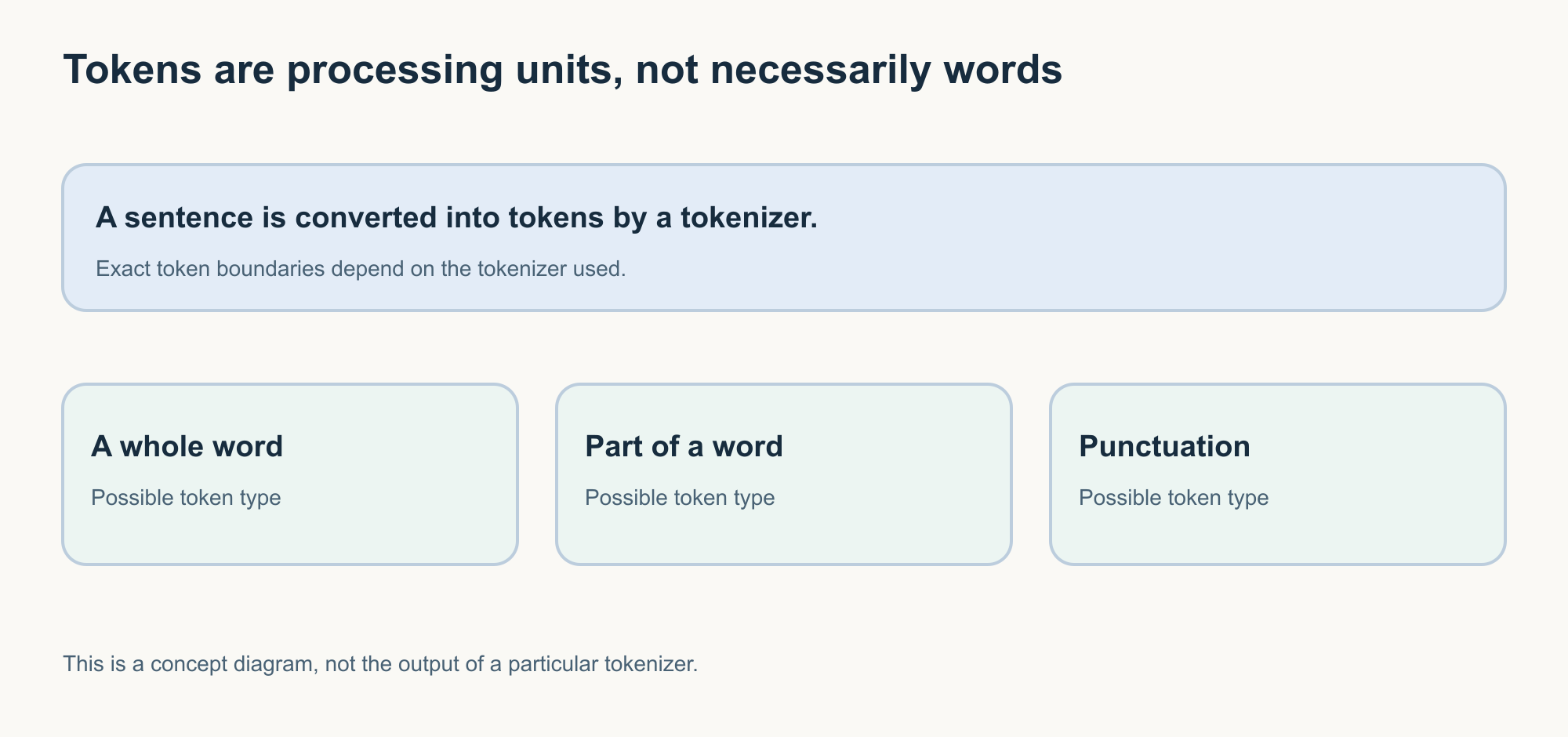
Conceptual example:
AI can help people understand technology.
The diagram is deliberately conceptual because different tokenizers may divide the same sentence differently.
Why tokens matter
Token counts can affect:
- how much information a model can process;
- API usage;
- cost in some services;
- response limits;
- context-window usage.
Remember it
Tokens = the pieces of information a language model processes.
Do not use:
one token = one word
as a rule.
It is not reliably true.
11. Context — the information available for the current task
Suppose you ask:
What are the main risks?
That question is difficult to answer without knowing what you are discussing.
If the previous conversation was about cybersecurity, the meaning is different from a conversation about investment or healthcare.
AI systems also need relevant context.
Context can include things such as:
- your current instruction;
- previous parts of the conversation;
- uploaded content;
- application-provided instructions;
- retrieved information;
- tool results.
Exactly what is included depends on how the application is built.
Remember it
Prompt = what you ask or provide.
Context = the information available around the task.
12. Context window — how much can be considered at once
A model cannot necessarily process unlimited information in one interaction.
The context window describes how much tokenised information the model can work with within a particular processing context.
That can include:
- instructions;
- conversation history;
- documents;
- retrieved passages;
- your current question;
- and other information supplied by the application.
A context window limits available information; extra material may need another handling method.
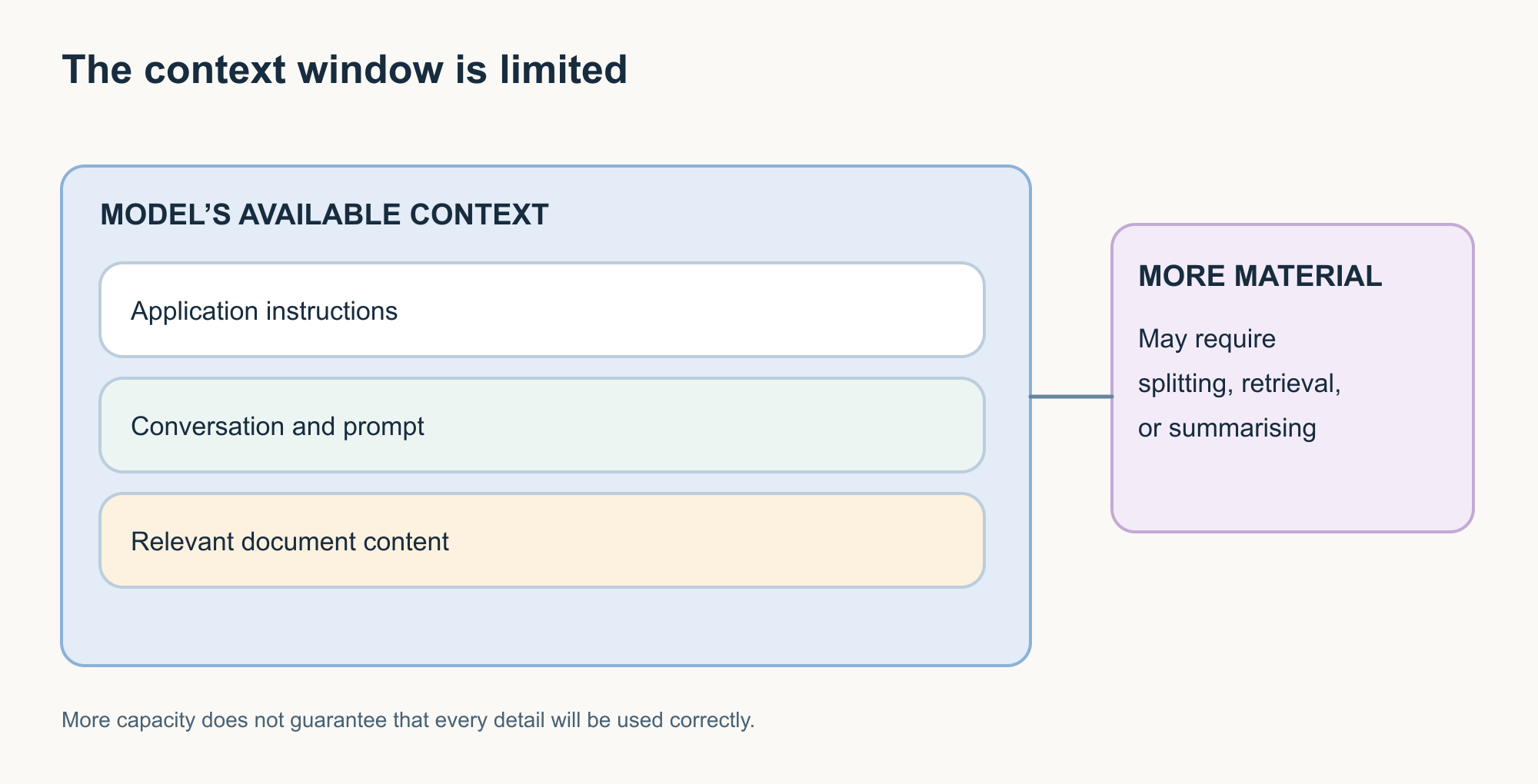
If the available material exceeds the supported context, the application may need to:
- omit older information;
- summarise;
- split documents;
- retrieve selected passages;
- or use another strategy.
Different applications handle this differently.
A larger context window does not mean perfect memory
This distinction matters.
Even if information technically fits inside the context window, the model may not use every detail equally well.
Context capacity and reliable understanding are not the same thing.
Remember it
Context window = the model’s available working space for that interaction.
It is not the same as permanent memory.
Put the terms together
We have covered several words.
Individually they are useful.
Together they make much more sense.
Imagine asking an AI assistant:
Explain machine learning to a beginner using the spam-email example.
What is happening?
One question connects the application, prompt, context, trained model, and inference.
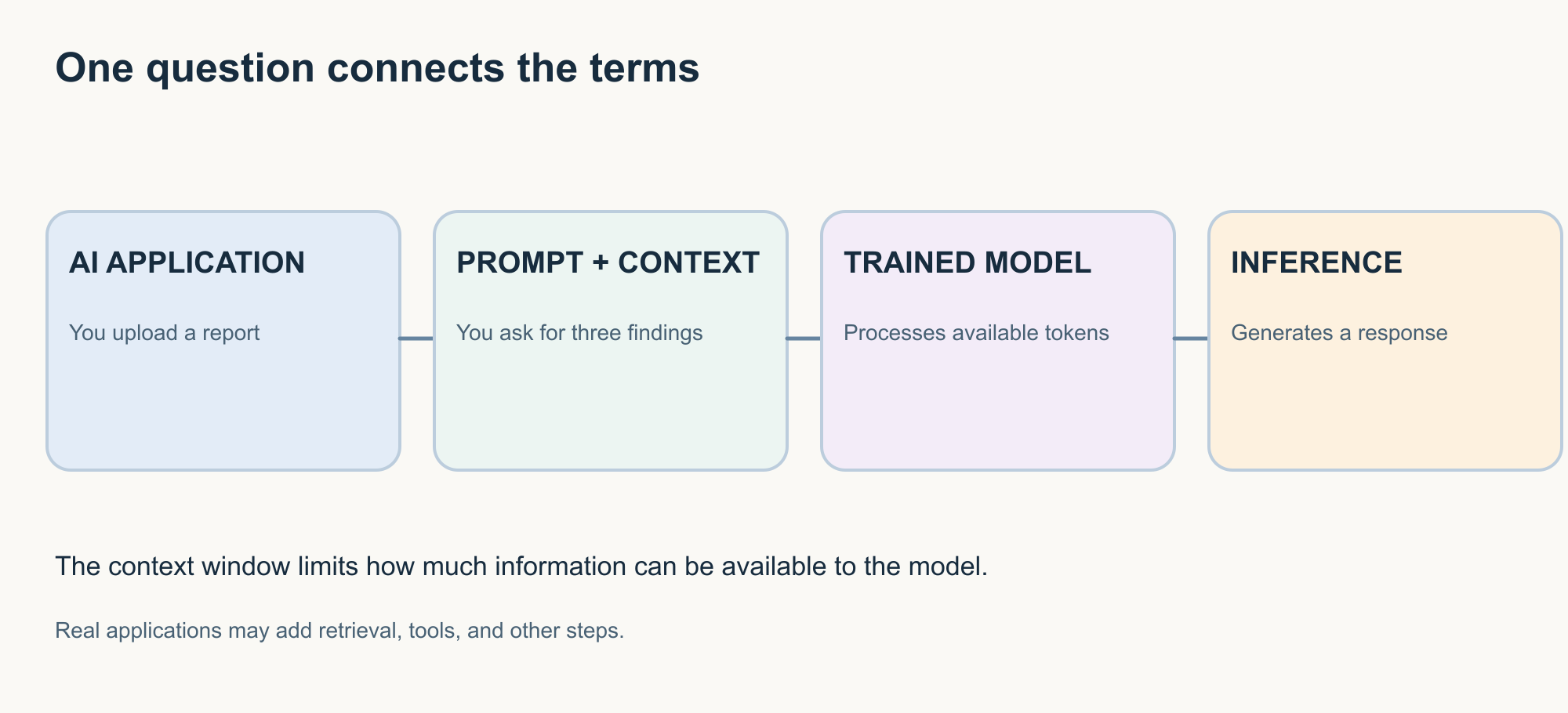
AI — the broad field.
Machine learning — one approach used to build AI systems.
Model — the trained system performing the learned task.
LLM — if the task involves a language model, this is the model working with your text.
Prompt — your instruction.
Tokens — the pieces of text processed by the model.
Context window — the available working information.
Inference — the trained model processes the input and produces an output.
That gives us a basic map of an ordinary AI interaction.
This is simplified.
A real AI application may also involve:
- system instructions;
- safety controls;
- search;
- memory;
- document retrieval;
- external tools;
- other models.
Those additional pieces become important in Article 2.
One small vocabulary test
Try answering these without looking back.
Question 1
What is the broadest term?
AI, machine learning, or LLM?
Answer: AI.
Question 2
What is the difference between training and inference?
Training: the model learns or is adjusted.
Inference: the trained model is used to process new input.
Question 3
Is a chatbot the same thing as an LLM?
No.
An LLM is a model. A chatbot is an application that may use an LLM along with other components.
Question 4
Does one token always equal one word?
No.
A token may be a word, part of a word, punctuation, or another text unit depending on the tokenizer.
Question 5
What is a context window?
The amount of tokenised information that can be available to the model within a processing context.
A simple way to remember the language
You do not need to memorise every definition separately.
Group the terms by the question they answer.
| Question | Terms |
|---|---|
| What kind of technology is this? | AI, machine learning, predictive AI, generative AI, LLM |
| What performs the task? | Model |
| How did it learn? | Training, fine-tuning |
| What happens when I use it? | Inference |
| What do I give it? | Prompt, context |
| What does it process? | Tokens |
| How much can it work with at once? | Context window |
When you encounter a new AI term, first ask:
What question is this term trying to answer?
That is often easier than memorising a dictionary definition.
What we have not covered yet
Knowing the language above gives you the foundation.
But it does not yet explain everything that happens inside a modern AI application.
For example:
Where does the answer come from?
Can the AI search for current information?
What happens when you upload a document?
What is grounding?
What is RAG?
How is that different from model training?
What does AI memory actually mean?
What changes when AI can use tools?
And when does an assistant become an AI agent?
Those questions belong to the next part of this series.
What matters most
The purpose of learning AI terminology is not to sound technical.
It is to make the technology easier to reason about.
Once you understand the difference between an AI application and a model, you can ask better questions about a product.
Once you understand training and inference, you are less likely to assume that every interaction retrains the model.
Once you understand prompts and context, you can give AI clearer information.
Once you understand tokens and context windows, some of the limits of language models become easier to recognise.
You do not need to remember every definition immediately.
Use the terms.
Connect them to something you already do.
And return to them when you encounter them again.
That is how terminology becomes understanding rather than vocabulary.
AI Fluency series
Part 1 — Learn the language The Language of AI: Essential Terms Everyone Should Understand
You are here.
Part 2 — Understand the experience How AI Answers Your Questions: Understanding the Terms Behind the Experience
Part 2 looks at grounding, retrieval, RAG, hallucinations, memory, multimodal AI, tools, and agents.
Part 3 — Develop judgment Understanding AI Claims: The Terms That Help You Make Better Decisions
Part 3 will look at accuracy, reliability, evaluations, benchmarks, bias, guardrails, privacy, human oversight, reasoning claims, and autonomy.
References and further reading
Readers who want to go deeper can use these sources as a starting point:
- Google for Developers — Machine Learning Glossary
Covers machine learning terminology including models, training, inference, tokens, large language models, and related concepts. - Google for Developers — Generative AI Glossary
Provides terminology specific to generative AI and language-model systems. - NIST AI Resource Center — Glossary
Provides definitions and guidance around AI systems, trustworthy AI, risk, and evaluation. - IBM — What is Machine Learning?
A practical introduction to machine learning and its relationship with artificial intelligence. - IBM — Generative AI vs. predictive AI: What’s the difference?
Useful for understanding the difference between systems that estimate outcomes and systems that generate new content.
Technology and terminology continue to evolve. Product-specific behaviour should always be checked against the documentation for the system being used.