

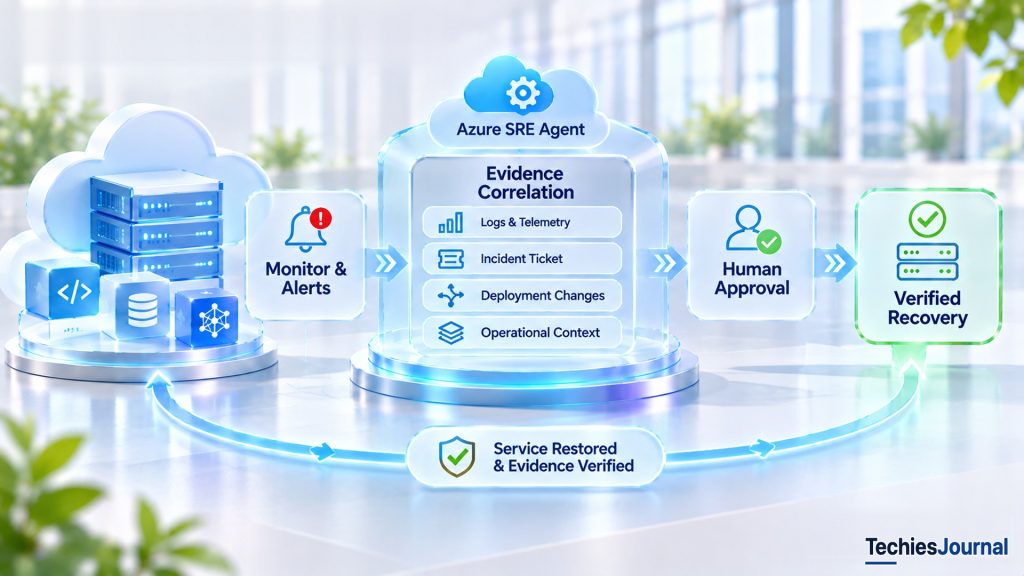
Azure Monitor can tell an operations team that an application is failing. Application Insights can reveal increased response times and exceptions. Deployment records can show what changed before the failure. None of these signals automatically establishes the cause of an incident.
An engineer still needs to connect the evidence, understand the affected systems and decide what action is justified.
Azure SRE Agent is Microsoft’s specialized AI service for this operational work. It connects to Azure resources, monitoring platforms, incident-management systems and repositories to support investigation, diagnosis and authorized remediation.
Unlike a general AI assistant, it is designed around site reliability engineering (SRE), the discipline of maintaining reliable applications and services through monitoring, incident response, automation and operational improvement.
This is Part 6 of TechiesJournal’s Microsoft AI ecosystem series. The previous parts established Microsoft’s AI platforms (Part 1), explored Foundry (Part 2), compared the platforms for enterprise requirements (Part 3), examined enterprise agent development (Part 4) and explained model selection (Part 5). We can now examine a product that applies those capabilities to an existing enterprise function: operating technology systems when something goes wrong.
1. What Azure SRE Agent Does
Azure SRE Agent helps operations teams investigate production issues using information from their actual environment. It can query supported Azure monitoring services, inspect connected operational context, identify possible causes and propose remediation. With appropriate configuration and permissions, it can also execute selected actions.
Its capabilities generally fall into three operating patterns.
| Operating pattern | What happens | Example |
|---|---|---|
| Interactive investigation | An engineer asks the agent to investigate an issue | Determine what changed before an application’s error rate increased |
| Incident response automation | An alert or incident initiates an investigation | Investigate a production alert using logs, metrics and deployment history |
| Scheduled operations | A defined schedule or supported trigger initiates a task | Run a recurring health check and report findings |
These are different ways to start operational work. They may use the same underlying diagnostic capabilities.
How this differs from a conventional monitoring alert
Azure Monitor and Application Insights collect and expose operational information. An alert may indicate that an error threshold was exceeded. It does not necessarily explain why the threshold was exceeded.
SRE Agent can use the available context to investigate that question. For example, it may examine when errors began, compare the timing with recent deployments and inspect relevant telemetry. The result is an evidence-based investigation with possible explanations and next steps.
An AI-generated root-cause hypothesis is not the same as a verified root cause. Two events occurring close together do not establish that one caused the other. The agent’s findings still need supporting evidence and appropriate validation. That distinction matters when the investigation could lead to a production-changing operation.
Microsoft documentation: Azure SRE Agent overview | Incident response
2. How SRE Agent Investigates an Incident
Consider the enterprise IT incident scenario used throughout this series. A customer-facing application begins returning HTTP 503 errors after a deployment. The operations team needs to identify the affected service, examine the timing of the failure and determine whether the deployment is related. SRE Agent can investigate using supported connections to the environment.
Step 1: Collect the signals
The investigation may begin with an Azure Monitor alert, an incident created in a connected incident-management platform or a direct request from an engineer. The agent can query Application Insights, Log Analytics or other configured observability tools to examine the application’s behavior.
A useful investigation first establishes the facts: When did the error rate increase? Which services or endpoints are affected? Did resource utilization change? Were similar errors present before the deployment?
These questions matter because the incident may have several plausible causes. A recent deployment is a candidate explanation, but so are downstream service failures, exhausted capacity and configuration changes.
Step 2: Correlate deployment and operational context
A monitoring chart shows what happened to application performance. Deployment records help establish what changed. SRE Agent supports connections to GitHub and Azure DevOps, allowing investigations to include relevant repository and deployment information where configured.
It can compare that information with telemetry from affected resources. Suppose response failures started at 10:15 and a deployment completed at 10:10. That timing supports investigating the deployment, but it does not establish that the deployment caused the outage. The agent may need additional evidence, such as an exception introduced by the new version or a configuration difference that explains the failure.
Each operational source contributes a different part of the investigation.
Text version of Figure 1
- Monitoring signals: alerts and metrics.
- Deployment history: changes and commits.
- Incident records: tickets and runbooks.
- Azure SRE Agent: evidence correlation.
- Control decision: policies and approval.
- Verified outcome: record and validate.
- A hypothesis is not a proven root cause.
Step 3: Produce findings and possible mitigations
After collecting evidence, the agent can summarize observed symptoms, propose likely causes and identify further checks. It may suggest a corrective action, such as restoring a previous configuration, restarting an affected workload or adjusting capacity.
Whether an action is appropriate depends on the environment. Restarting a component may temporarily restore availability without correcting the cause. Scaling may help capacity but not a broken database connection. The decision requires understanding both evidence and consequences.
Step 4: Record and share the investigation
SRE Agent can integrate with supported incident-management and collaboration services, including ServiceNow, PagerDuty and Microsoft Teams. Investigation findings can help prepare incident updates and share context with responders.
An accurate incident record distinguishes confirmed observations, proposed causes, actions taken and verified outcomes. The agent’s summary is operational context, not a substitute for an authoritative incident record.
Microsoft documentation: Incident response | Tools and integrations
3. Inside the Operations Architecture
The earlier parts examined how developers build agents using models, tools and workflows. Azure SRE Agent provides a specialized implementation with Azure-focused operational integrations.
Its architecture connects four responsibilities. Operational context comes from monitoring, incident platforms, repositories and supported enterprise connections. Agent reasoning uses that context to investigate symptoms and select diagnostic tools. Tool execution retrieves information or performs authorized operations. Operational governance controls which actions may be attempted and whether approval is required.
These responsibilities are connected, but they are not interchangeable.
Built-in tools and extensions
Microsoft documents ways to extend SRE Agent.
| Extension | Role |
|---|---|
| Skills | Reusable operational capabilities, including supported runbooks and command-based operations |
| Custom agents | Specialized agents focused on particular operational domains |
| Python tools | Developer-defined logic, transformations and integrations |
| MCP servers | Connections to supported external tools through Model Context Protocol |
| Agent hooks | Actions or checks triggered at defined points in an agent’s execution |
The agent also has supported built-in diagnostic capabilities. Teams may connect an external observability system through an available MCP integration, or use a Python tool to transform data from an internal API before analysis.
Connecting a tool makes a capability available. It does not automatically make every use safe or authorized.
Operational knowledge and previous investigations
SRE Agent can retain investigation context and use stored knowledge from earlier work. This may help engineers recognize recurring incidents, but retained knowledge can become outdated as the system changes.
An incident from six months earlier may resemble today’s failure but have a different cause. Previous findings are context, not verified facts about a new incident. Runbooks and configuration sources also require ownership and maintenance outside the agent where appropriate.
Microsoft documentation: SRE Agent overview | Agent reasoning
4. Reader, Privileged, Review and Autonomous: Who Controls the Action?
This is one of the most important technical distinctions in Azure SRE Agent. The agent’s access permissions determine which operations it can perform. Its run mode and applicable tool policies determine how those operations are handled. These are separate controls.
Reader versus privileged access
Reader-level access supports permitted read-only investigation. This is a useful starting point when teams want to evaluate diagnostics without granting production-changing permissions.
Privileged access permits additional operations subject to the agent identity’s roles and applicable policies. Restarting a workload, for example, needs permissions not required for reading metrics. Grant only the access needed for the intended work.
Review versus Autonomous execution
Microsoft documents Review and Autonomous run modes for supported operations and automation contexts. In Review mode, actions that require approval pause until an authorized reviewer makes a decision. In Autonomous mode, supported actions can proceed without a human approval pause when permissions and tool policies allow them. Microsoft also notes that Review mode presents approval requests for Azure infrastructure operations. Other actions, such as sending email or posting to Teams, follow the agent’s instructions unless hooks or tool access policies govern them.
| Dimension | What it controls |
|---|---|
| Azure roles and identity permissions | Which Azure resources and operations the agent may access |
| Run mode | Whether supported actions require review or may proceed automatically |
| Tool access policies | Which tools or actions are allowed, denied or subject to approval |
| Human authorization | Whether a requested operation receives the required approval |
Autonomous mode does not grant unlimited Azure permissions. Review mode does not replace identity access restrictions. Microsoft also describes on-behalf-of authorization for certain operations when direct permissions are insufficient, subject to supported configuration.
Text version of Figure 2
- Identity permission defines what the agent can access. Reader or privileged sets the scope of Azure operations.
- Run mode and tool policy define execution and approval. Review or autonomous sets the approval treatment.
- The two controls are independent.
- An action is allowed only if all checks pass: identity, policy and approval.
Reader access
The agent can inspect permitted resources and telemetry. With Reader access its own permissions do not allow changes, whatever the run mode. Microsoft documents on-behalf-of authorization for some operations when direct permissions are insufficient. Starting use: an evidence-first investigation pilot.
Privileged with Review
The identity may permit selected changes, while Review mode pauses Azure infrastructure operations for approval. Tool policies and hooks can restrict other actions. Starting use: evaluate controlled remediation and denied actions.
Privileged with Autonomous
Supported permitted actions may run without a human approval pause. Neither the mode nor the agent’s reasoning grants permissions or overrides a tool policy that denies an operation. Use only after tested safety, recovery and audit procedures.
Why the distinction matters
Suppose the agent proposes restarting a container. It may prepare the evidence and recommend the operation, but approval must remain a genuine execution boundary if required by policy. If autonomous execution is permitted, the organization must already have accepted that level of automation for the resource and action.
A restart can disrupt sessions, and an incorrect rollback may restore an incompatible configuration. The ability to execute an action is not proof that it is safe. Read-only investigation with controlled approvals provides a useful initial evaluation path.
Microsoft documentation: Manage permissions | Run modes | Tool policies
5. What’s New: Teams, Agent Identity and Connected Operations
Microsoft’s November 2026 announcements extend how Azure SRE Agent can participate in enterprise operations. Several capabilities remain in public preview, so they must not be presented as universally available production features.
Microsoft Teams integration
Microsoft announced public-preview Teams integration for Azure SRE Agent. Engineers can engage with supported agent capabilities in Teams conversations, including channels and group interactions, subject to configuration. Microsoft also describes approval cards for operations that require authorization.
Teams is the collaboration experience. The underlying identity and operational policies still govern the agent’s permitted actions. A message posted in a shared channel should not itself become authority to change infrastructure.
Microsoft Entra Agent ID and Agent 365
Public-preview support for Entra Agent ID and Agent 365 gives organizations additional ways to identify, discover and govern SRE agents. An agent identity can support attribution for eligible actions, while managed identity and role assignments remain important for resource access.
The wider tenant-level governance subject belongs to Part 7. Here, the operational distinction is that an agent’s actions need to be attributable and authorized.
Agent-to-agent collaboration
Microsoft introduced public-preview support for the Agent-to-Agent (A2A) protocol. Supported SRE agents can delegate work to other agents while retaining configured authorization boundaries.
An application operations agent investigating latency could request help from a database specialist agent. That specialist uses its own permitted tools and returns findings. It does not automatically inherit the calling agent’s permissions. Delegation adds coordination and ownership requirements.
Multicloud operations
Microsoft’s November 2026 updates describe native AWS and Google Cloud support in preview. Availability and supported operations require specific verification. A cloud integration does not establish identical capabilities or permissions across providers.
Sources: Teams preview | A2A preview | Agent identity preview | Multicloud preview
6. Reliability, Privacy and Cost in Production
Azure SRE Agent is useful when it improves operational outcomes without creating unacceptable risk or cost. That requires more than convincing incident summaries.
Measure investigation usefulness
Evaluate whether the agent finds relevant evidence, distinguishes proposed causes from facts, recognizes gaps, chooses suitable tools and produces useful incident records. Operational outcomes may include investigation time, time to mitigation, repeated incidents and engineer effort.
A shorter incident duration should not be attributed to the agent without adequate evidence. Severity, staffing and system changes also influence those measurements. Representative incidents and controlled comparisons offer stronger evidence than a successful demonstration.
Text version of Figure 3
- Evidence quality: are findings supported by logs and records?
- Action safety: are approvals and restrictions respected?
- Incident outcome: was mitigation verified in the actual system?
- Operating cost: what was spent over availability and active work?
- Compare outcomes with baseline operations and account for incident differences.
Operational privacy is not just chat privacy
SRE Agent can process logs, incident records, telemetry, repository context and tool responses. These may contain sensitive configuration or personal information. Microsoft documents stored conversations, retained knowledge, connector settings and model-provider considerations.
Supported Anthropic provider configurations, for example, include notices about global data processing. The organization must verify hosting region, provider, processing arrangements and retention requirements. Deleting a conversation does not necessarily remove every associated memory or connector record. Separate deletion and retention behavior must be understood.
Region support has more than one dimension
An SRE agent runs in a chosen Azure region, while its permissions may allow investigation of resources elsewhere. Agent hosting location and investigated-resource location are different considerations. Microsoft’s supported-region list includes Canada Central and Central India, subject to current subscription availability. The selected agent region cannot simply be changed after creation.
Cost includes availability and active work
Azure SRE Agent uses Azure Agent Units (AAUs). Microsoft documents ongoing charges associated with agent availability and active-flow consumption for work performed. Multi-step investigation may require several model interactions and tool calls, increasing usage. The pricing page describes the agent’s own usage, so check separately what the monitoring tools, integrations and other infrastructure it uses cost.
For an occasionally used agent, ongoing availability charges may matter. For frequent automated investigations, active usage may dominate. Evaluate the operational capability over time against genuine improvements in engineering effort and outcomes.
Microsoft documentation: Pricing and billing | Data privacy | Supported regions
7. When Should an Organization Adopt Azure SRE Agent?
Azure SRE Agent is relevant where operations teams spend substantial time collecting evidence across systems, investigating recurring incidents or performing repeatable tasks. It is not necessary for every Azure deployment.
A small application with effective monitoring and simple failure patterns may not benefit enough to justify another service. A larger environment with distributed ownership and frequent incidents may offer more opportunities.
A practical evaluation sequence
Start with one workload. For example, investigate application errors using existing monitoring and deployment history.
Connect the evidence. Verify access to the relevant telemetry without unnecessarily broad privileges.
Begin read-only. Assess whether the agent’s explanations are supported by the actual evidence.
Introduce controlled actions only where justified. Test approval, denied operations, permission failures and recovery.
Measure the outcome. Compare investigation usefulness, engineering time, latency and cost with the existing process.
This sequence avoids granting autonomous remediation authority before establishing whether the agent can reliably understand the environment.
Where custom agents still fit
A custom Agent Framework or Foundry implementation can be suitable when a team needs functionality or an operating model beyond SRE Agent’s supported capabilities. A specialized product reduces engineering work when its integrations and controls fit, while a custom implementation creates more ownership and potentially more control.
Neither is universally preferable. The requirement determines the appropriate approach.
The operational takeaway
Azure SRE Agent connects operational evidence, investigation, tool execution and governed remediation within a specialized workflow. The correct starting point is an agent that can investigate reliably and explain its findings. Greater autonomy should follow demonstrated operational value, appropriate permissions and tested controls.
Part 7 will examine Microsoft Agent 365 and governance, security and cost when organizations operate multiple agents.
Go Deeper: Microsoft Documentation
- Azure SRE Agent overview: What the agent does and how it is organized.
- Incident response: How an alert becomes an investigation and a proposed mitigation.
- Tools and integrations: Built-in tools, connectors and custom tools.
- Manage permissions: Reader and privileged permission levels, managed resource groups and roles.
- Run modes: Review and Autonomous modes and how they interact with permissions.
- Tool access policies: Allow, deny and approval rules for tools.
- Data privacy and residency: Model providers, data residency, retention and deletion.
- Pricing and billing: Azure Agent Units, the always-on charge and active usage.
- Supported regions: Where an agent can run and what a region choice means.
- Evaluate Azure SRE Agent: A guided way to try the agent against your own environment.
Reviewed November 24, 2026. The incident-investigation example is illustrative, not an independent TechiesJournal deployment. The preview features named in Section 5, region support, provider arrangements and pricing change often, so check Microsoft’s current documentation before relying on a detail.