

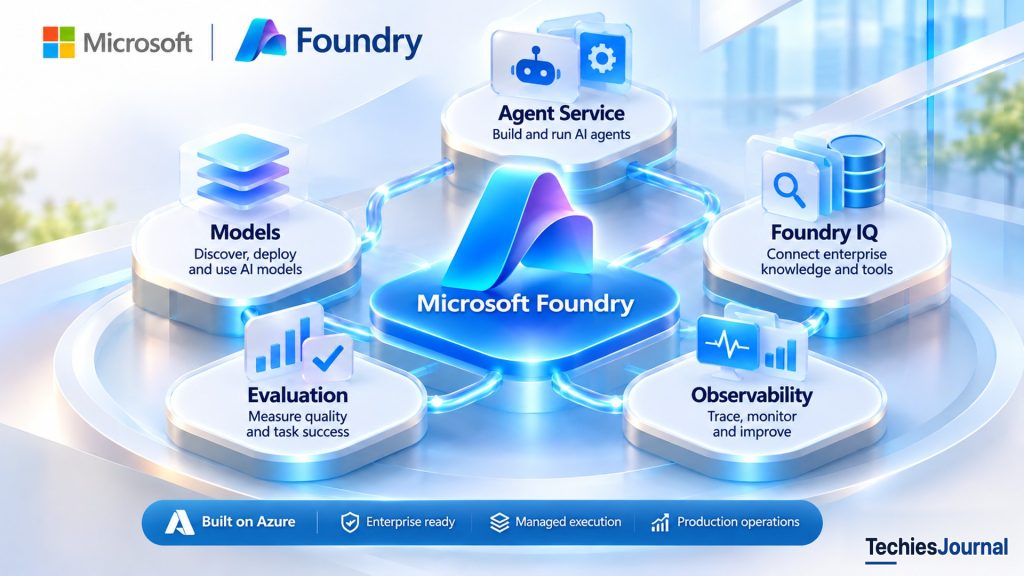
Microsoft Foundry presents developers with a unified AI development experience. Behind that experience, however, an application may depend on several different execution environments, model deployments, Azure resources and enterprise services.
That contrast is what makes Foundry worth understanding.
A developer can deploy a model, configure an agent, connect enterprise information and examine execution traces through related Foundry capabilities. Yet these components do not all run in the same place, share the same permissions or follow the same lifecycle.
Microsoft Ignite 2026 expanded the platform’s managed agent execution and production capabilities, making the relationships between these components increasingly relevant.
This article, the second in TechiesJournal’s eight-part Microsoft AI ecosystem series, examines how Foundry is organized and how its capabilities connect to support production AI applications.
1. What Microsoft Foundry Is and How It Has Evolved
Microsoft Foundry is an Azure-based platform for developing, deploying and operating AI applications.
It brings together capabilities for model inference, agents, enterprise integrations, evaluation and observability. Developers can use these services from supported SDKs, APIs, developer tools and the Foundry portal.
The platform evolved from Microsoft’s earlier Azure AI development experiences, including Azure AI Studio and Azure AI Foundry. Existing applications may still use classic resources, interfaces or APIs, so the current Foundry experience should not be mistaken for a simple rename of every earlier service.
The meaningful change is the closer integration of activities that AI developers previously handled through separate development and operational workflows.
Foundry now connects three broad responsibilities:
Build: Discover models, develop agents and connect tools.
Deploy: Expose supported models and agents through managed endpoints and execution environments.
Operate: Evaluate results, trace execution, monitor performance and improve application behavior.
A model may be sufficient for document classification. A research agent may need a model, search tools and an execution runtime. A production service may additionally need evaluation datasets, operational traces and controlled deployments.
Foundry supports these different requirements without making every component mandatory.
The first important distinction is architectural. A unified development experience does not mean a single Azure resource contains every service an application uses.
Microsoft documentation: What is Microsoft Foundry? | Foundry capability map | Microsoft Ignite 2026 Book of News
2. Inside Microsoft Foundry’s Architecture
Foundry has two responsibilities that are easy to confuse: managing AI development resources and processing AI application requests.
Its resource architecture establishes where teams develop applications and which settings they share. Its runtime capabilities determine how models and agents process requests.
Start with the Foundry resource
A Foundry resource is an Azure resource within a subscription, resource group and region.
It provides the top-level boundary for common settings such as security, networking and supported model deployments.
Teams can create projects beneath that resource.
A project organizes work associated with a specific AI application, including supported agents, files and evaluations. Multiple projects can reuse configured model deployments and connections.
For example, a document assistant and a support agent might belong to separate projects but share a supported model deployment.
That arrangement makes common management easier, but it also creates dependencies. Both applications may be affected by the shared model’s capacity limits or configuration changes.
Project separation therefore provides a development and access boundary, not necessarily complete infrastructure isolation.
Connected services are separate Azure resources
An application may need enterprise search, file storage or secrets management.
Foundry can connect to Azure AI Search, Azure Storage and Key Vault, but those services retain their own Azure resource boundaries.
The distinction affects permissions and operations.
A developer may be authorized to work inside a Foundry project without having permission to change the connected search service. Similarly, an agent’s ability to use a configured model does not automatically grant it access to an enterprise database.
Text version of Figure 1
- A business application, with its frontend, backend and business logic, calls a Foundry project agent, or it can call the model deployment directly.
- The Foundry project, which holds Agent Service and evaluations, and the shared model deployment sit inside one Foundry resource that provides Azure governance and shared configuration.
- Agent Service can call Azure AI Search for enterprise retrieval and enterprise APIs for authorized business operations. Both are independently managed services.
- Execution telemetry flows to Azure Monitor for traces and metrics.
The accompanying architecture diagram distinguishes the parent Foundry resource, project assets, shared model deployments, agent execution and independently managed Azure services. It also separates live application requests from evaluation and telemetry.
Control plane versus data plane
Foundry follows Azure’s distinction between management operations and service operations.
The control plane manages resources and configuration. Creating a project or changing a model deployment are examples.
The data plane performs application-facing work, such as invoking agents, running evaluations and interacting with project assets.
These operations can require different role assignments.
This matters to production design because application identities normally need narrowly scoped runtime permissions, not full control over the Foundry resource.
With the management boundaries established, we can examine what an application accesses first: a model deployment.
Microsoft documentation: Foundry architecture | Foundry rollout and isolation planning
3. Working With Models in Foundry
Foundry’s model catalog helps developers discover supported models from Microsoft and other providers.
But discovering a model is different from serving it.
A model catalog entry describes an available capability. A supported deployment or inference route makes that model accessible to an application.
The hosting choice determines important properties of the runtime.
| Deployment approach | What developers need to understand |
|---|---|
| Serverless API | Microsoft-hosted inference, with model-specific region, capacity and billing options |
| Managed compute | Supported models served on allocated compute, with greater responsibility for capacity and configuration |
| Supported local or customer-operated options | Execution depends on eligible infrastructure and deployment support. Foundry Local on Azure Local, for eligible models on customer-operated Azure Arc-enabled Kubernetes clusters, is a preview capability |
Serverless options may include standard consumption, provisioned throughput or batch processing.
An interactive application may need predictable latency and throughput. A noninteractive processing job may be better suited to an asynchronous batch option.
These are deployment decisions, not just model-selection decisions.
From a project to an inference request
A developer connects application code to the relevant Foundry project and supported inference interface.
The application sends input and instructions, authenticates the request and receives the result.
Model usage commonly involves input and output tokens. Larger requests can affect latency, service limits and operating costs.
For some applications, the model should produce a constrained or structured result that the backend validates before using.
An important detail is that not every Foundry capability is available through precisely the same endpoint or API scope. Some capabilities remain resource-level, while newer APIs emphasize project-level access.
This is why the current API documentation matters when integrating an existing application.
Models are versioned dependencies
A model update can change output formatting, response quality or tool-selection behavior even when the surrounding application code is unchanged.
Foundry provides deployment and model-management capabilities, but a team must still evaluate the effect of model changes on its application.
The detailed comparison of available models belongs in Part 5 of this series.
For Part 2, the architectural transition is more important: a deployed model can process a request, but it does not automatically coordinate tools, retain application state or perform an extended task.
That introduces Foundry Agent Service.
Microsoft documentation: Foundry Models | Model deployment options
4. Building Agents With Foundry Agent Service
A model can identify that a service ticket needs checking. The ticket’s actual status, however, lives in the service-management system.
To retrieve it, something must execute a tool, receive its response and make the result available for further processing.
Foundry Agent Service provides managed capabilities for that execution.
A typical tool interaction follows a recognizable sequence:
Text version of Figure 2
- A request reaches the agent from an application or a user.
- The model proposes a tool call.
- The agent runtime invokes the configured tool.
- The external service checks permissions and performs the action.
- The tool result returns and the agent continues.
The model does not independently execute an arbitrary business operation. The selected runtime and tool implementation perform the actual work.
Three agent approaches
Microsoft documents several agent approaches within Agent Service.
Prompt agents are defined through configuration, including instructions, model selection and supported tools. Foundry manages their execution.
Voice-based prompt agents extend managed agent experiences to real-time audio interactions through supported voice services.
Hosted agents let developers bring agent code and supported dependencies. Foundry runs the packaged code in a managed hosting environment.
A hosted agent can be supplied as a supported container image or source package. The platform provides managed endpoint, scaling and identity capabilities for the hosted workload.
This is a meaningful distinction. In a prompt agent, developers configure much of the behavior through supported platform facilities. In a hosted agent, developers own more of the orchestration code and runtime dependencies.
Managed harness versus developer-owned orchestration
An agent harness coordinates repeated model interactions, tool execution and task state.
Microsoft’s Agent Service documentation describes a Microsoft Copilot harness that developers can select for supported Foundry prompt agents. The documentation labels the harness a preview capability.
Developers can use a managed harness where it meets their requirements or implement their own orchestration in hosted code.
Microsoft Agent Framework provides code-level building blocks for agents and workflows. It can be used with supported Foundry hosting, but it is not the same product as Agent Service.
The framework defines behavior. Agent Service can provide the managed environment in which that behavior runs.
What persists during execution?
An agent may need conversation history, intermediate tool results and session state.
Hosted-agent capabilities support session-level state management, but that state is different from an application’s authoritative business records.
A completed payment, approved claim or changed service ticket must remain recorded in the responsible business system.
The useful distinction is between execution context, which helps the agent continue work, and durable application state, which records business outcomes.
The agent can now coordinate actions. The next challenge is providing appropriate information and tools to perform them.
Microsoft documentation: Foundry Agent Service | Hosted agents | Agent Framework
5. Connecting Enterprise Knowledge and Tools
Foundry agents can connect to two kinds of external capability.
One provides information. The other provides operations.
The distinction is easy to see in an internal support assistant.
Answering a question about company policy requires retrieving the appropriate document.
Creating a support ticket requires executing an operation against the ticketing system.
Both may involve tools, but their business effects differ.
Enterprise knowledge with Foundry IQ
Foundry IQ supports retrieval from enterprise information sources, with Azure AI Search providing important underlying search capabilities.
A typical retrieval pipeline processes documents into searchable content, adds useful metadata and selects relevant information when the application needs it.
Keyword search helps with exact terms and identifiers.
Vector search uses embeddings to find content with similar meaning.
Hybrid retrieval combines techniques, while ranking can improve the order of results.
The selected material is supplied as context to the model, an approach known as retrieval-augmented generation.
Foundry IQ’s role is therefore not to make a language model remember the organization’s documents. It helps the application obtain appropriate information when that information is needed.
The source material still requires versioning, quality control and access management.
Tools and managed connections
Foundry agents can use supported built-in tools, application-defined functions and integrations through interfaces such as Model Context Protocol, or MCP.
A tool exposes a defined operation. Its implementation may call an enterprise API, query a service or perform another permitted task.
Connections provide the configuration needed to reach those services using supported authentication methods.
An agent identity or connection is not a substitute for the receiving system’s authorization.
For example, permission to invoke a ticketing tool does not necessarily include permission to modify every ticket.
That operation remains subject to the ticketing application’s rules.
This gives Foundry applications a useful separation: models and agents interpret requests, while connected services remain authoritative for their own data and actions.
Once these components are connected, the architecture supports real application behavior. Operating it for production users introduces a different set of concerns.
Microsoft documentation: Foundry capabilities | RAG with Azure AI Search
6. Deploying and Operating Foundry in Production
The architecture now contains model inference, agent execution and connected systems.
Each component has its own limits and failure behavior.
A slow response could originate in the model, the hosted-agent runtime or a downstream API. A permission failure could involve a project role assignment or access to an independently managed Azure service.
Production engineering begins by distinguishing those boundaries.
Identity, networking and capacity
Foundry uses Microsoft Entra and Azure role-based access control to support administrative and runtime permissions.
Hosted agents can use dedicated identities for permitted downstream access.
Hosted agents can run in network-isolated Foundry resources and can use a customer-provided Azure virtual network for outbound traffic.
These controls are separate from the target application’s authorization rules.
Scaling is similarly distributed.
Model serving has capacity and throughput limits. Hosted execution has concurrency and runtime constraints. External search and business services have their own performance limits.
Increasing model throughput will not solve an agent that spends most of its time waiting for a slow enterprise API.
The architecture must be monitored as a complete system.
A failure that managed recovery cannot fix alone
Consider an agent that submits a service request.
The receiving system creates the request, but the agent is interrupted before receiving confirmation.
A resilient execution mechanism may restart the handler.
If the operation is repeated without protection, the business system could create a duplicate record.
Foundry’s supported resilient-execution capabilities help recover interrupted agent work, but they cannot automatically make every external transaction safe to repeat.
The receiving system needs an appropriate safeguard, such as an implemented idempotency key that identifies an already completed request.
This is not a general warning about AI. It is a specific consequence of combining managed agent recovery with external transactional APIs.
Deployments and costs follow the same boundaries
A release can change application code, model deployment, agent instructions, tool definitions or connected-service configuration.
These changes should be versioned and validated together when they affect the same application behavior.
Costs also accumulate across components: model inference, hosted compute, retrieval, storage and telemetry may be billed separately.
For an agent that invokes several tools and models, cost per completed task may be more meaningful than the cost of one inference request.
Once the application operates at scale, the team needs evidence that its behavior remains acceptable. That is where Foundry’s evaluation and observability capabilities become central.
Microsoft documentation: Foundry architecture | Hosted agents
7. Evaluation, Observability and Continuous Improvement
Foundry connects three related activities that solve different engineering questions.
Evaluation: Is the application’s behavior acceptable?
Tracing: What happened during a particular execution?
Monitoring: Are failures, quality or performance changing across production traffic?
The value comes from combining their evidence, not treating them as interchangeable dashboards.
Evaluation before a release
Foundry supports evaluators that measure characteristics such as relevance, groundedness, task adherence and safety, where supported by the selected evaluation method.
A document assistant might be tested with a policy question and an expected source.
A groundedness evaluator can assess whether the generated answer is supported by the retrieved context.
But if the retrieved context is outdated, the answer can be well-grounded and still incorrect.
The application therefore needs tests for both retrieval quality and response quality.
Some evaluations use deterministic checks. Others use AI-assisted scoring, which has its own limitations and should be calibrated against representative cases.
Tracing the cause of a failure
Suppose an agent provides an incorrect deployment procedure.
A trace reveals that the agent retrieved an obsolete document, then sent that document to the model.
The model followed the supplied information. The retrieval stage was responsible for selecting the wrong source.
Changing the prompt alone would miss the underlying problem.
Foundry tracing uses OpenTelemetry-related instrumentation and can integrate with Azure Monitor Application Insights to record supported execution details.
Trace collection needs privacy controls because request content and tool arguments may contain sensitive information.
Production monitoring closes the loop
Monitoring tracks patterns such as latency, error rates, token consumption and supported quality signals.
If response times increase, traces can identify whether the delay comes from model inference, retrieval or tool execution.
If tool-selection errors rise after an agent update, the team can turn those incidents into evaluation cases, correct the behavior and test the next version.
The improvement cycle becomes:
- Observe
- Diagnose
- Change
- Evaluate
- Release
Ignite 2026 expanded Microsoft’s production insights and agent-optimization direction. Feature readiness is not uniform, however, and some optimization or monitoring capabilities remain in preview.
The correct production decision depends on the exact capability, not on Foundry’s overall general availability.
Microsoft documentation: Foundry observability | Agent tracing | Feature availability | Microsoft Ignite 2026 Book of News
8. What Foundry Manages and What Developers Still Own
Foundry’s architecture becomes most useful when teams understand which responsibilities the platform can take over.
It can provide supported model inference, managed agent hosting, project tooling, integrations, evaluation and observability.
It does not determine whether an application has the right business rules or whether every agent action is appropriate.
The practical boundary can be summarized in four areas.
| Foundry capability | Remaining application responsibility |
|---|---|
| Model deployment and inference | Validate output and manage model-dependent behavior |
| Agent hosting and execution | Design business actions, durable state and safe recovery |
| Knowledge and tool connections | Maintain source quality and enforce downstream permissions |
| Evaluation and observability | Set acceptance criteria, investigate failures and approve releases |
What feature maturity changes
Foundry supports generally available core scenarios, while individual capabilities may be preview, region-limited or subject to retirement.
As of the November 2026 review, Microsoft’s availability guidance identifies December 1, 2026 as the retirement date for the older Foundry Workflows capability.
New workflow development should follow Microsoft’s current Agent Framework guidance. The retirement does not mean that all code-based agent orchestration or Copilot Studio workflows are ending.
For production planning, the relevant questions are which feature is used, where it is supported and what happens when its lifecycle changes.
What to adopt first
An application requiring only inference can begin with a model deployment.
An application requiring coordinated tool use can evaluate Agent Service.
A knowledge-grounded application may need enterprise retrieval.
Production workloads benefit from evaluation and telemetry appropriate to their actual risk, usage and operating model.
There is no requirement to adopt every Foundry capability.
Microsoft Foundry’s significance is that it connects the AI parts of application development and operations without making them one indistinguishable service.
Understanding the boundaries between models, agents, enterprise systems and operational tooling is what allows developers to use those capabilities effectively.
Go Deeper: Microsoft Documentation
- What is Microsoft Foundry?: Platform scope and developer experience.
- Foundry architecture: Resource, project and connected-service boundaries.
- Foundry Models: Model discovery and inference.
- Foundry Agent Service: Prompt, voice-based and hosted agents.
- Foundry observability: Evaluation, tracing and monitoring.
- Foundry feature availability: General availability, preview status and retirement guidance.
- Foundry Agent Framework overview: Code-level agent and workflow development.
Reviewed November 22, 2026. The architectural explanations are based on Microsoft’s documented product behavior. Illustrative examples do not represent independently tested TechiesJournal deployments. Feature availability changes often, so check Microsoft’s current documentation before relying on a specific capability.