

What an attacker could do with your pipeline in one hour
If someone got into your build system for one hour, what could they take, and what could they change?
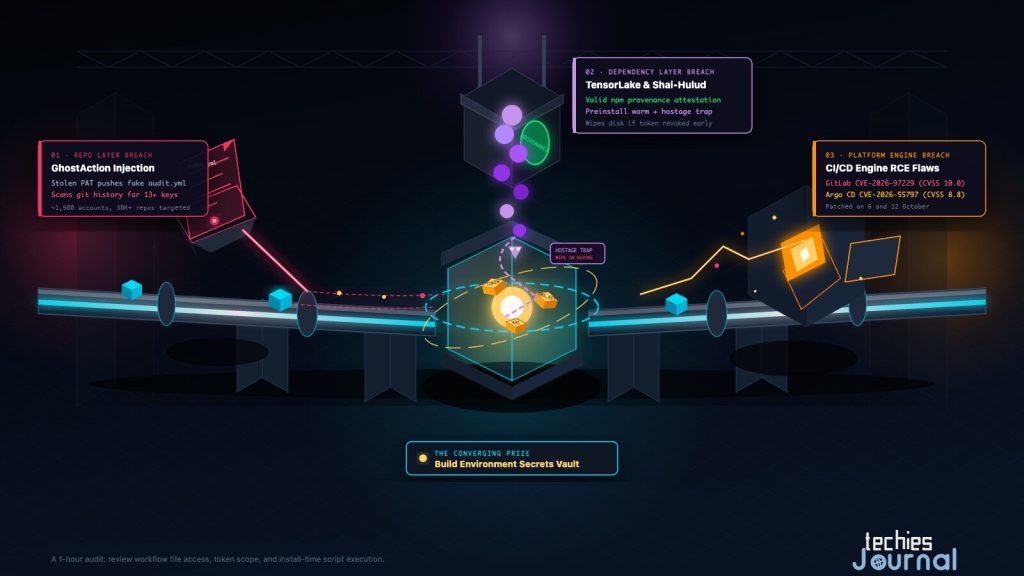
Conceptual illustration of three ways into a build pipeline. It is not a diagram of any real system. The labels in the image are English and part of the illustration.
A CI/CD pipeline is the automated path that builds, tests and ships your software. To do that job, it holds your source code, the secrets needed to reach other systems, and the right to deploy. A secret here means a password, token or key that proves who you are to another service.
That combination makes the pipeline a good target. An attacker who reaches it may not need to break into your application at all. They can take the keys, or change what gets shipped.
Three incidents in the same fortnight show how this happens. They look different, but they end in the same place. This article walks through each one, then gives you a one-hour check.
Why attackers go after pipelines
A pipeline is trusted by design. It can read private code, call cloud services and publish packages, and nobody watches every step it takes. A secret stored in a pipeline is often more powerful than one on a developer’s laptop.
A supply chain attack means attacking something your software depends on, instead of attacking your software directly. In this article that means the workflow files in your repository, the packages your build installs, and the CI system itself. The attacker reaches you through a door you already opened.
Accessible text alternative for this figure
A pipeline runs from left to right: a source repository holding code and workflow files, a build and test step that installs, compiles and tests, and a deploy step that reaches registries, cloud and clusters. Secrets such as tokens, cloud keys and publishing keys are held in the build environment.
Three attacks enter at different points. Attack 1: a stolen token adds a fake workflow file at the repository. Attack 2: a trusted package runs code at install time in the build. Attack 3: a flaw in the CI system itself, for example GitLab or Argo CD, is exploited at the CI server.
All three attacks lead to the secrets, which is why the secrets in the build environment are the common target.
Pattern 1: a stolen token adds a fake workflow (GhostAction)
GitHub Actions runs your pipeline from workflow files stored in the repository, under .github/workflows/. Anyone who can write to the repository can add one. That is the weakness GhostAction uses.
The campaign was first reported in September 2025. GitGuardian counts an August 2026 wave, and the activity in this fortnight peaked on 8 and 9 October.
According to StepSecurity, the attackers added a workflow named “Security Audit” or “Github Actions Security” to repositories. It looks like a helpful check. It runs on every push and sends data to a hardcoded server address.
The older version sent the repository’s named secrets. The October version went further. It also searched the working files and the whole git history for about 13 kinds of credentials, such as cloud, AI-service and software-as-a-service keys. StepSecurity’s advice is plain: deleting a secret from the current branch does not help, because the history is scanned too.
How did the attackers get write access? StepSecurity says this is not confirmed for the October accounts. The most likely source is personal access tokens leaked through credential-stealing malware or data dumps. In one case, the compromised account could write to a large company’s repository, so the new workflow went in without review.
There are two sets of numbers, and they measure different things:
- StepSecurity counted 345 repositories hit in two sweeps on 8 October. About 378 repositories had the malicious workflow live on 9 October.
- GitGuardian, in its update of 13 October, says about 1,900 accounts were compromised. It says more than 30,000 repositories were targeted, and that the campaign attempted to extract 3,174 secrets. These are targets and attempts, not confirmed thefts, and GitGuardian gives no count of secrets actually taken in October.
GitGuardian also reports that GitHub began blocking the malicious workflow from 9 October, and that the waves on 10 and 12 October extracted no secrets. This is GitGuardian’s report, and GitHub has not been quoted on it here.
GitGuardian notes that some victims were hit in both 2025 and 2026, which suggests secrets from the first wave were never rotated. It also warns that rotating the stolen secrets is not enough. You must find and revoke the GitHub credential that was used to add the workflow, or someone can use it again.
GitHub also has protections of its own. Since July, it holds workflow runs it judges to be potentially malicious until a collaborator with write access approves them, on public repositories on github.com, without any setup. Its workflow execution protections, generally available since 17 September, let you set rules for who and what can trigger workflows. These help, but they do not replace reviewing changes to workflow files.
Pattern 2: a trusted package runs code when you install it (TensorLake)
Most package managers can run a small script when a package is installed. These are called install scripts. They exist for good reasons, such as compiling native code. They also run on your developer laptop and your build server before anyone has looked at what they do.
On 8 October, version 0.5.144 of the tensorlake package appeared on npm. Aikido describes it as carrying a variant of the Shai-Hulud worm, a family of credential-stealing malware that has been seen before. StepSecurity calls it a worm and describes the same behaviour. Its preinstall script downloaded a JavaScript runtime and ran an obfuscated payload. That payload looked for environment variables, cloud and Kubernetes credentials, SSH keys and browser data.
Two details matter for defenders.
First, the package had a valid npm provenance attestation. Provenance is a signed record of where and how a package was built. StepSecurity reports that the attackers pushed their code straight to the main branch under a maintainer’s identity, with no pull request.
The project’s own release workflow then built and published the package. Provenance told the truth about where it was built. It could not tell you the code was safe.
Second, the malware included what StepSecurity calls a “hostage token”. It checks the stolen GitHub token every 60 seconds for up to 24 hours, and if GitHub rejects the token, it deletes the home directory. The usual advice after a theft is to revoke the token first, but here that could trigger the damage.
StepSecurity’s guidance is to remove the malware’s monitor service, after taking a backup, before you revoke anything.
Other advice is simpler. Pin to the last good version, 0.5.143. Turn install scripts off. Rotate every credential the machine could reach, and rebuild any machine you cannot prove is clean.
StepSecurity found that version 0.5.144 could still be downloaded when it wrote its report. The npm registry no longer lists that version (checked on 19 October), and the package has moved on to later releases.
There is also good news. npm 12, made generally available by GitHub on 8 July 2026, turns install scripts off by default, and it blocks git and remote-URL dependencies unless you allow them. That stops the step this attack depended on. It only helps if your pipeline actually runs npm 12 or later, and not an older version in a pinned build image.
Pattern 3: a flaw in the CI system itself (GitLab and Argo CD)
The third pattern is different. Nobody tricks the pipeline. The software that runs the pipeline has a bug.
GitLab. On 12 October, GitLab released 19.4.2, 19.3.5 and 19.2.8 to fix CVE-2026-97229. It has the highest possible severity score, CVSS 10.0. GitLab’s advisory title describes an integer overflow in the regular expression compiler used for CI/CD configuration, and GitLab says that under certain conditions it could let an unauthenticated user run code on the server.
GitLab.com is already patched, and all GitLab Dedicated tenants were patched before the release. GitLab strongly recommends that self-managed installations upgrade immediately.
The score assumes no login, but Rapid7 found a condition. The attacker must be able to commit a crafted .gitlab-ci.yml file and a specially named repository path to a branch in a public project. An ordinary account can meet that on instances where users are allowed to create public projects.
Rapid7 reproduced code execution on an unpatched 19.4.1 and published a proof of concept. As of its update on 16 October, no attacks in the wild had been confirmed.
Argo CD. Argo CD is a tool that deploys applications to Kubernetes from a git repository. Its maintainers released fixes in 3.5.4, 3.4.10 and 3.3.15 on 6 October. One of the issues is CVE-2026-55797, a command injection in the repo server through a repository proxy URL on SSH git repositories, rated 8.8.
The release notes list eight security fixes in all, four of them rated critical. They include ways to run commands or read files on the repository server, and a way around project restrictions. No attacks have been reported for any of them. If you run Argo CD, read the release notes and upgrade.
Neither of these is evidence of attacks. They matter because the systems that run your pipeline have the same powers your pipeline has.
What the three patterns share
Each attack took a different route. GhostAction came through a stolen token and a workflow file. TensorLake came through a package your build installs. GitLab and Argo CD would come through the platform.
Every one ends at the secrets in the build environment. That is the common point. Controls built to protect application code, such as code review and vulnerability scans of your dependencies, do not cover that point on their own. The pipeline needs its own protection.
How much you need to know
Know. Every developer should understand that the pipeline is a target, what a secret is, and why a package install can run code. You do not need to configure anything.
Use. Platform and DevOps engineers who write or review workflows need the practical skills. These are limiting token permissions, protecting workflow files, turning off install scripts, restricting network access from build runners, and rotating secrets in the right order.
Master. The people who own pipeline security need to design for failure. They decide how secrets are issued, how long they live, and how a compromised build would be contained and rebuilt.
A one-hour check
You can do most of this in an hour. Start with the items that cost nothing.
- Check who can change workflow files. Make sure changes to
.github/workflows/need a review, for example with a code owners rule and branch protection. To see when workflow files were added, rungit log --all --diff-filter=A --name-only -- .github/workflows. Look for names you do not recognise, such as a “security audit” you never asked for. - Check token scope. Use fine-grained tokens with the shortest life and the fewest repositories they need. Set the default
permissionsfor the workflow token to read-only and widen it only where a job needs more. - Check install scripts. Run
npm --versionin the same image your pipeline uses. If it is older than 12, setignore-scripts=truein.npmrcand allow only the packages that truly need a script. - Check what the build can reach. If your runners can send data to any address on the internet, a stolen secret leaves easily. Allow only the destinations the build needs.
- Know your rotation order. If you must rotate, start with credentials that can publish or deploy (package registry, container registry, cloud deploy roles), then cloud and cluster access, then everything else. After a malicious package, read the vendor’s removal steps first.
- Check your own CI system. If you run GitLab or Argo CD yourself, confirm you are on a fixed version.
What you can ignore for now
You do not need to follow every proof of concept or learn the internals of each malware family. The details change from week to week, but the checks above do not.
You also do not need to drop provenance checks because of TensorLake. They tell you where a package was built, which is still useful. Just do not treat them as a statement that the code is safe.
What to do next
Pick one repository and walk through the checklist. Start with workflow-file review and token scope, since those cost nothing and close the door used in GhostAction.
If you read only one thing about your own setup this week, find out which secrets your build can reach and how old they are.
The pipeline is part of your attack surface. Protect it like production.
Go Deeper
- StepSecurity, GhostAction Returns
- GitGuardian, GhostAction Returns
- GitHub, GitHub Actions holds potentially malicious workflows for approval and Workflow execution protections generally available
- Aikido, tensorlake NPM package compromised with Shai Hulud worm
- StepSecurity, Tensorlake npm package compromised: a worm with a hostage token
- GitHub, npm install-time security and GAT bypass-2FA deprecation
- GitLab, Critical patch release 19.4.2, 19.3.5, 19.2.8
- Rapid7, CVE-2026-97229: Critical unauthenticated remote code execution in GitLab
- Argo CD, v3.5.4 release notes and advisory GHSA-j6cw-g6p4-7hch
- npm, tensorlake package metadata, where version 0.5.144 is no longer listed (checked 19 October 2026)
For related reading, see GitHub Actions Is Changing, which covers another platform change that affects pipelines.