

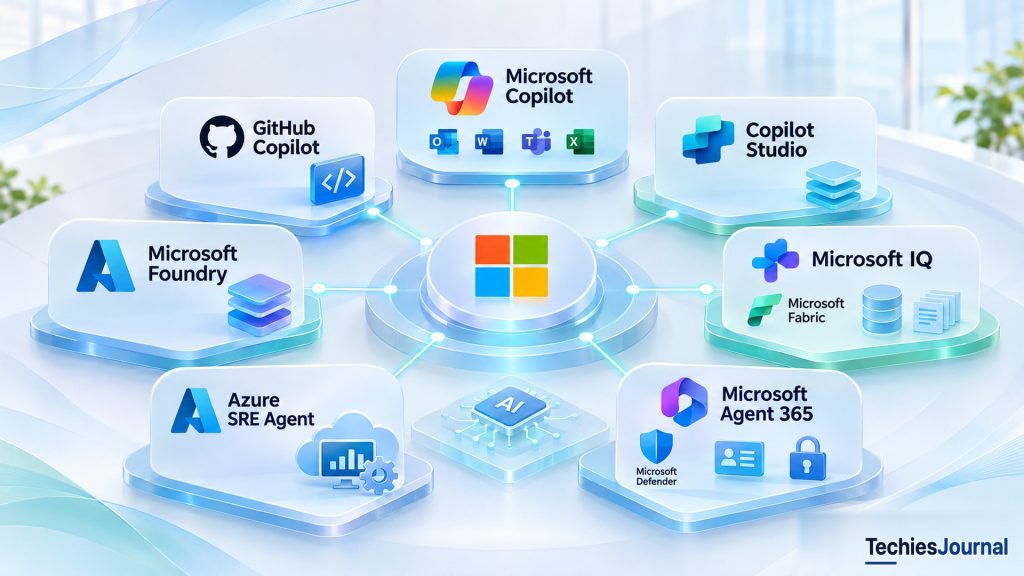
Most people are familiar with Microsoft Copilot, but fewer may realize how much Microsoft’s AI ecosystem extends beyond it.
Microsoft now offers a broad range of AI products and platforms covering application development, intelligent agents, enterprise knowledge, cybersecurity, IT operations and governance. Understanding how these offerings connect is not always straightforward, especially as new capabilities continue to emerge.
This is part 1 of TechiesJournal’s eight-part series on Microsoft’s AI ecosystem. Each article stands on its own, so you can read the series in order or go straight to the subject closest to your work. The full list is at the end of this article.
Understanding How Microsoft’s AI Ecosystem Is Organized
Microsoft’s AI ecosystem consists of more than models that generate text, images or code. It includes applications that people interact with, platforms that developers use to build solutions, services that retrieve business information, systems that execute actions and tools that control access and security.
These components solve different technical problems. A language model can interpret a question or generate a response. It does not automatically have access to a company’s documents, permission to update a business record or an execution environment where it can operate software. Those capabilities must come from other components.
Microsoft Ignite 2026 highlighted how Microsoft is bringing these capabilities closer together through its Copilot, Foundry, Microsoft IQ and Agent 365 offerings.
| Functional area | What it provides | Microsoft examples |
|---|---|---|
| AI applications | Ready-to-use AI experiences | Microsoft 365 Copilot, GitHub Copilot, Security Copilot |
| Business agent development | Tools to create agents and automate work | Copilot Studio, Power Platform |
| Custom AI development | Models, application services and programmable agents | Microsoft Foundry, Microsoft Agent Framework |
| Enterprise knowledge | Access to organizational information and business context | Microsoft IQ, Graph, Fabric, Azure AI Search |
| Specialized AI | Capabilities for particular business or technical workloads | Azure SRE Agent, Fabric agents, security agents |
| Governance and security | Agent visibility, identity, access and oversight | Microsoft Agent 365, Entra, Purview, Defender |
These groupings explain each area’s primary responsibility. They are not six separate products or an official Microsoft deployment architecture. A real application may use components from several areas, but it should only use those that its requirements justify.
Microsoft sources: Microsoft Ignite 2026 Book of News.
Microsoft Copilot: AI Delivered Through Existing Applications
Microsoft Copilot is not one assistant with the same capabilities everywhere. The Copilot name is used across products that serve different users and connect to different tools and information sources.
Microsoft 365 Copilot works within Microsoft’s productivity environment. It can help users work with documents, email, meetings and other organizational information, subject to the capabilities and permissions available in their environment.
GitHub Copilot focuses on software development. It can assist with writing code, understanding existing code and supported development tasks. Microsoft Security Copilot supports security professionals who investigate threats and work with security information.
What makes these products different is not simply the AI model behind them. It is the application context in which the model operates.
Consider a Microsoft 365 Copilot request to summarize project updates. The system needs to identify relevant information from connected Microsoft 365 services, apply the user’s access context and provide selected information to the AI capability that prepares the response. The quality of the result depends partly on what information the user can access and how well that information represents the project. The model does not independently gain access to every document in the organization.
This connection between AI and the application environment is what makes an integrated Copilot different from using a general-purpose model without business context.
How Copilot is evolving
At Ignite 2026, Microsoft’s Copilot announcements included new Copilot Cowork features, Copilot Code, Autopilot and a generally available Copilot Managed Runtime for supported work. Copilot Code is available in Microsoft’s Frontier program and was announced for general availability in December, and Autopilot is rolling out through the Frontier program, so availability differs across these capabilities. These developments broaden the kinds of tasks Copilot experiences can support, from generating content toward completing longer-running activities and creating applications.
However, capability, licensing and availability differ by product and feature. New announcements should not be interpreted as identical functionality across all Copilot products. For a user whose requirement is already supported inside Microsoft 365 or another Microsoft application, an integrated Copilot may provide the most direct solution.
Microsoft sources: Microsoft Ignite 2026 Book of News, Microsoft Copilot security and data access, Microsoft Security Copilot, GitHub Copilot.
Copilot Studio: Connecting AI to Business Processes
Microsoft Copilot Studio provides a low-code environment for developing and managing business-oriented agents and workflows. To understand its role, consider what an agent needs beyond an AI model.
An employee might ask an IT assistant to check the status of an access request. To answer correctly, the agent needs an instruction describing its responsibility, a way to understand the request, access to an approved system containing the request and a tool that retrieves the status.
An agent combines instructions that define its role, knowledge sources, tools and connectors, workflows and agent flows, and channels that make it available to users.
For example, an employee could ask, “What happened to my software access request?” The agent identifies the request, invokes an approved connector or tool to retrieve its status and explains the result. If the employee wants to submit a new request, the agent may call a workflow that records the required information in the service management system.
The exact way an agent handles a request depends partly on the harness configured in Copilot Studio. Microsoft supports different harnesses for reasoning-based agents, customer conversations and structured interactions.
The important technical boundary is between understanding a request and performing an action. An AI model may determine which tool is relevant, but the connected system must still enforce the permissions and rules governing that action. Copilot Studio provides the environment for configuring this interaction. The business application remains responsible for the operations it exposes.
This approach can reduce the amount of software an organization must develop when its needs fit supported low-code components and integrations. A more specialized application may require developers to control API design, application logic, deployment or model interactions directly.
Microsoft sources: Copilot Studio overview, Tools and external integrations.
Microsoft Foundry: Building AI Into Custom Software
Microsoft Foundry is a platform for teams that build and operate applications and agents that use AI. Unlike an integrated Copilot experience, Foundry is not primarily a user-facing productivity assistant. It provides services that developers can combine with their own applications.
A customer submits a question through an AI-powered support application. The backend identifies the request, retrieves relevant information and sends an appropriate prompt and context to an AI model. The model produces a response, which the application checks or processes before presenting it to the customer. Foundry can support parts of this system through model deployment, agent services, evaluation and operational tooling.
- User interface
- Application API
- Information retrieval
- AI model or agent
- Application response
This is a conceptual flow, not a required Foundry architecture. Some agents can call retrieval tools themselves, and applications can use other arrangements. The application still owns its customer experience, business rules and integrations. Foundry supplies AI-related capabilities that can be integrated into that application.
Where does Microsoft Agent Framework fit?
Microsoft Agent Framework provides programming components for creating agents, connecting tools, maintaining conversation state and defining workflows. An agent can use a model to interpret a request and choose a permitted tool. A workflow can define which steps execute in a particular sequence and how results pass between them.
For example, a support application could use an agent to interpret an incident description. A defined workflow could then collect diagnostic details, create a ticket and request approval before taking further action. Microsoft Agent Framework helps developers implement that behavior in code. Foundry can supply supported model, managed-agent and operational services. Developers may combine them, but an application does not necessarily need both.
The architectural distinction is between the code that defines agent behavior and the platform services that support its execution and operation.
What Ignite changed for developers
Ignite 2026 emphasized a broader development lifecycle around Foundry, including evaluation, production insights and agent optimization. Developers need to determine whether responses are accurate enough, whether behavior changes after a model update, how much requests cost and whether an agent is using tools correctly. A model returning a plausible answer is not sufficient evidence that an application is reliable.
Foundry’s current documentation distinguishes generally available capabilities from preview features. Microsoft lists its Foundry Workflows feature as preview and is retiring it on December 1, 2026, with new workflow development directed toward Agent Framework. This retirement concerns the Foundry Workflows feature, not Copilot Studio workflows.
For production planning, the availability of the exact feature and deployment region matters more than the general availability label of the overall platform. Part 2 will examine Foundry’s production lifecycle in depth. Part 4 will explain the programming and execution choices for enterprise agents.
Microsoft sources: Microsoft Ignite 2026 Book of News, Foundry capabilities, Foundry availability, Agent Framework.
Microsoft IQ: Connecting Models to Business Knowledge
A model trained on general information does not automatically know the current state of a company’s inventory, the latest internal policies or the people responsible for approving a purchase. This information must be retrieved from systems that maintain it.
A common approach is retrieval-augmented generation (RAG). Instead of asking the model to answer entirely from its training, the application retrieves relevant information and supplies it as context for the response. For example, a retrieval system may search approved travel policy documents and return relevant sections that a model then uses when preparing an answer.
But retrieving documents is only one kind of enterprise intelligence. An agent may also need to understand who is responsible for a project, how business entities relate to one another or what is happening outside the organization.
The four Microsoft IQ capabilities
At Ignite 2026, Microsoft presented Microsoft IQ as a broader enterprise context management approach.
| Capability | What it helps an AI system understand |
|---|---|
| Work IQ | People, collaboration and workflows |
| Fabric IQ | Business entities, their relationships, properties, actions and rules |
| Foundry IQ | Curated knowledge from policies, documents and reusable knowledge bases |
| Web IQ | Fresh, real-world information from across the web |
These are not interchangeable search engines. Foundry IQ focuses on finding relevant information in enterprise content. Its retrieval capabilities include approaches such as keyword, vector and hybrid search, alongside relevance ranking and managed retrieval features.
Keyword search matches terms. Vector search uses numerical representations to find content with similar meaning. Hybrid search combines approaches. Semantic ranking can help order results by relevance. Foundry IQ builds on retrieval capabilities associated with Azure AI Search.
Fabric IQ helps represent business entities and relationships so applications can work with the meaning of business data rather than treating every record as unrelated information. For instance, understanding the relationship among a customer, an order and a delivery status provides context beyond a single document.
Work IQ contributes context related to work and collaboration. Web IQ extends context to external information. Microsoft’s wider IQ approach aims to make such knowledge and expertise reusable across compatible applications and agents. Individual IQ features have different availability and integration requirements.
AI models generate or interpret responses, while enterprise information services supply the context needed to make those responses relevant to an organization.
Microsoft sources: Microsoft Ignite 2026 Book of News, Microsoft IQ, Retrieval-augmented generation and Azure AI Search.
Specialized AI Agents: When the Platform Already Understands the Workload
Some AI requirements involve a specific technology domain rather than a general business conversation. Site reliability engineering is one example. Investigating an application outage may require examining metrics, application logs, deployment changes and relationships between services.
Azure SRE Agent is designed to support this operational investigation through supported connections to monitoring and management tools. Rather than building a custom agent that implements all those integrations, an organization can evaluate the specialized service. An investigation may involve collecting telemetry, comparing the current problem with previous incidents and suggesting next steps. Where automation is enabled, actions are constrained by configured permissions, run modes and policies.
Specialized agents also appear in security, data and business applications. Microsoft Security Copilot supports security operations. Fabric offers data-oriented agent capabilities. Dynamics 365 includes AI features in supported business workflows. Their value comes partly from connections to domain-specific tools and information, not simply from attaching a different name to a general-purpose model.
Where computer-using agents fit
An agent may call an API to update a business record. Some older applications, however, do not provide suitable APIs. An agent may then need to interact with an application’s interface, subject to platform capabilities and controls.
Microsoft’s Windows 365 for Agents direction addresses managed Cloud PC environments for supported agent execution. That introduces three responsibilities: the model interprets information, the agent framework or runtime coordinates instructions and tools, and the execution environment provides access to applications where actions take place.
Computer-using agents face risks such as interface changes, incorrect clicks and actions in the wrong application context. Part 4 covers implementation choices, while Part 6 examines Azure SRE Agent operations.
Microsoft sources: Azure SRE Agent, Windows 365 for Agents.
Microsoft Agent 365: Governance Across AI Systems
An organization may use agents created by different departments, tools and vendors. A retired application may leave agent credentials active. Another team may create an agent with access to sensitive information but no clear owner. A third agent may call an external tool whose permissions have changed.
Individual development platforms can manage aspects of their own agents. Enterprises also need visibility across the wider agent estate.
Microsoft Agent 365 addresses this need through centralized agent management, governance, security and business-value capabilities. Its agent registry helps administrators identify agents and review relevant ownership, activity, adoption and risk information within supported integrations.
Agent 365 works alongside other Microsoft security services. Entra supplies identity and access management. Purview supports information protection and governance. Defender contributes threat detection and security protection. Identity establishes who or what may access resources, data controls protect information and threat protection helps identify suspicious behavior.
Registering an agent in Agent 365 does not replace application-level authorization. A registered agent still needs permission from a finance system before changing a payment record. Microsoft Agent 365 is generally available for the Commercial segment on a per-user basis, and Microsoft notes that it works best when used with Microsoft E5. Features and licensing requirements vary by environment. At Ignite 2026, Microsoft announced parts of its cost management, business analytics and agent risk capabilities in preview or through the Frontier program, so availability differs by feature.
Ignite 2026 also expanded attention to agent cost management and business analytics. Agent costs can include model usage, supporting services and execution resources. Part 7 explores these governance and operational questions in depth.
Microsoft sources: Microsoft Ignite 2026 Book of News, Agent 365 overview.
How These Microsoft AI Technologies Work Together
Consider a hypothetical internal assistant answering a SharePoint access question: “Why can’t I access the project site, and how do I request permission?”
Text version of Figure 1
- Request: The employee asks why project site access fails. Copilot Studio agent in a supported channel.
- Identity and knowledge: Access context and approved knowledge connections. Microsoft 365, Graph, Azure AI Search or Microsoft IQ.
- Interpretation: The model and instructions explain the policy and next step. Copilot Studio, or a custom Foundry service if needed.
- Approved action: An authorized workflow requests access. The target service enforces permissions.
- Oversight: Logs and governance give visibility. Application logging, Agent 365 where integrated.
First, the employee submits the request. A Copilot Studio agent could provide the user-facing experience within a supported channel.
Next, the solution establishes identity and retrieves relevant information. It uses the employee’s access context and approved knowledge connections, which may involve Microsoft 365 services, Microsoft Graph, Azure AI Search or an appropriate Microsoft IQ capability.
The agent interprets the result. Its model and configured instructions help explain the policy and identify the appropriate next step. A custom Foundry service may participate if specialized behavior is required, but it is unnecessary for a straightforward Copilot Studio implementation.
An approved tool performs any permitted action. If the employee chooses to request access, the agent invokes an authorized workflow. The target service still enforces business rules and permissions.
Finally, logs and governance systems support oversight. Application logging records relevant operations, and Agent 365 may provide broader visibility where integrated and supported.
This example is illustrative, not a prescribed Microsoft deployment. It separates the user experience, contextual knowledge, model behavior, tools, authorization and oversight. Several of these components may already be integrated into one Microsoft product. Adding separate services without a real requirement can create unnecessary complexity.
Where Should You Start Learning?
| Role | Start with | Understand next |
|---|---|---|
| Microsoft 365 user | Microsoft 365 Copilot | Supported capabilities and information access |
| Microsoft 365 administrator | Copilot and Copilot Studio | Identity, agent management and governance |
| Power Platform professional | Copilot Studio | Connectors, actions and business workflows |
| Application developer | Microsoft Foundry | Model integration, retrieval and Agent Framework |
| Cloud architect | Foundry and Azure services | Identity, networking, operations and deployment choices |
| Data professional | Microsoft Fabric and Microsoft IQ | Business context, knowledge retrieval and data access |
| IT operations professional | Azure SRE Agent | Monitoring, incident investigation and controlled actions |
| Security professional | Security Copilot, Entra and Defender | Agent identity, data protection and Agent 365 |
| Technology decision-maker | Ecosystem overview and platform comparison | Ownership, licensing, operational costs and suitability |
These are learning starting points, not fixed professional boundaries. A solution architect may need several product families. A developer may need information-retrieval knowledge before deciding which model to use.
What to Remember About Microsoft’s AI Ecosystem
The ecosystem becomes easier to navigate when its products are viewed by responsibility rather than name. Copilot provides AI experiences inside supported applications. Copilot Studio helps organizations configure business agents. Foundry supports custom application development, while Agent Framework supplies code-level building blocks for agent behavior and workflows.
Microsoft IQ helps connect AI to organizational information. Specialized agents work with domain-specific systems. Agent 365 and Microsoft’s security technologies help organizations manage the resulting agent estate.
These capabilities can be used together, but every solution does not need every component. Start by identifying the product family that addresses the actual requirement, then explore the relevant article in this series for deeper technical understanding.
A clear ecosystem map is more useful than memorizing a list of product names. It helps explain what each technology actually contributes.
Articles in This Series
| Part | Article | Coverage |
|---|---|---|
| Part 1 | Understanding Microsoft’s AI Ecosystem: What Each Platform Does and When to Use It | Major product families, technical relationships and starting points |
| Part 2 | Microsoft Foundry: Building and Operating Production AI | Model deployment, evaluations, hosting, optimization and operations |
| Part 3 | Copilot, Copilot Studio or Foundry? | Platform comparison, Copilot Cowork and Code, managed capabilities and application choices |
| Part 4 | Building Enterprise AI Agents with Microsoft | Agent Framework, Copilot SDK, managed harnesses and execution environments |
| Part 5 | Choosing AI Models in Microsoft Foundry | MAI models, Microsoft-Decision-1.1, model routing and model selection |
| Part 6 | Azure SRE Agent and AI-Powered IT Operations | Monitoring, incident investigation, identity and controlled remediation |
| Part 7 | Microsoft Agent 365: Governance, Security and Cost | Agent discovery, permissions, tool governance, cost and business analytics |
| Part 8 | Microsoft IQ and Specialized Enterprise Agents | Enterprise context, Fabric agents, organizational knowledge and Microsoft Perception |
Later parts will be linked here as they are published.
Go Deeper: Microsoft AI Ecosystem
- Microsoft Ignite 2026 Book of News
- Microsoft Foundry product and capability map
- Microsoft IQ documentation
- Microsoft Agent 365 overview
Source review: November 22, 2026. Product availability, licensing and supported integrations vary by environment and change over time, so check Microsoft’s documentation for yours.