

Microsoft’s new plugin registry makes it easier to distribute Copilot capabilities across enterprise applications. The systems those plugins depend on still need people to operate and support them.
An employee asks Copilot for the latest status of a project and receives information from an internal project-management system through a company-approved integration. The experience works until, one morning, Copilot can no longer retrieve the information.
The employee calls the Microsoft 365 support team. A SharePoint administrator checks the available configuration but finds no obvious problem. Eventually, the application team discovers that credentials used by the internal API have expired.
The problem was in the connected service, not SharePoint. This fictional example shows how familiar integration failures can become harder for users, and the first support team they contact, to locate when several systems sit behind one Copilot experience.
What Microsoft announced
On September 30, 2026, Microsoft announced a plugin registry for supported Copilot experiences, including SharePoint. It provides a shared place to discover, publish, manage and govern plugins. A plugin can package or reference capabilities such as skills, connectors and agents. Microsoft’s announcement describes the registry as rolling out, with availability varying by experience and capability.
The SharePoint enterprise-store feature has its own timetable. Microsoft 365 roadmap item 567669 lists a preview starting in August 2026 and a December 2026 release target for SharePoint on the web. These are planned dates, not proof that every tenant already has the feature. Microsoft 365 roadmap.
The terminology also needs care. A connector that provides information to Copilot is not the same as an API action that retrieves or changes data in another application. Microsoft’s current documentation places API and MCP plugins as actions within declarative agents, not as standalone Microsoft 365 Copilot experiences. Microsoft Learn: MCP and API plugins.
One plugin, several systems to maintain
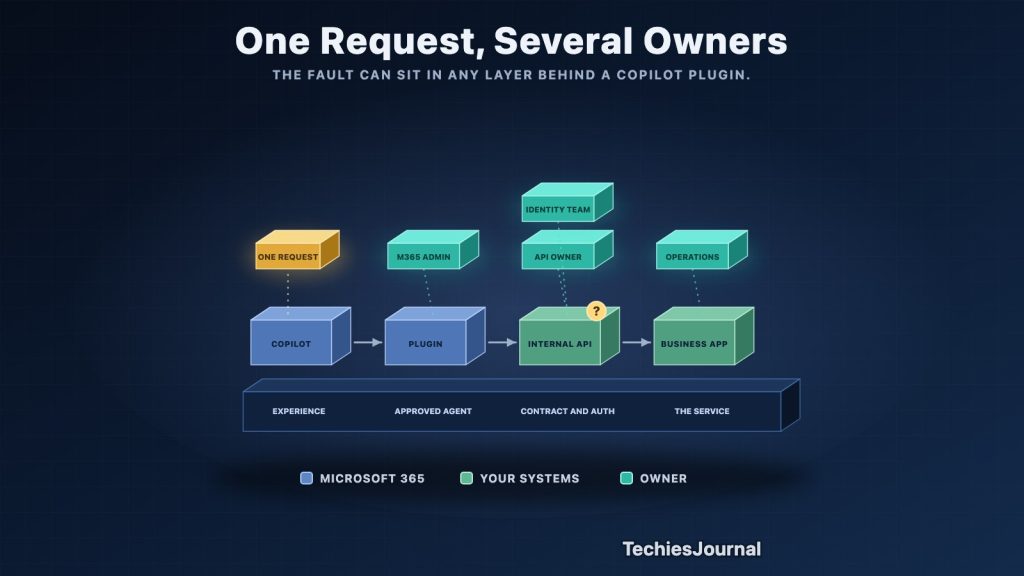
In the project-status example, an agent could call a project-management API through an approved action. That API might run in Azure, use an identity configuration maintained by a different team, and depend on a database the SharePoint administrator never touches.
From the employee’s perspective, there is one failed request. Behind it, the fault could be in the agent configuration, API authentication, network access, application availability or an incompatible API change.
The responsibility therefore crosses team boundaries. Microsoft 365 administrators manage how a plugin is made available, developers own the API contract, identity teams manage access arrangements, and application operations teams investigate service failures. The exact split varies by organization. Microsoft’s declarative-agent guidance explicitly calls for identifying connections, permissions, owners and support contacts.
That ownership should be settled while the integration is built. Otherwise, the first production failure becomes an exercise in finding the team that can diagnose it.
Removing a plugin is not the whole retirement process
Suppose the organization later replaces the project-management application and removes its Copilot plugin. Has the integration been fully retired?
Microsoft warns that blocking or uninstalling a plugin does not necessarily shut down a remote service, revoke consent or remove previously indexed connector data. Other plugins may also rely on the same service or connector. Microsoft Learn: govern plugin access and connections.
The retirement plan may therefore include revoking unused permissions, reviewing connector data, removing service credentials and confirming that shared dependencies are still needed. Those are separate actions, not automatic results of removing a plugin from the registry.
This also affects updates. Changing authentication, an API response or a remote tool can break a Copilot interaction even when the published plugin itself has not changed.
Can the support team trace a failed request?
In the opening scenario, the support team needs to determine whether Copilot called the expected integration, whether authentication succeeded and what the API returned. Relevant information may be spread across Microsoft administration, identity records, API logs and service monitoring.
The registry should not be assumed to provide a complete end-to-end audit trail for every external operation. Available diagnostics depend on the integration route and the logging configured in each connected service. Where actions modify business data, the application should also record who or what initiated the change under its own audit requirements.
A small pilot is a good place to test these paths. Deliberately deny an API permission, interrupt the backing service or change a test credential. Check what the user sees, which team receives the alert and whether the available records identify the cause. Use test systems and non-sensitive data for these checks.
Microsoft’s registry can make approved Copilot capabilities easier to distribute. Enterprises will get more value from that convenience if they also identify who owns each connected system and how it will be supported, updated and retired. For the employee, the integration may look like one feature. Keeping it working remains a shared engineering responsibility.
References and further reading
The Microsoft announcement and documentation pages were checked on 14 October 2026. Roadmap dates are plans and may change.
- Microsoft: Introducing the plugin registry. Published September 30, 2026. Announcement and supported experiences.
- Microsoft 365 roadmap: item 567669. SharePoint enterprise-store plugin rollout. Scheduled dates may change.
- Microsoft Learn: MCP and API plugins for declarative agents. Technical distinction between actions and plugin distribution.
- Microsoft Learn: Declarative agents. Integration planning and owner and dependency guidance.
- Microsoft Learn: Govern plugin access and connections. Lifecycle controls and separate component management.