

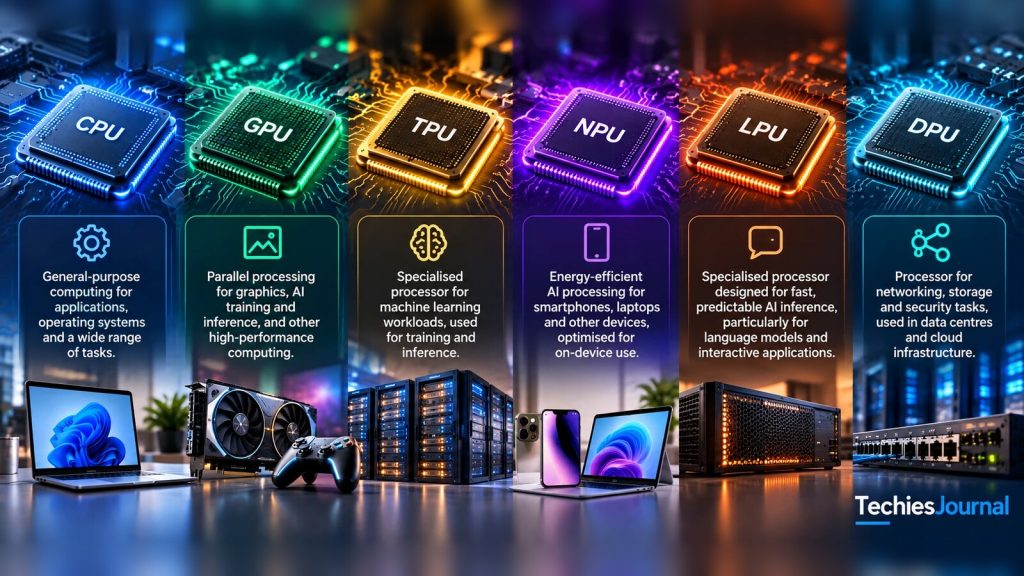
Six processor types explained in everyday language, with examples from phones, computers and AI systems.
AI-generated conceptual illustration of the six processor types. The chips, devices and on-image labels are artistic renderings, not photographs of real products.
When you open a browser, play a game, improve a photo on your phone or ask an AI assistant a question, your device or an online service must carry out different kinds of work. Some work requires flexibility. Some involves repeating similar calculations thousands of times. Other work needs to use very little power or move information efficiently between servers.
That is why computers and AI services use different processors. You have probably heard of CPUs and GPUs. TPUs, NPUs, LPUs and DPUs are less familiar, and their names can make them sound like competing versions of the same product. They are not.
Some run AI models, some handle general application work, and some look after the infrastructure supporting those models. Let’s look at how each one works and where you might encounter it.
CPU: The general-purpose processor
CPU stands for Central Processing Unit. It is the flexible processor that handles a wide range of computer instructions. Your operating system, browser, business applications and many server processes depend on CPUs.
A CPU has multiple cores. Each can carry out different instructions, respond to decisions in a program and coordinate work with memory and other components. Think of a skilled kitchen chef who can read orders, switch between dishes and handle unexpected requests. That is only an analogy, but it captures why flexibility matters.
Common uses: Running an operating system such as Windows, macOS or Linux, executing application and database logic, processing web requests and coordinating AI applications. CPUs can also run smaller AI models when their performance is sufficient.
Strength: Handles varied tasks well. Limitation: Usually less efficient than dedicated accelerators for huge amounts of suitable parallel AI calculation.
GPU: The parallel-processing specialist
GPU stands for Graphics Processing Unit. It began as hardware for graphics, where many similar calculations must be carried out across pixels and 3D objects. The same ability makes it useful for AI.
Imagine a kitchen team preparing hundreds of similar items at once rather than one chef switching between unrelated jobs. GPUs divide suitable work into many parallel operations. Modern GPUs also include dedicated hardware for matrix calculations, the numerical operations used heavily in neural networks.
Common uses: Games and 3D graphics, scientific simulations, training AI models and running trained models to generate text, images and other results.
In a cloud AI service, a CPU may handle the user request while a GPU runs the model. GPUs are important because they combine substantial parallel computing power with a broad software ecosystem.
Strength: Performs many suitable calculations in parallel. Limitation: High-power hardware can be wasteful when a workload is small or cannot use its available parallelism. NVIDIA’s CUDA programming guide explains the parallel execution model in more depth.
TPU: Google’s specialised AI accelerator
TPU stands for Tensor Processing Unit. It is Google’s family of processors built for machine-learning computation. A tensor is a collection of numbers, and an ordinary matrix is one familiar example.
Neural networks make repeated calculations using these numerical collections. TPUs use specialised matrix-processing hardware to accelerate that work. An important design uses a grid of calculation units that pass values from one unit to another, somewhat like an assembly line. The technical term is a systolic array. Modern TPUs also include other processing, memory and communication components.
Common uses: Training machine-learning models, running AI inference and deploying supported workloads through Google Cloud.
Strength: Efficient execution of supported machine-learning operations. Limitation: You must consider the supported software and workload, because a TPU is not automatically a better choice than a GPU. Google’s Cloud TPU introduction explicitly discusses situations where CPUs or GPUs may be preferable.
NPU: Efficient AI processing on devices
NPU stands for Neural Processing Unit. It refers to dedicated neural-network acceleration hardware, frequently built into phones, laptops and embedded devices. Many NPUs are designed to perform supported AI operations without using as much power as a larger, more general-purpose processor.
A phone might use dedicated AI hardware to improve photos or process speech. A laptop might use an NPU for compatible video-call or accessibility features. Which tasks actually run on the NPU depends on the device, model and software. The CPU or GPU may handle other parts.
Common uses: Phone cameras, supported speech and language features, video-call effects, and embedded and edge AI.
Strength: Power-efficient AI acceleration for compatible on-device workloads. Limitation: Model size, memory and supported operations vary between devices.
Running AI locally can reduce the need to send data to a remote service, but an NPU does not automatically make an application private. The app may still transmit information elsewhere. Apple’s Core ML documentation describes how supported models can use different device processors.
LPU: Groq’s language-model inference architecture
LPU stands for Language Processing Unit in Groq’s terminology. Unlike CPU or GPU, this is a name associated with a particular vendor’s inference architecture, not a general industry-wide processor family.
Inference means using an already trained model to produce a result. Groq designs its LPU technology for fast, predictable execution of supported models. Its compiler plans when calculations happen and where information moves. The architecture also relies heavily on fast on-chip memory.
Imagine a carefully scheduled assembly line where each station knows when information will arrive and what to do next. That is an introductory way to think about the design, not a literal description of every operation.
Common uses: Supported language-model serving, interactive AI applications, and systems where low response latency matters.
Strength: Predictable execution and potentially very fast inference on suitable workloads. Limitation: Model compatibility, memory capacity and the need to connect multiple chips affect practical performance. Faster token generation does not necessarily mean a cheaper or faster complete application. See Groq’s LPU explanation for the vendor’s architecture description.
DPU: The infrastructure offload processor
DPU stands for Data Processing Unit. It performs a different role from the processors above. Large servers and data centres must move network traffic, handle storage operations and apply security controls while applications run.
A DPU can take over selected infrastructure tasks from a host CPU. Think of a logistics team handling deliveries, access checks and stock movement so the people preparing orders can focus on their work.
Common uses: Data-centre networking, selected encryption and security processing, storage I/O, infrastructure isolation and support for large AI clusters.
Strength: Offloads supporting infrastructure operations. Limitation: It is not normally the processor doing the AI model’s main calculations. NVIDIA’s BlueField platform documentation provides one implementation example.
All six at a glance
| Processor | Main job | Where you may encounter it | AI role |
|---|---|---|---|
| CPU | General-purpose computing | Phones, laptops, servers | Runs applications, coordinates processing and can execute models |
| GPU | Parallel computing | PCs, workstations, AI servers | Training and inference |
| TPU | Specialised machine-learning calculation | Google infrastructure and Google Cloud | Training and inference |
| NPU | Efficient neural-network acceleration | Phones, laptops, smart devices | Supported on-device AI |
| LPU | Groq’s specialised inference execution | AI inference infrastructure | Supported low-latency model serving |
| DPU | Network, storage and security offload | Data centres and large servers | Supports the infrastructure around AI workloads |
These labels are not all equivalent. CPU, GPU, NPU and DPU describe broad categories. TPU is Google’s processor family, and LPU is Groq’s terminology. Other AI accelerators also exist, including AWS Trainium. The table is an introduction, not an exhaustive catalogue.
Where you see them in everyday technology
On a smartphone: A CPU handles general application work, a GPU handles graphics and compatible calculations, and an NPU or similar neural accelerator may run supported AI features. Not every phone has the same components or capabilities.
On a laptop or desktop: The CPU runs the operating system and applications. A GPU accelerates graphics and, when suitable, AI models. Some newer laptops include NPUs for local AI features.
In a cloud AI service: CPUs manage applications and user requests. GPUs, TPUs, LPUs or other supported accelerators may run the model. At large scale, DPUs can help with some of the networking, security or storage work around the servers.
Accessible text alternative for this figure
Figure 1 shows three groups of processor responsibilities. The groups overlap, so this is not a diagram of one system containing every processor.
Devices and apps, everyday computing: CPU, GPU and NPU. Applications, graphics and supported local AI.
AI model execution, training and/or inference: GPU, TPU and LPU. Choose compatible hardware for the model and workload.
Infrastructure, support for large systems: CPU and DPU. Server management, network, security and storage.
The CPU appears in the devices group and the infrastructure group. The GPU appears in the devices group and the AI model execution group.
Each processor is shown with a short job label: CPU general work, GPU parallel math, TPU tensor math, NPU on-device AI, LPU scheduled inference, DPU network and storage offload.
The categories are illustrative. The exact processors used depend on the device and deployment.
How different processors work together
Yes. Imagine asking a cloud AI assistant to summarise a document.
Your device runs the application. A cloud server receives the request, checks permissions and prepares the information. A compatible accelerator performs the model calculations. The server then returns the result.
A large deployment may also use infrastructure processors for some network or security tasks. Local AI features on your phone or laptop might instead use an NPU.
Accessible text alternative for this figure
Figure 2 shows one possible AI request in simplified form.
Step 1. The user device runs the app on a CPU. A local GPU or NPU is optional. The request goes to a cloud app server.
Step 2. In the cloud app server, a CPU handles the request and permissions. The request then goes to one AI accelerator.
The AI accelerator is one compatible option chosen from GPU, TPU or LPU. They are alternatives, not three mandatory stages.
Step 3. The generated response returns to the user.
Optional infrastructure support: a DPU can handle selected network, storage and security work around the servers.
The important point is that not every AI application needs all six processor types. An ordinary CPU may be enough for a small model. A powerful AI service may combine many different types of hardware.
Which processor to learn about first
If you are new to computing, begin with the CPU and GPU. Understanding general-purpose computing and parallel computing provides the best foundation.
If you build mobile or embedded applications, learn when software can use an NPU and what its limits are. If you work on AI models, cloud deployment or machine learning, understand GPUs and specialised accelerators such as TPUs. If you work in data-centre networking or infrastructure, DPUs become more relevant. And if you evaluate low-latency model serving, Groq’s LPU is one architecture worth understanding.
You do not need to master all six names just because they appear in AI discussions. Learn enough to recognise what each one does, then go deeper where your work requires it.
The main difference to remember
CPUs are flexible general-purpose processors. GPUs excel at suitable parallel work. Google’s TPUs accelerate machine-learning computation. NPUs enable efficient AI processing on devices. Groq’s LPUs take a specialised approach to model inference. DPUs offload selected infrastructure tasks.
These technologies can complement one another, and none is the universal choice for every application.
The best processor is not simply the most powerful. It is the one suited to the work that needs to be done.
Sources and further reading
Editorial source cutoff: 17 October 2026. Each source was opened and checked on 17 October 2026. Several are vendor documents, so they describe each vendor’s own products and are not independent comparisons.
- Intel: CPU vs GPU. Introduction to general-purpose and parallel processing.
- NVIDIA: CUDA Programming Guide. The GPU execution model and parallel programming.
- Google Cloud: Introduction to Cloud TPU. TPU purpose, suitable workloads and limitations.
- Apple: Core ML. Using machine-learning models across Apple device hardware.
- Groq: What is a Language Processing Unit?. Groq’s own explanation of its architecture. Promotional performance claims should not be treated as independent benchmark results.
- NVIDIA: BlueField Networking Platform. DPU networking, security and storage uses.
- AWS: Trainium. An example of an AI accelerator beyond the six introductory labels.
Technical sources reviewed 17 October 2026. Product capabilities change, so check the linked documentation for current details.