

An online retailer is preparing for its largest sale of the year. The application passed its load tests. Autoscaling is enabled, service quotas were increased, and the cloud status page shows no problems.
When the sale begins, traffic rises as expected. The autoscaler asks for more virtual machines, but the cloud platform cannot provide the selected machine type in that zone. Some of the scaling requests fail.
The provider has not suffered a regional outage. Other customers and services may be working normally. Yet this application cannot obtain the resources it needs.
That situation surprises teams because cloud services usually feel unlimited. We request infrastructure through an API and receive it within minutes. After this works hundreds of times, it is easy to treat capacity as a permanent property of the service.
It is not. The API still depends on physical equipment in a real location.
What sits behind a cloud request
A request for a virtual machine eventually needs a server with the right processor, memory and local connections. A GPU request needs a particular accelerator and supporting hardware. Both depend on storage, networks, cooling, electricity and available data-centre space.
Those resources are installed in specific facilities. If demand rises in one location, unused hardware in another region cannot immediately satisfy it. Providers can add infrastructure, but new data-centre capacity takes time to plan, power, build and connect.
The scale of that work is growing. The International Energy Agency’s Energy and AI analysis projects that global data-centre electricity consumption could more than double to about 945 terawatt-hours by 2030. This does not mean cloud capacity is generally running out. It shows that expansion now depends on more than purchasing servers. Power and supporting infrastructure also have to arrive in the right places.
A provider’s global investment says little about whether your account can launch a particular GPU in one zone tomorrow morning.
“Available” can mean several things
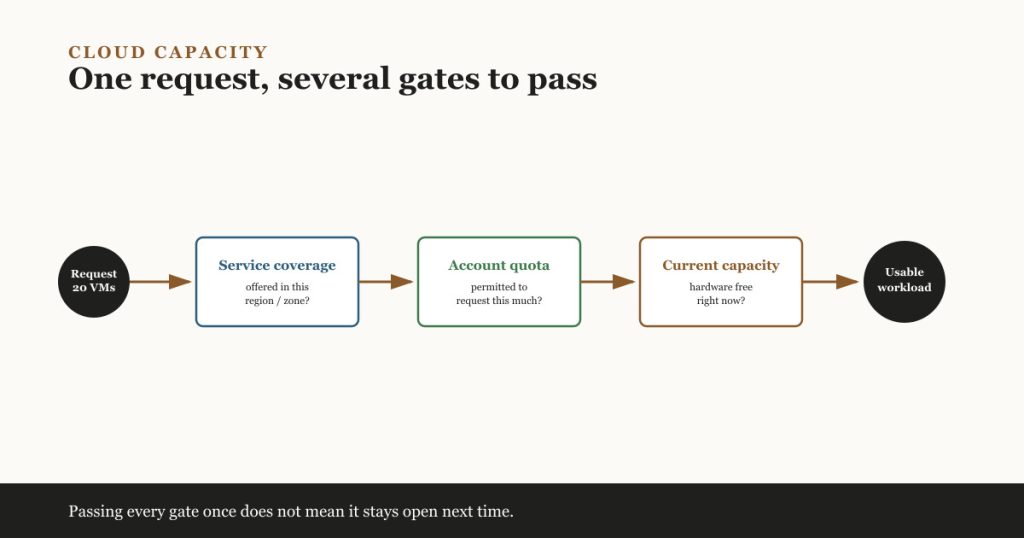
Suppose a team wants twenty machines of one type in a particular zone. Before the request can succeed, several conditions must be true.
| Check | What it means |
|---|---|
| Service coverage | The machine family and required features are offered in that region or zone. |
| Account quota | The project or subscription is permitted to request that quantity. |
| Current capacity | The provider has enough suitable hardware free at that moment. |
| Capacity assurance | A valid reservation or similar arrangement holds the required resources. |
| Workload availability | The application can remain usable or recover when a resource cannot be allocated. |
These checks are related, but they are not interchangeable.
A machine type may appear in the regional catalogue while one zone has no spare capacity. The hardware may be available while the customer’s quota is too low. A reservation may secure compute in one zone while leaving the application exposed to a zonal failure.
The phrase “the service is available” is therefore too vague for capacity planning.
Quota approval does not confirm physical capacity
A quota controls how much of a resource an account, project or subscription may use. If an account is limited to 100 virtual CPUs, a request that would raise usage to 120 can fail even when the provider has plenty of hardware.
Teams usually solve this by requesting a higher limit, reducing usage or moving part of the workload. Quota checks belong in release and event planning because approvals may take time.
Physical capacity is a separate issue. The account may have a quota of 500 virtual CPUs but still fail to obtain 200 CPUs of a particular machine family in one zone.
This is not an unusual or hidden behaviour. AWS documentation describes InsufficientInstanceCapacity errors and suggests trying another instance type, Availability Zone or time. Microsoft’s Azure guidance explains that a preferred VM type may be temporarily unavailable in a chosen location. Google Cloud documents similar resource-availability errors for requests such as vCPUs and GPUs.
An approved quota means the account is allowed to ask. It does not promise that the answer will be yes.
Where autoscaling reaches its limit
Autoscaling responds to demand by requesting more resources. It cannot produce hardware that is unavailable.
Consider the retailer again. Its scaling policy permits only one machine family because the team tested that configuration and copied it into production. All instances must run in the same zone as another dependency. When capacity becomes tight, the autoscaler repeats a request the platform cannot satisfy.
The application has automated scaling, but it has no flexibility.
A better design might allow two or three tested machine families, distribute capacity across zones, place incoming work in a queue, or reduce non-essential processing during a peak. The right choice depends on the workload. A licensed database appliance cannot switch configurations as easily as a pool of stateless web servers.
Specialised and large configurations deserve extra attention. GPU clusters, unusually large machines and tightly packed compute fleets give the provider fewer placement options. Flexibility should be designed and tested before demand arrives.
When a reservation makes sense
Providers offer capacity reservations for workloads that cannot depend on best-effort allocation. AWS EC2 Capacity Reservations, for example, can hold a specified configuration in a particular Availability Zone. Google Cloud reservations also verify that the requested capacity is available before reserving it in a zone.
This can be useful for a planned migration, a major sale, a recovery requirement or a workload needing scarce accelerators. The organisation pays for greater certainty and accepts the reservation’s configuration and location rules.
There is an important boundary: reserved compute does not make the whole service resilient. If every reserved machine is in one zone, a zonal problem can still affect the fleet. The application may also depend on one database, identity service or network path. Each dependency needs its own availability and recovery design.
The reservation helps answer whether compute can be allocated. It does not answer whether the business service will survive a failure.
The stopped-machine assumption
Teams sometimes stop machines outside business hours or keep deallocated resources for disaster recovery. The configuration remains visible in the console, which can create the impression that the hardware is still waiting.
Depending on the service and reservation arrangement, stopping or deallocating a machine may release its physical capacity. Restarting it later can require a new allocation. If that machine type is constrained, the restart may fail even though it worked previously.
This is why a recovery test must do more than inspect templates and confirm that backups exist. The team should start or create the required resources, restore the data, reconnect dependencies and measure how long it takes to provide a usable service. A successful test with one small machine does not prove that a full production fleet can be recovered.
Questions to settle before the next peak
Start by listing the parts of the workload that cannot move. Data-residency rules may require one region. Software licences may restrict instance types. Performance needs may tie a service to a GPU family or local storage. These constraints decide how many alternatives are genuinely available.
Then answer the following:
- Which quotas could block growth, and when were they last checked?
- Which alternative machine types have actually been tested?
- Can the workload use another zone without breaking data, latency or licensing requirements?
- Which events require reserved capacity rather than best-effort allocation?
- What happens to incoming work while new capacity is unavailable?
- Can the recovery plan allocate the full required fleet, not just a demonstration instance?
- Does automation recognise a capacity error and choose an approved alternative, or simply retry forever?
Not every system needs multiple regions or reserved hardware. A small internal service can accept more risk than a payment platform during a seasonal peak. The decision should be deliberate, with the cost of protection compared against the business impact of waiting for capacity.
What teams should learn
People who approve or design cloud systems should understand the difference between regional service coverage, account quota, current physical capacity, reservations and application availability.
Cloud, platform and reliability engineers need practical experience with quotas, alternative configurations, scaling behaviour, reservations and realistic recovery tests. Engineers responsible for large accelerator fleets or critical platforms need deeper knowledge of placement constraints and capacity commitments because small design choices can remove fallback options.
The subject is not about predicting whether a cloud provider will run out of infrastructure. It is about finding the assumptions inside one workload.
Before the next migration, sale or recovery exercise, ask a precise question: if the preferred resource cannot be allocated in the chosen location, what will the system do?
If nobody has tested the answer, the capacity plan is unfinished.
References and further reading
- Energy demand from AI — International Energy Agency. Projections for data-centre electricity use and the infrastructure behind capacity expansion.
- Troubleshoot Amazon EC2 instance launch issues — AWS. Causes and responses for insufficient-capacity launch errors.
- Troubleshoot Azure VM allocation failures — Microsoft. How location, VM size and deployment constraints affect allocation.
- Troubleshooting resource availability errors — Google Cloud. Zonal resource shortages and available responses.
- EC2 On-Demand Capacity Reservations — AWS. How zonal capacity reservations work.
- Compute Engine reservations overview — Google Cloud. How Compute Engine verifies and holds reserved resources.