

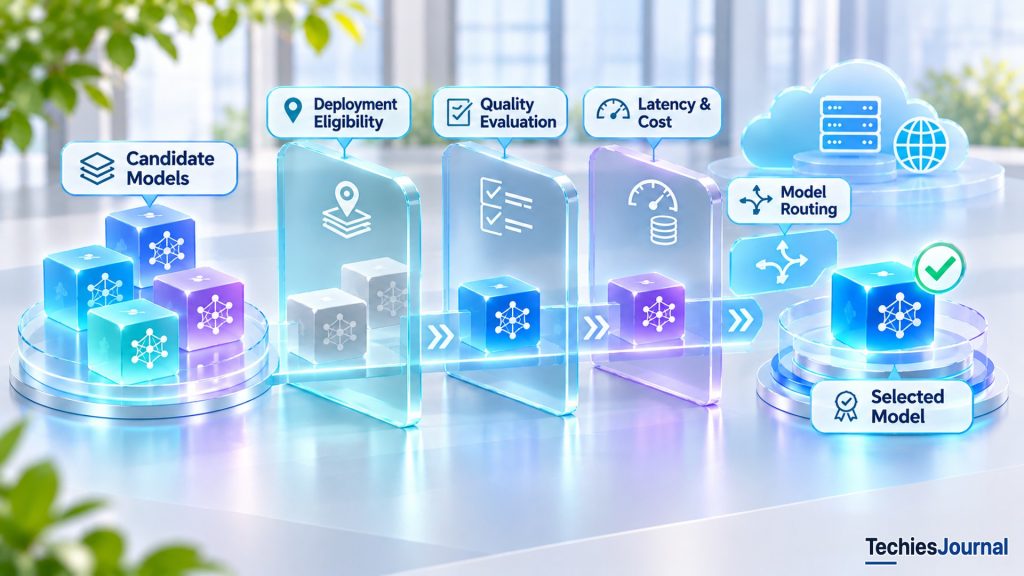
Microsoft Foundry gives developers access to models from Microsoft, OpenAI and other providers. Its catalog makes model discovery easier, but it does not determine which model is appropriate for a particular application.
That decision requires understanding what the model must accomplish and the conditions under which it will operate.
A model may produce excellent technical explanations but select the wrong tools during an agent task. Another may handle tools reliably while responding too slowly for an interactive application. A third may pass every functional test but lack a deployment option compatible with the organization’s data-processing requirements.
These differences are not visible from a model name or benchmark ranking alone.
In the first four parts of this TechiesJournal series, we explored Microsoft’s AI ecosystem (Part 1), examined Foundry’s architecture (Part 2), selected enterprise AI development approaches (Part 3) and built an agent using Microsoft’s development tools (Part 4).
We now have an application to make a model decision for.
Our continuing example is an enterprise IT incident-investigation agent. It retrieves deployment information, examines monitoring evidence and prepares findings for an engineer. We need to select the model that can perform those tasks reliably under the application’s technical, operational and commercial requirements.
The goal is not to identify one universally superior model. It is to understand how to select a model that is suitable for a defined workload, and how to verify that decision with evidence.
1. Understanding the Model Choices in Microsoft Foundry
Foundry’s catalog includes models from several providers, with different capabilities, licenses and deployment arrangements.
The first distinction is between discovering a model and running it.
A catalog entry helps developers examine a model’s capabilities and identify potential deployment options. A supported deployment provides the inference service that an application can call.
Microsoft also documents an instant access option (preview) that lets a developer call some supported models by name without creating a deployment. It suits trying a model, not the production decisions this article covers.
Not every catalog model is available through the same API, region, hosting option or commercial arrangement.
Different models perform different jobs
An enterprise application may need more than one kind of model.
| Model category | What it does | Example in our IT application |
|---|---|---|
| General language model | Understands instructions and produces text | Summarizes an incident and explains findings |
| Reasoning-oriented model | Handles tasks requiring more involved analysis | Compares conflicting evidence across services |
| Multimodal model | Processes supported combinations of text, images and other inputs | Analyzes an error screenshot with a written incident report |
| Embedding model | Converts information into numerical representations for similarity search | Finds previous incidents with related symptoms |
| Specialized model | Performs a particular supported task | Classifies incoming incidents or transcribes a support call |
These are capability categories rather than mutually exclusive product groups.
A model may support several of them. Models within the same category may also differ in tool calling, supported output formats, context limits and inference performance.
For the incident agent, a language model might handle the investigation while an embedding model supports retrieval of similar historical incidents.
The application does not need a separate AI agent for every model. Models are components that can serve different functions inside the same application.
A model’s provider affects deployment choices
Foundry includes models sold through Azure as well as models available through partner and community arrangements.
That distinction can affect billing, support, model access, deployment and applicable terms.
Some models use serverless inference. Others can use supported managed compute. Provider-specific prerequisites may also apply.
For an enterprise team, these are eligibility questions rather than details to resolve after model selection.
If a model cannot be deployed using an acceptable commercial and operational arrangement, its benchmark performance is irrelevant to the final choice.
Once the eligible models are identified, the next question is what capabilities the application actually requires.
Microsoft documentation: Foundry Models overview | Deployment overview | Deployment types
2. Match Model Capabilities to the Application
Our incident-investigation agent has four essential responsibilities: understand the incident, select useful diagnostic tools, interpret returned evidence and prepare a structured report.
Those responsibilities form a more meaningful model-selection specification than a general request for the most intelligent model.
Context length does not guarantee better analysis
A model’s context window limits how much information it can process within the relevant interaction constraints.
A larger context window can help when an application handles long documents, logs or conversations.
However, the ability to accept a large volume of information does not guarantee that the model will identify the most relevant evidence.
Imagine an incident occurring shortly after a deployment. The monitoring system contains several hours of logs from dozens of services.
Sending every log entry to the model may increase cost and introduce unrelated information.
A better retrieval process might first select events from the affected services, narrow the time range and identify relevant severity levels.
The model then analyzes a smaller, better-defined set of evidence.
The design lesson is that context capacity and evidence selection solve different problems.
A larger context window may be useful, but it is not a replacement for retrieving the right information.
Tool calling must be evaluated as behavior
Suppose the incident agent has three available tools:
get_deployment_eventsget_service_metricssearch_previous_incidents
When an engineer asks whether a deployment caused the incident, the model may select get_deployment_events and provide an application identifier and time range.
The agent runtime checks the request and executes the configured tool. The tool returns deployment records, which the model can use in its next analysis step.
The model is not directly accessing the deployment system. It produces a structured tool request that the application processes.
A useful tool-calling evaluation therefore measures three distinct behaviors:
- Tool selection: Did the model choose the appropriate tool?
- Argument accuracy: Did it provide the correct application identifier, time range and other required inputs?
- Result interpretation: Did it use the returned evidence correctly?
A model might excel at writing explanations while repeatedly choosing the wrong diagnostic tool.
That makes it a poor choice for this particular agent, regardless of its general knowledge benchmark results.
Structured output is necessary but insufficient
The agent’s findings may be consumed by another application.
A structured report could contain an incident ID, confirmed observations, possible causes, missing evidence and recommended next steps.
Supported structured-output capabilities can help the model return data in a required format.
The receiving application should still validate the output.
A valid JSON object is not proof that the incident analysis is accurate.
For example, the report may contain every required field while describing a deployment event that does not appear in the retrieved evidence.
Format correctness and factual correctness must therefore be tested separately.
Select capabilities before comparing model size
The first shortlist should contain only models that support the inputs, tools and output behavior the application requires.
A smaller model may perform a straightforward ticket-classification task adequately. A more capable reasoning model may be justified for complex investigations.
The decision should follow observed workload performance, not assumptions about model size or provider reputation.
Those candidates must then pass another test: whether they can be deployed under the organization’s requirements.
3. Deployment Options Can Change the Decision
Part 2 introduced Foundry’s model-deployment architecture.
For model selection, the important point is that deployment type affects where a request is processed, how capacity is provided and how usage is billed.
Two applications can use the same model family but need different deployment arrangements.
The deployment types in this section apply to serverless deployments. Open-source and custom models that run on managed compute do not use them.
Standard consumption and provisioned throughput
Standard consumption deployments are useful when request volume varies and usage-based billing fits the workload.
An internal incident-investigation agent may receive only a few requests during normal operations, followed by increased activity during an outage.
The team should establish whether an eligible standard deployment offers adequate performance and capacity for that pattern.
Provisioned deployments reserve model-processing capacity under the applicable provisioned-throughput arrangement.
They can be useful for sustained workloads where predictable available capacity is important.
However, reserving throughput introduces capacity planning and commercial commitments. It does not guarantee that every request will complete within a fixed time.
The deployment decision depends on actual traffic, token consumption, supported capacity and service performance.
Batch processing serves a different need
An employee investigating an active incident needs an interactive response.
A nightly job that classifies thousands of historical incident records can process requests asynchronously.
Foundry provides supported batch options for eligible models and workloads, with different completion and billing characteristics.
The organization might therefore use an interactive deployment for live investigations and a batch deployment for historical analysis.
The model and deployment should be selected together because the workload’s timing requirements affect which deployment types are useful.
Data-processing geography must be checked first
Consider an organization that requires sensitive incident data to be processed within a specified geographic boundary.
The Foundry resource is created in an Azure region, but that location alone does not establish where every inference request is processed.
The deployment type determines the documented inference-processing scope.
| Deployment scope | Processing boundary | What the organization must verify |
|---|---|---|
| Global | Eligible processing regions may extend beyond the resource’s geography | Whether global processing is permitted |
| Data zone | Requests remain within the defined supported data zone | Whether that zone meets the policy requirement |
| Regional or geography-based | Processing follows the documented regional or Azure-geography boundary for that deployment | Whether the precise supported scope meets the requirement |
For example, creating a resource in Canada does not by itself prove that a global deployment processes every request in Canada.
Similarly, selecting a data-zone option should not be confused with selecting one specific Azure region.
The organization needs to verify the exact deployment type, model availability and current Microsoft processing documentation.
It must also distinguish stored data from data processed during inference. These may be governed by different documented location arrangements.
If the intended deployment does not satisfy a mandatory processing requirement, the model must be excluded from the shortlist.
A stronger benchmark score cannot compensate for an unacceptable data-processing boundary.
Microsoft documentation: Deployment types | Deployment overview
4. Evaluate Models Using the Work They Must Perform
Foundry provides benchmarks and evaluation capabilities that help developers compare models. The model leaderboards in the Foundry portal are currently in preview.
Published benchmarks are useful for identifying candidates, but they do not demonstrate how a model will behave inside a particular enterprise application.
Our incident agent needs a test set that reflects its actual work.
Turn requirements into measurable tests
Suppose the engineering team prepares 100 representative incident-investigation cases.
The cases include straightforward incidents, deployment-related failures, conflicting evidence and requests where the available information is insufficient to determine a cause.
Each test contains an incident request and the information the agent is permitted to use.
For tool-related tests, the team also records which tools and arguments are expected or acceptable.
The model’s response can then be evaluated against the task requirements.
An important test is whether the model appropriately reports uncertainty.
If the evidence does not establish the root cause, a confident but unsupported explanation should count as a quality failure.
A comparison must show trade-offs
Consider the following hypothetical results.
| Evaluation metric | Model A | Model B |
|---|---|---|
| Correct tool selection | 94/100 | 97/100 |
| Valid structured output | 99/100 | 96/100 |
| Evidence-supported findings | 89/100 | 95/100 |
| P95 task completion time | 8.2 seconds | 12.5 seconds |
| Cost per successful investigation | $0.08 | $0.14 |
Illustrative figures only. These are not Microsoft benchmark results or independently measured TechiesJournal findings.
Model A is faster, cheaper and more consistent at producing the required output structure.
Model B performs better on tool selection and evidence-supported findings.
Which should the organization choose?
That depends on the acceptance criteria established before comparing the results.
If the application requires at least 93 out of 100 investigations to produce evidence-supported findings in this test set, Model A does not meet that criterion.
Its lower cost would not be sufficient reason to select it.
If the application is primarily a low-risk internal assistant, different thresholds and review requirements may lead to another decision.
The example does not prove that either model is generally superior. It shows why a model-selection decision needs task-specific requirements.
Text version of Figure 2
- Correct tool selection: Model A 94 of 100, Model B 97 of 100.
- Valid structured output: Model A 99 of 100, Model B 96 of 100.
- Evidence-supported findings: Model A 89 of 100, Model B 95 of 100.
- Hypothetical data, not vendor benchmark results.
Understand what the measurements mean
Correct tool selection measures whether the model selected an expected or otherwise acceptable diagnostic tool.
Structured-output validity measures whether the response satisfied the required format.
Evidence-supported findings measures whether the conclusions were justified by the supplied material under the evaluation’s criteria.
P95 completion time is the time within which 95 percent of measured tasks finished. It exposes slower requests that an average can hide.
Cost per successful investigation divides the measured workload cost by the number of investigations that met the defined success criteria.
For real evaluations, the team should record the test population, grading method and limits of each metric. A sample of 100 cases can reveal important problems, but it is not proof of universal model reliability.
Test the same application behavior
The comparison is meaningful only if the candidates are tested under comparable conditions.
Use the same incident cases, available evidence, tool definitions and output expectations wherever the interfaces permit.
Record model-specific changes that are necessary, such as differences in supported structured-output features.
Otherwise, an apparent model-quality difference might actually come from giving one model better instructions or more useful evidence.
Review failures, not only scores
A single aggregate quality score can conceal important weaknesses.
For example, a model might perform well on routine incident summaries but frequently invent causes when monitoring data is missing.
Another might analyze evidence correctly but send invalid identifiers to a diagnostic tool.
These failures require different corrections.
Foundry’s evaluation tools can help measure supported response and agent behaviors, while custom tests and human review can assess application-specific requirements.
AI-assisted evaluators also have limitations. Their scores should not be treated as unquestionable ground truth.
The purpose of evaluation is to identify which model satisfies the application’s requirements, where it fails and whether those failures are acceptable.
Microsoft documentation: Model benchmarks | Foundry evaluations
5. Quality, Latency and Cost Must Be Evaluated Together
After eliminating unsuitable candidates and measuring quality, the team can evaluate operational performance.
For an incident agent, an answer that arrives too late may have limited value. A model that requires repeated calls may also consume more resources than its published unit price suggests.
Compare completed tasks, not isolated model requests
A single incident investigation may involve several model interactions.
The agent might interpret the request, select a diagnostic tool, examine the result and prepare the report.
The model may also retry an operation or request additional evidence.
Total task cost can include model inference, supported routing charges, retrieval, external services and other applicable consumption.
For example, a lower-priced model might require repeated attempts to meet the investigation’s success criteria.
A more expensive model might complete the task correctly on its first attempt.
The lower token price does not necessarily produce the lower cost per successful task.
The application should therefore record completed investigations, actual token usage, retries and applicable service charges.
Measure latency at the correct boundary
Model response time is only one part of agent completion time.
An investigation might spend time waiting for monitoring APIs, retrieving documents or executing several model calls.
The team should distinguish model latency from end-to-end task latency.
For interactive requests, both the time to the first useful response and the time to task completion may matter.
P95 latency helps reveal how often users encounter unusually slow tasks.
For asynchronous processing, throughput and total completion time may be more useful than conversational response speed.
Establish acceptance criteria before optimizing cost
A sensible selection process defines minimum quality and operational requirements first.
For instance, a model might need to satisfy the application’s evidence-supported response threshold while completing most investigations within an agreed response-time limit.
Only models that meet those requirements should be compared primarily on cost.
This prevents the team from selecting a cheaper model that cannot reliably perform the intended task.
Once a suitable fixed-model baseline exists, another option becomes worth investigating: whether different requests should use different models.
6. Model Router, Specialization and Model Changes
Not every request requires the same level of model capability.
A straightforward incident summary and a difficult infrastructure investigation have different reasoning demands.
Microsoft Foundry Model Router provides a way to route supported requests among eligible models without requiring the application to select one fixed underlying model for every request.
This article treats routing only as an option to test after a fixed-model baseline. When Should an AI Application Use a Model Router? covers the wider question of whether an application needs a router, provider routing or an AI gateway at all.
How model routing works
With a fixed deployment, the application sends requests to a selected model.
With a model-router deployment, the application sends requests to the router, which chooses an eligible model based on its supported routing behavior and configuration.
Microsoft documents routing modes that prioritize different trade-offs.
| Routing mode | Main optimization direction |
|---|---|
| Quality | Emphasize model quality for the request |
| Balanced | Balance quality and cost |
| Cost | Favor lower-cost eligible models within the routing policy |
The actual decision depends on the configured model pool, regional availability, supported interfaces and router version.
Microsoft’s November 18, 2026 documentation describes a router version with a pool of up to 45 supported models. The available pool can differ by region and provider prerequisites, and the count can change.
Routing is not the same as fallback
These mechanisms solve different problems.
Model routing selects an eligible model for a request according to a routing strategy.
Fallback switches to an alternative when a primary option cannot complete a request under the application’s failure-handling policy.
A router may support its own failover behavior, but routing should not be described as merely a fallback configuration.
Text version of Figure 3
- The application sends an incident request to the model router.
- The model router works from a configured pool of eligible models and chooses one for each request.
- Model A is a lower-cost eligible candidate and Model B is a reasoning-oriented candidate.
- Selection is not fallback. Routing chooses a model for each request, and fallback reacts to a failure.
For our incident agent, routing could potentially send simpler requests to less expensive models while selecting more capable models for difficult investigations.
That is a hypothesis to test, not a guaranteed operating outcome.
Evaluate routing against a fixed model
The team should retain the fixed-model results from Section 4 as a baseline.
Then run the same cases through an eligible router deployment.
Compare evidence-supported findings, tool behavior, task latency, the underlying models selected and total cost.
A router may lower average cost but worsen critical incident performance.
It may improve overall quality while introducing more variable latency.
Either result is useful evidence.
If routing does not improve the application’s agreed outcomes, the simpler fixed-model deployment remains a reasonable choice.
Model Router also introduces operational considerations. Teams need to understand which underlying models were used, which features are supported across the selected pool and how routing charges affect overall cost.
Fine-tuning solves a different problem
Fine-tuning changes a supported model through additional training on task-specific examples.
It does not choose among models at request time.
Suppose the incident agent repeatedly fails to produce a consistent classification despite receiving correct context and clear instructions.
Fine-tuning may be worth evaluating if the chosen model and training method support it.
But if the agent fails because it retrieves outdated incident records, training the model is not the correct first solution.
The retrieval process needs correction.
Similarly, if a tool receives invalid arguments, the problem may be the tool definition, input validation or model behavior. Fine-tuning should not be assumed to fix every such failure.
Fine-tuning introduces training data, validation and model-lifecycle responsibilities. It should be justified by a demonstrated performance gap.
A model upgrade is an application change
Model providers release new versions and retire older ones.
An update can alter reasoning, structured-output behavior, tool selection, latency or token usage.
For an enterprise agent, these are application-level changes even when the surrounding code remains unchanged.
The team should preserve representative evaluation cases and repeat them before changing a production model or router configuration.
This provides evidence that the new configuration is suitable for the application’s actual work.
Microsoft documentation: Model Router | Supported router models and regions | Fine-tuning
7. A Practical Model-Selection Method
The previous sections provide the information needed to select a model for the incident-investigation agent.
The important point is that the order of the decision matters.
A model should not pass because its strengths compensate numerically for a mandatory requirement it fails.
Step 1: Eliminate models that cannot meet mandatory requirements
Begin with deployment availability, permitted providers, applicable terms, processing geography, required input types, tool interfaces and output features.
If a model fails a mandatory condition, exclude it.
A benchmark score should not override the organization’s data-processing policy.
Step 2: Test the eligible models on real application tasks
Build a small, meaningful shortlist.
Use representative incident requests, including difficult and incomplete cases.
Test tool selection, argument accuracy, evidence-supported findings, structured output and uncertainty handling.
Identify minimum quality requirements before reviewing the scores.
Step 3: Measure operational performance
For candidates that meet the quality criteria, measure end-to-end latency, token consumption, retries and cost per successful task.
Also examine slower requests and failure patterns.
Do not infer production cost from a model’s unit price alone.
Step 4: Select a deployment arrangement
Choose the supported deployment type that fits the workload and mandatory geographic requirements.
Standard consumption may suit variable traffic.
Provisioned throughput may be appropriate for sustained capacity needs.
Batch processing may suit asynchronous jobs.
The model’s supported deployment options determine which choices are available.
Step 5: Test advanced options only when justified
If requests vary substantially in complexity, compare Model Router with the fixed-model baseline.
If a model has a persistent, narrowly defined behavior gap, investigate supported fine-tuning.
Neither is a mandatory step for every application.
Step 6: Record the decision and regression criteria
The final decision record should identify:
- The selected model, version and deployment type.
- The applicable processing geography and provider arrangement.
- Required model capabilities and evaluation cases.
- Quality results, latency and cost assumptions.
- Known limitations and conditions that would trigger reevaluation.
This record makes the model choice understandable to the engineers who maintain the application later.
It also establishes a baseline for evaluating upgrades.
Text version of Figure 1
- Mandatory fit: region, provider and API requirements.
- Task quality: evidence, tools and output.
- Operations: P95 latency and cost.
- Deployment: capacity and processing scope.
- Decision: record the choice and the regression tests.
- Hard constraints come first. A model that fails a mandatory geography or API requirement cannot be rescued by a high benchmark score.
- Optional routing comes after a measured fixed-model baseline. Compare it against the same workload, success criteria and total cost.
Knowledge-grounded assistant
Evaluate groundedness and retrieval quality. Compare models using the same approved documents and questions, and check whether conclusions are supported by the source text. A large context window does not correct stale source documents.
IT incident investigator
Evaluate correct tool selection, arguments and supported findings. Use representative incident cases and identical read-only tools, include missing-evidence cases and test uncertainty handling. Model selection cannot substitute for downstream authorization.
Historical incident classification
Evaluate classification accuracy and asynchronous completion cost. Compare eligible batch-capable models using a shared historical dataset and total job costs. Do not mistake asynchronous batch capacity for interactive response behavior.
Geographic processing restrictions
Check the documented inference processing scope first. Exclude models without an acceptable global, data zone or regional deployment, and confirm the selected model and deployment type. Resource location alone does not prove inference processing residency.
Model selection in one view
| Decision stage | Question | Outcome |
|---|---|---|
| Eligibility | Can this model run under our mandatory constraints? | Exclude unsuitable candidates |
| Capability | Can it perform our required tasks? | Create a qualified shortlist |
| Evaluation | Does it meet our acceptance criteria? | Identify models that pass |
| Operations | Is performance and cost acceptable? | Choose a viable deployment |
| Optimization | Does routing or customization improve results? | Adopt only demonstrated benefits |
| Lifecycle | Can we safely evaluate future changes? | Preserve the evidence and decision |
The decision is complete when the organization has evidence that the chosen configuration meets its requirements, not merely when a model has been deployed successfully.
Conclusion
Microsoft Foundry brings many model choices into one development environment, but production model selection remains an engineering decision.
An effective process starts by eliminating models that cannot satisfy mandatory requirements. It then measures application-specific behavior, examines performance and cost, and selects an appropriate deployment arrangement.
Routing, fine-tuning and model upgrades can improve the result when they address measured limitations. They are not substitutes for understanding the workload.
For our enterprise incident-investigation agent, the right model is the one that can interpret the available evidence, use permitted tools and produce reliable findings within the required deployment and operating boundaries.
The objective is not to deploy the most impressive model. It is to choose a model whose behavior the application team can measure, justify and maintain.
Part 6 will examine Azure SRE Agent and AI-powered IT operations, moving from the models and agents we build to Microsoft’s specialized capabilities for operating enterprise systems.
Go Deeper: Microsoft Documentation
- Foundry Models overview: What the catalog contains and how models differ by provider and sale arrangement.
- Model deployment overview: How the deployment options differ.
- Deployment types and processing geography: Standard, provisioned and batch types and where requests are processed.
- Model benchmarks and leaderboards: Compare models on quality, safety, performance and cost in the portal (preview).
- Foundry evaluation: Run evaluators over datasets, generated responses and traces.
- Model Router concepts: How routing, routing modes and routing fees work.
- Supported Model Router models and regions: The model pool, versions and regions.
- Fine-tuning in Foundry: Customization methods and supported models.
Reviewed November 24, 2026. The incident-investigation scenario and the evaluation figures are illustrative, not independently tested TechiesJournal findings. Model availability, deployment options, processing geography, pricing and feature maturity change often, so check Microsoft’s current documentation before relying on a detail.