

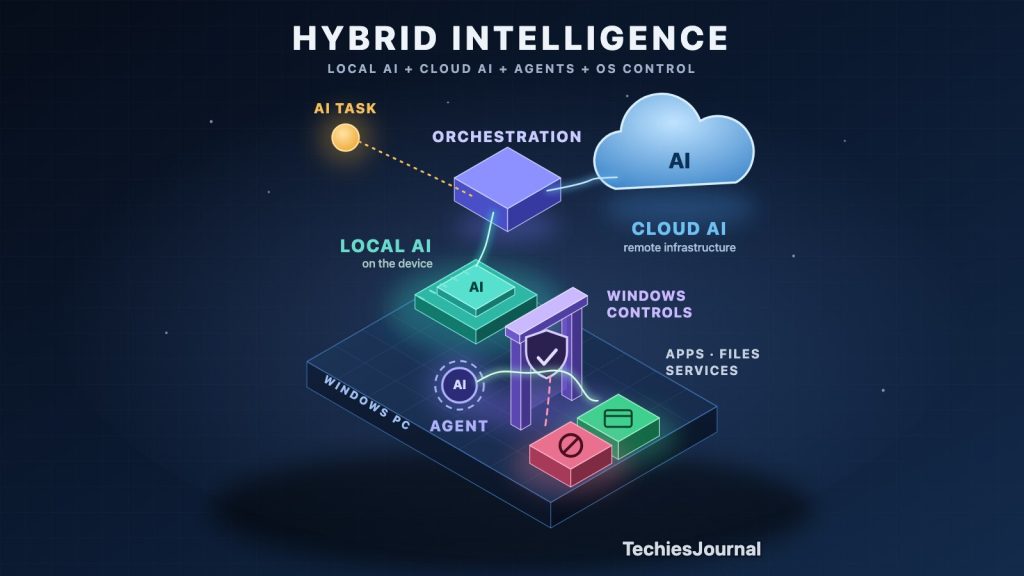
Microsoft announced a new direction for Windows on October 7 called hybrid intelligence.
The announcement includes local AI models, cloud models, intelligent routing between them, AI agents that can use local context and take actions, and new Windows security controls designed to contain those agents.
Individually, none of these ideas is entirely new. What is interesting is that Microsoft is bringing them together as part of the Windows platform.
The direction is straightforward:
AI does not always have to run in the cloud. It can increasingly run on the PC, in the cloud, or across both depending on the task.
And when AI agents start taking actions on the computer, Windows itself needs to control what those agents are allowed to do.
That is the important change.
What Microsoft announced
Microsoft calls the approach hybrid intelligence.
Instead of assuming that an application sends every AI request to a cloud model, Windows is being prepared to support different execution choices.
Accessible text alternative for this figure
Top to bottom: an AI task goes to an orchestration step that decides where the work runs. It can run on a local model on the device or on a cloud model on remote infrastructure. The two are drawn as equal peers. Both lead to a result.
Principle: local AI does not replace cloud AI. They complement each other, and the application or AI runtime can potentially decide where a task runs.
Microsoft says GitHub’s HydraFusion technology will extend this model by allowing GitHub Copilot to route work between models running locally on Windows and models running in the cloud.
The idea is not that local AI replaces cloud AI.
The two can complement each other.
A local model may make sense when latency, connectivity, privacy or local processing matters. A cloud model may still be appropriate when a task requires greater capability or cloud-scale resources.
Over time, users may not need to make every one of these choices manually. The application or AI runtime can potentially decide where a task should run.
That makes local AI another computing resource available to applications, rather than a separate category of AI.
Local AI is becoming more capable
This direction is becoming practical because PC hardware and AI models are changing together.
Microsoft announced support for increasingly capable models running directly on Windows hardware, alongside Windows ML and experimental llama.cpp support.
For example, Microsoft describes an on-device version of MAI Code 1.1 Flash with 137 billion total parameters but 6.8 billion active parameters, using model-compression techniques to make local execution practical on supported hardware.
The individual model specifications will change quickly.
The broader development is more important:
Personal computers are becoming capable of handling AI workloads that previously would have been expected to run mainly in cloud infrastructure.
This does not make cloud AI unnecessary. It gives software another place to perform AI computation.
The bigger change comes when AI can act
Running an AI model on a PC is one thing.
Allowing an AI agent to interact with the computer is different.
Microsoft is developing Copilot capabilities that can use local context and perform permitted actions across Windows.
That changes the security problem.
An AI system that only produces an answer has limited direct authority:
User → AI → AnswerAn agent may have a much longer path:
Accessible text alternative for this figure
Top to bottom: a user gives an agent a goal. The agent understands context and chooses an action, which becomes a proposed action, a request to touch an application, file or service. The proposal crosses a control boundary enforced by Windows, outside the agent. Windows policy covers identity, permissions and isolation. Then the question is asked: is it allowed? If yes, the action reaches the application, file or service. If no, it is blocked.
Principle: an AI agent should not decide its own permissions. Those controls need to exist outside the agent.
Once AI reaches this stage, the operating system needs to know what the agent is allowed to access and what it is allowed to change.
Microsoft’s answer includes Microsoft Execution Containers (MXC), which is now generally available on Windows 11.
MXC provides policy-controlled environments for agentic workloads. Developers and administrators can restrict resources such as files and network destinations rather than simply giving an agent all the permissions available to the user.
Microsoft summarizes the security principle clearly:
“An agent cannot be its own security authority.”
In other words, an AI agent should not decide its own permissions. Those controls need to exist outside the agent.
This changes the role of the operating system
Windows has traditionally managed things such as applications, processes, files, devices, users and permissions.
AI agents introduce another workload that may need to be managed.
                 WINDOWS
                    │
          ┌─────────┼─────────┐
          ▼         ▼         ▼
        Users     Apps      Agents
                              │
                              ▼
                         Identity
                         Permissions
                         Isolation
                         Execution
This is perhaps the most interesting part of Microsoft’s announcement.
Microsoft is not only adding AI features to Windows. It is building platform capabilities for running AI locally, connecting it with cloud intelligence, and controlling agents that can interact with the computer.
That points toward a broader change in personal computing.
Where could this take personal computing?
For the last few years, much of generative AI has followed a simple model:
PC → Internet → Cloud AI → ResponseMicrosoft’s direction looks more like:
Where should this AI task run?
Choose what matters most for a task and see which part of the architecture it points toward.
Emphasised: Local
Keeping processing on the device can suit tasks where data should stay local. It is not automatic privacy: a local model can still use networks, cloud services and external tools.
Emphasised: Local
Running on the device avoids a round trip to remote infrastructure, which can help interactive work. Real speed depends on the model and the hardware.
Emphasised: Local
A model on the device can keep working without a connection, provided the hardware can run it.
Emphasised: Cloud
The largest and most capable models continue to depend heavily on cloud infrastructure.
Emphasised: Cloud
Cloud-scale resources suit work that a PC cannot handle on its own.
Emphasised: Hybrid
When a task has several of these needs, the application or AI runtime can potentially route or combine work between the device and the cloud.
Illustrative architecture choices. Actual placement depends on the model, hardware, application policy, data requirements and workload.
If this architecture develops as Microsoft expects, the PC becomes more than the interface through which we reach cloud AI.
It also becomes part of the AI infrastructure.
For developers, this could mean that calling a cloud AI API is no longer the only normal architecture. Local inference may become another computing resource available to applications.
For IT and security teams, agents introduce questions about identity, permissions, isolation and auditing.
For users, the change may eventually be simpler: some AI work happens on the computer, some happens in the cloud, and the software decides how to combine them.
What this does not mean
Microsoft’s announcement does not mean cloud AI is disappearing.
The largest and most capable models will continue to depend heavily on cloud infrastructure.
It also does not mean local AI is automatically private or secure. A locally running model can still interact with networks, cloud services and external tools.
Not every application needs an AI agent, and not every PC will be capable of running the same models.
Several capabilities Microsoft announced are also experimental, previewed or planned for later availability. We are seeing Microsoft’s direction for Windows, not a completed transition across personal computing.
The change worth watching
The important part of Microsoft’s hybrid-intelligence announcement is not one new model, laptop or Copilot feature.
It is the architecture that is beginning to form:
local AI + cloud AI + intelligent routing + agents + operating-system controls.
For years, we have thought of a personal computer primarily as a machine that runs applications and connects to cloud services.
Microsoft is preparing Windows for another possibility:
A PC that can run AI locally, use cloud intelligence when needed, allow agents to take permitted actions, and use the operating system to control those actions.
Whether Microsoft’s particular implementation becomes the industry model remains to be seen.
But the direction is worth watching.
Sources
Each source was opened and checked on 8 October 2026. Availability labels follow Microsoft’s own wording at that time and may change.
- Windows Experience Blog: Building Windows for hybrid intelligence (7 October 2026). The announcement itself: hybrid intelligence, local and cloud models, Copilot with local context and actions, and MXC.
- Windows Developer Blog: Microsoft Execution Containers, policy-driven containment for AI agents (7 October 2026). MXC is described as generally available, with some backends experimental and some management controls coming later. The quoted sentence comes from this post.
- Windows Command Line: Bringing local models and sandboxed tools to Windows and GitHub Copilot (7 October 2026). Local models on Windows, the on-device MAI Code 1.1 Flash figures, and Copilot routing between local and cloud models, which Microsoft says is coming by the end of October.
- GitHub Blog: Project HydraFusion, frontier quality via multi-model orchestration (4 September 2026). GitHub’s description of HydraFusion as a research preview. Its cost and quality results are GitHub’s own and are not adopted here.
- Foundry on Windows Blog: AI development on Windows, from PyTorch and llama.cpp to Windows ML (7 October 2026). Windows ML and experimental llama.cpp support.
- Microsoft Learn: Generate text with your own language model using Windows ML. Microsoft states that the Windows ML runtime and text generation APIs are experimental and not supported in production.
- Microsoft AI: MAI-Code-1.1-Flash. The model announcement. Its benchmark and cost comparisons are Microsoft’s claims and are not adopted here.
Microsoft performance comparisons and broader competitive claims should be treated as vendor claims rather than independent conclusions.